HD (Heavy Duty)
The HD program should be used when driving with
heavy loads. The HD program is activated/inactivated
by holding the E/P button depressed for at least three
seconds. When the program is engaged “HD” is shown
in the display. The selection remains even if the
ignition is switched off.
When the HD driving program is activated, starting
gear 1 is selected automatically.
(The function is optional.)
Kickdown
Kick-down
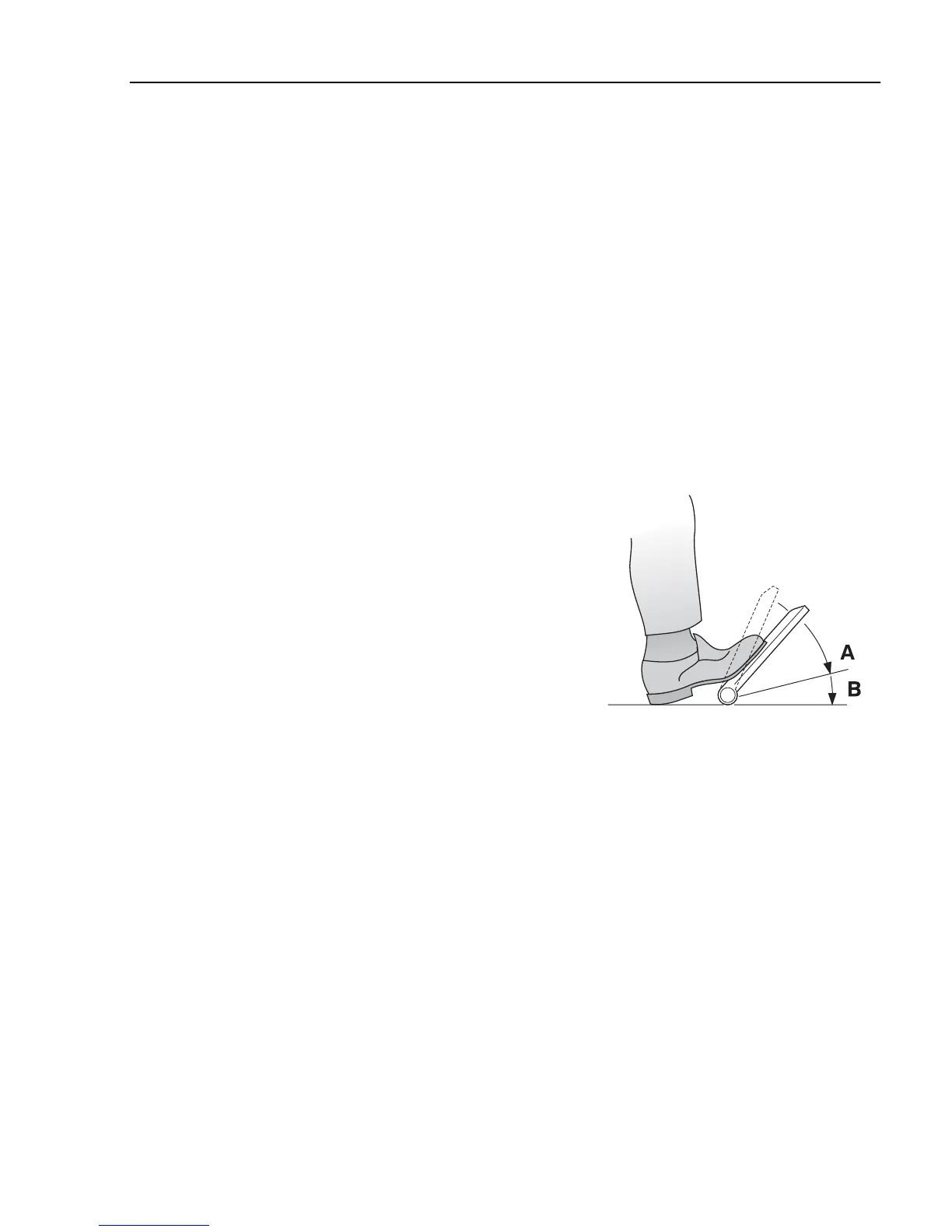
is obtained by depressing the accelerator
completely (position B).
Kick-down
optimises the
choice of gear/throttle for maximum acceleration
which most often leads to a down shift.
Kick-down
functions in both the economy and power programs,
but not in the manual mode M or in driving program P
+.
Kick-down
optimises the vehicle's power at the
expense of optimum fuel consumption. For the lowest
fuel consumption, only use the
kick-down
when
necessary. The accelerator pedal always has a
kick-down
position, but access to the function is an
option.
Position A = full throttle
Position B =
kick-down
(Kick-down
is an option.)
J2012347
I-Shift
245


 To Next Page