Page 36 of 102 Page 37 of 102Doc: DRX Installation
Version: 7.1 January 2021
Doc: DRX Installation
Version: 7.1 January 2021
wassp.com wassp.com
DRX INSTALLATION MANUAL DRX INSTALLATION MANUAL
5.2. COMMISSIONING STEP 2: SENSOR CONFIGURATION
The Configuration section of the DRX SETUP WEBPAGES is used for configuring the DRX
physical ports and the sensors connected to the DRX.
Launching the DRX SYSTEM WEBPAGE is described in “3.6. Display and Control Devices”
on page 23.
5.2.1. Presets Tab
The PRESETS tab allows a selection of preconfigured sensor setup options and the ability
to save and retrieve custom or user defined preset options.
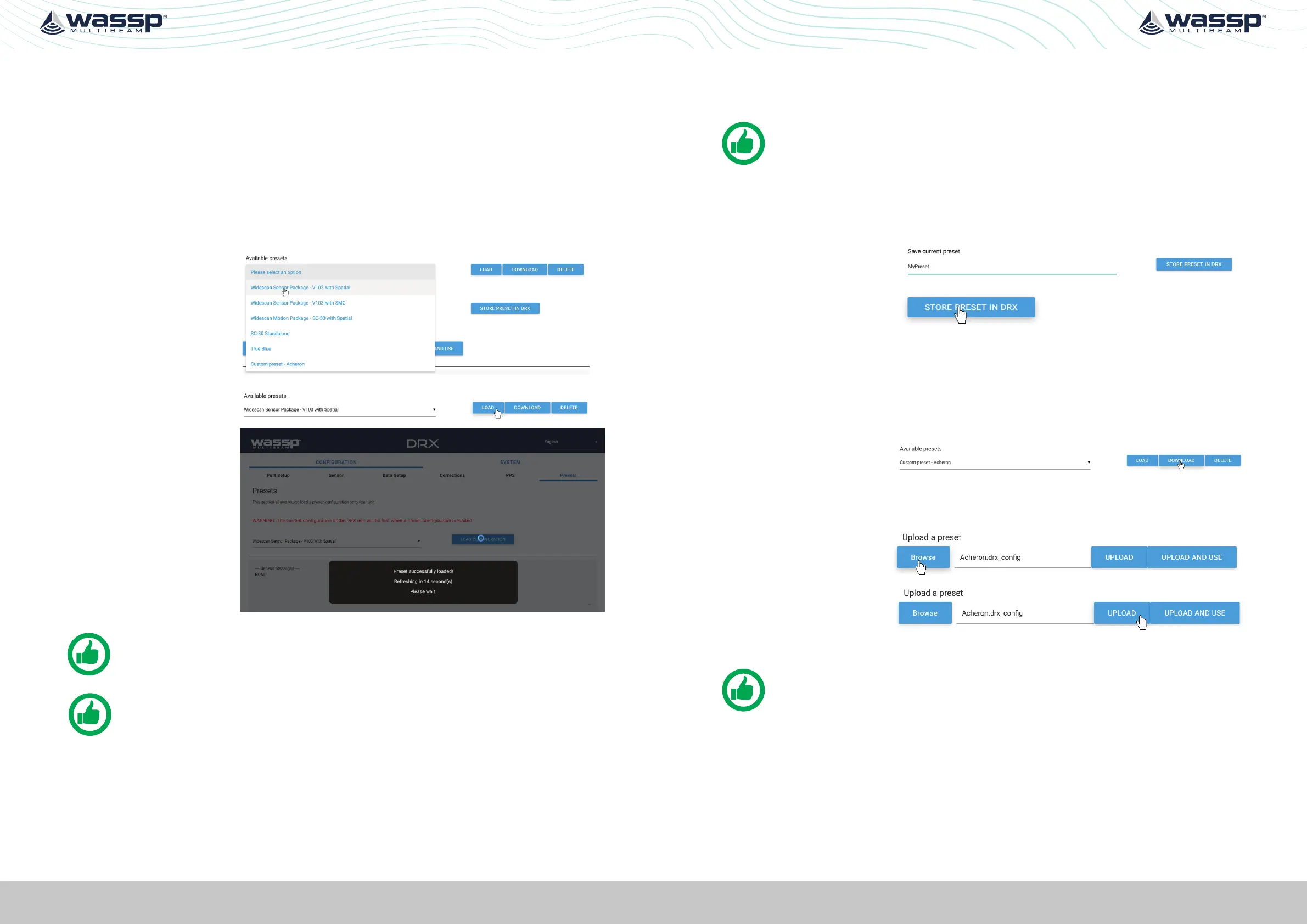
5.2.1.1. Applying Presets
1. Select the required
preset from the
dropdown of
AVAILABLE PRESETS.
2. Select LOAD to apply
the chosen preset.
3. Presets will be loaded
and set PORT SETUP,
SENSOR, DATA SETUP,
CORRECTIONS. PPS
configuration.
NOTE: Sensor Osets still need to be manually setup.
NOTE: Available Presets will consist of defaults loaded into the DRX and any
custom presets applied by the user.
Preset options include:
» Widescan Sensor Package – V103 With Spatial; Sensor package supplied as optional
kit. Reference Sensor Box Installation Manual for details.
» Widescan Sensor Package – V103 With WSP-038; Sensor Package available from
WASSP Ltd. Configures as WSP-038 on
RS232 Port and V103 on RS422 Port with
PPS configures.
» SC-30 Standalone; Configuration for customer supply SC-30 used for Position,
heading and attitude data. Configure with SC-30 on
0183 port.
These presets may change depending on version and model.
NOTE: Presets will configure PORT SETUP, SENSOR, DATA SETUP,
CORRECTIONS, PPS.
5.2.1.2. Saving Custom Presets
To save current configuration as a Preset:
1. Enter a name for the
Preset under SAVE
CURRENT PRESET.
2. Select STORE PRESET
IN DRX.
The preset will be stored in the DRX.
5.2.1.3. Downloading and Uploading Presets
Custom configurations can be stored externally to the DRX.
1. Select a custom preset from the Available Presets
2. Select DOWNLOAD
and store in your
preferred location.
Custom configurations stored externally can be uploaded to the DRX
1. Select BROWSE and
select the appropriate
preset file.
2. Select UPLOAD or
UPLOAD AND USE.
3. The preset will now appear under Available Presets as a custom preset.
NOTE: Only upload presets that were downloaded from the DRX.
5.2.2. Port Setup Tab
The PORT SETUP tab is used for configuring the physical DRX ports to receive data from
the sensors attached to that port.
NMEA 0183 port can also be used to transmit data and uses the same configuration as
receive.



 To Next Page