Notice: To avoid damaging the fragile probe, use care when removing it from the
source enclosure.
Warning: To avoid puncture injuries from the sharp ESI capillary, use care when
inserting and removing the probe from the source enclosure.
Warning: To avoid burn injuries, exercise care when handling the components of the
source enclosure heated to high temperatures. Wait until the hot components have
sufficiently cooled before you handle them.
Required tools and materials
• Chemical-resistant, powder-free gloves
To remove the source enclosure:
1. In the UNIFI software, click Power Save to put the instrument into Power Save mode.
Important: To avoid injury, do not remove the ion block, restrictor, or source ion guide
when the instrument is in Power Save mode. To remove these components you must turn
off the instrument and wait five minutes for it to vent. Power-off the instrument by pressing
and holding the power button for approximately five seconds until the instrument powers-
off.
2. Open the instrument door.
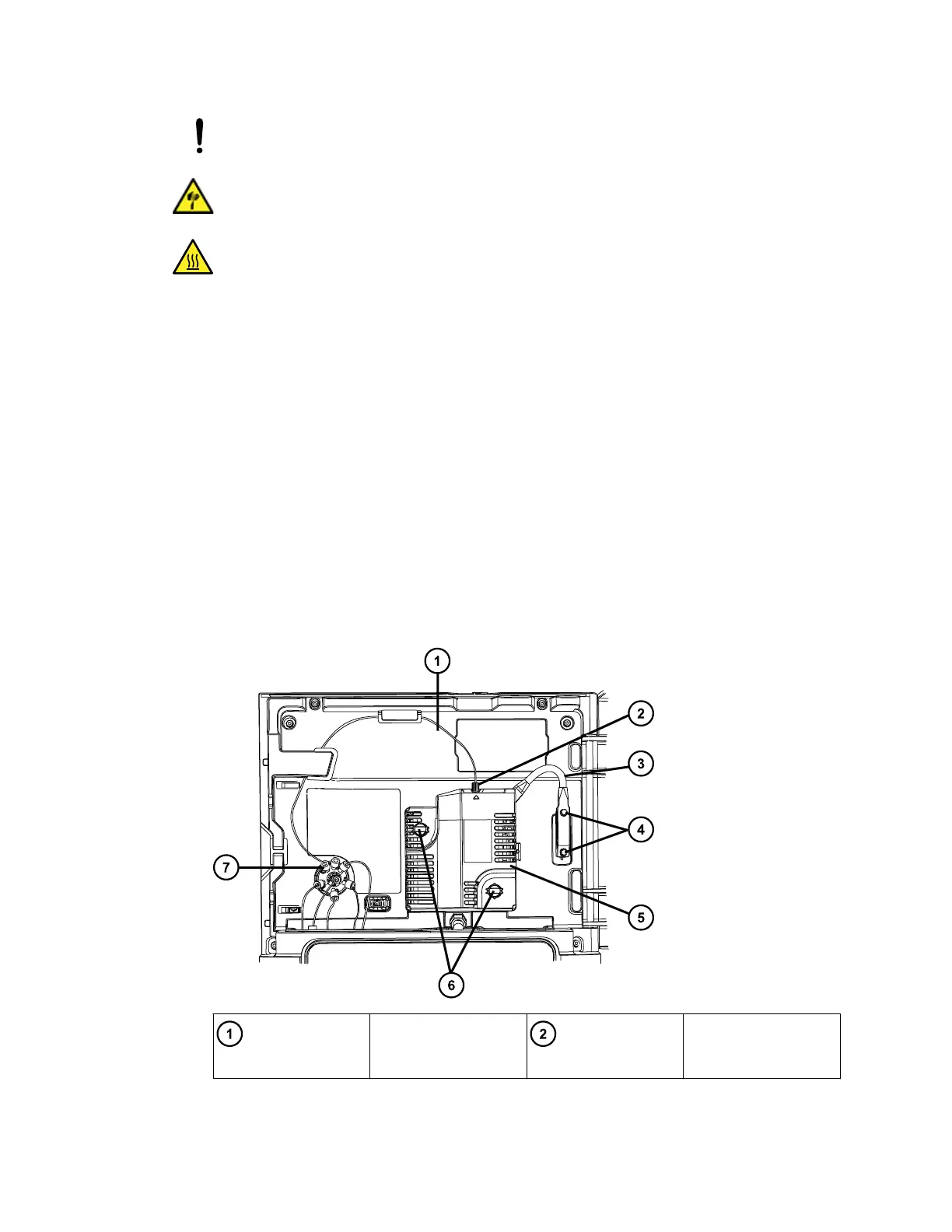
Figure 3–1: Removing the source enclosure
Probe capillary
assembly
Probe capillary
connection at source
August 20, 2021, 715005003 Ver. 04 (Previously released as Revision C)
Page 29



 To Next Page