Test Callup
More than five tests can be called up from the basic IS-136 test mask, so the
softkeys have three levels with different functions assigned to them. Use
{ETC}
to
reach the required level:
-ETC- EXECUTE RELEASE MOBILE CELL. RETURN
-ETC- AUTO SP-LOOP HOOKFLSH REGISTER RETURN
-ETC- BER MAHO CONST. MOD-SPEC BURSTS
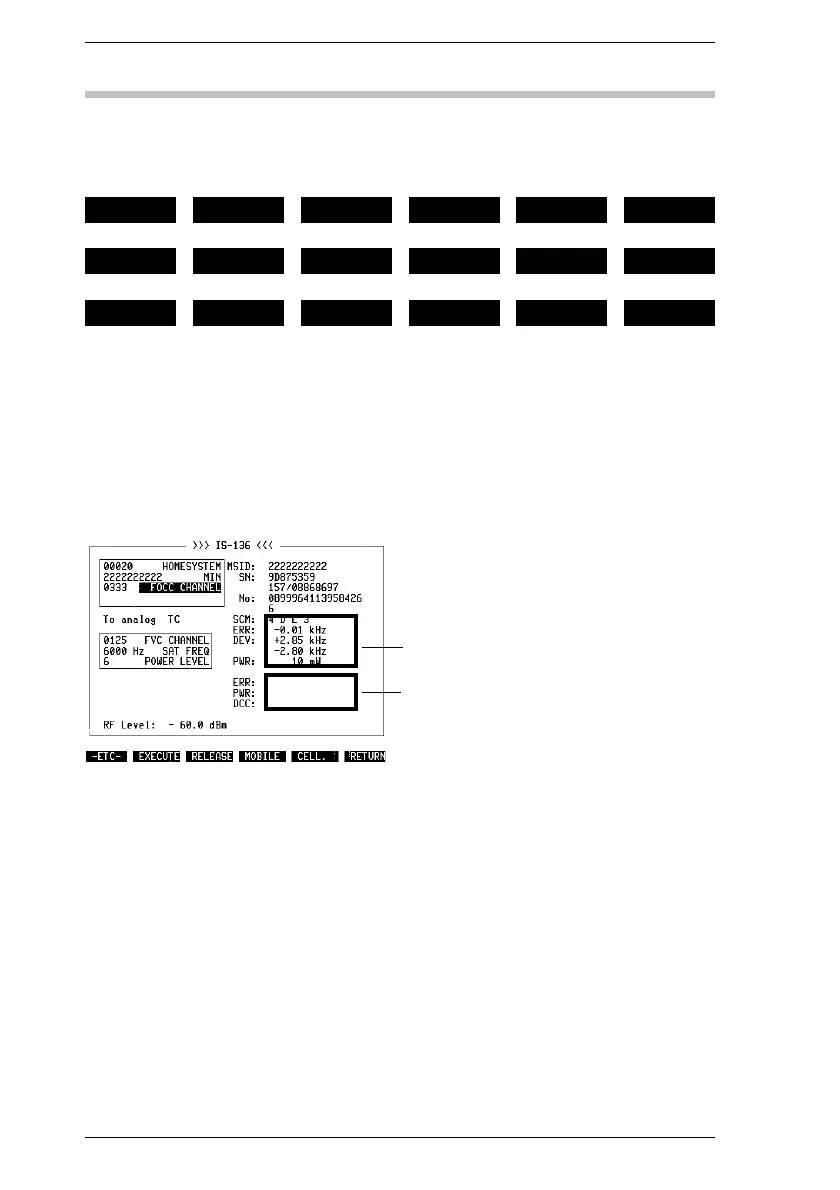
The basic IS-136 mask shows all test results in the righthand half of the screen
(Fig. 10.7). The entry sectors (analog/digital) are assigned the appropriate
display sectors. Depending on what type of traffic channel the connection was
directed to (analog/digital), only the corresponding display sector will show test
results. The other sector remains blank.
☞
To set the number of measurements in the AUTORUN or remote-control mode,
use the IEEE command described in the appendix.
Analog sector
Digital sector
Fig. 10.7: Basic IS-136 test mask after call
setup in analog TC
IS-136 MS Test Callup
10-12



 To Next Page