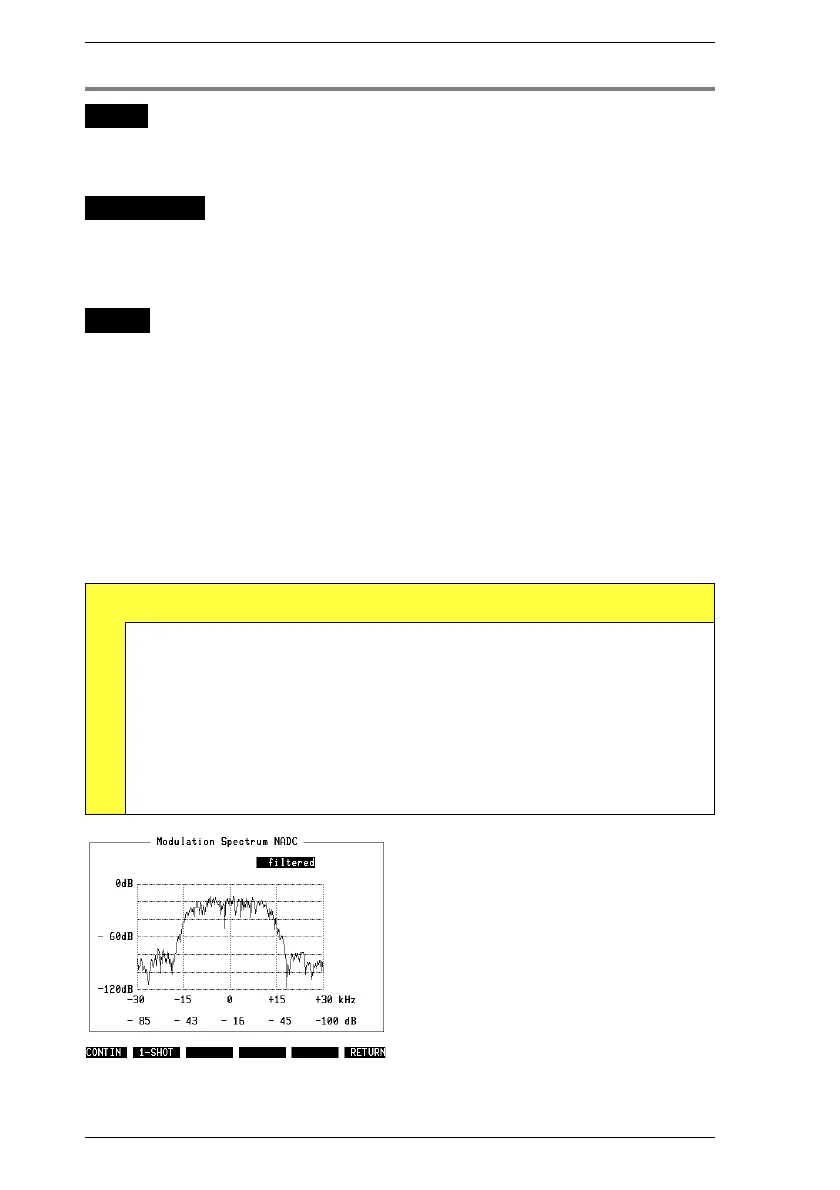
Modulation spectrum
WHY?
Test whether the modulation spectrum of the mobile
maintains the permissible levels within the 30-kHz chan-
nel spacing (otherwise there is adjacent-channel inter-
ference).
Requirement
Make the general test preparations. The channel type
must be To digital TC.
Initiate a call with
{MOBILE}
or
{CELL.}
(the mobile must be
in a digital traffic channel).
This is also possible in test mode of the mobile.
HOW?
Press
{MOD-SPEC}
in the basic test mask.
Select in the scroll field whether the modulation spec-
trum is to be shown unfiltered (you see the signal on
the input of the test set) or filtered like from a base
station (see IS-54 section 2.1.3.3).
Start the test with
{CONTIN}
(continuous measurement,
halted by
{STOP}
) or with
{1-SHOT}
(one measurement
frozen on display).
Note: Due to a single autoranging at the beginning of the
measurement it isn’t permissible to change the mobile
output power during the measurement.
{RETURN} takes you back to the basic test mask.
Test Results
D
When filtered, modulation spectrum of correctly aligned mobile
must be approximately as shown in Fig. 10.22. These are
relative power figures refered to average power of burst.
RESULt6 Relative power at –30 kHz
RESULt7 Relative power at –15 kHz
RESULt8 Relative power at 0 kHz
RESULt9 Relative power at +15 kHz
RESULtA Relative power at +30 kHz
Fig. 10.22: Modulation spectrum of correctly
aligned mobile shown here barely tres-
passes on upper and lower adjacent chan-
nel.
IS-136 MS Modulation Quality
10-38



 To Next Page