General preparations
Check that STABILOCK is fitted with IS-136-compatible hardware. In order to test
IS-136 mobiles, the D-AMPS unit (236 044), the D-AMPS duplex unit (229 063),
the DATA module (236 034) and the frequency extension FEX (248 295) have to
be installed.
Check procedure
Call up the STATUS mask:
[AUX]
+
{DEF.PAR}
+
{STATUS}
Check the status of the related firmware versions
(SOFTWARE-VERSIONS:)
STABILOCK 4031 STABILOCK 4032
HOST-MCU ≥ 3j58 HOST-MCU ≥ 5.00
CRT-MCU ≥ 2.58 CRT-MCU ≥ 5.00
RF/AF-MCU ≥ 2.5S RF/AF-MCU ≥ 5.00
If the STATUS mask shows DIG-MCU, the D-AMPS unit
is installed.
(4031: If HOST-MCU ≤ 3.82, STATUS mask shows
OPT-MCU instead of DIG-MCU.)
(4032: If HOST-MCU ≤ 5.02, STATUS mask shows
OPT-MCU instead of DIG-MCU.)
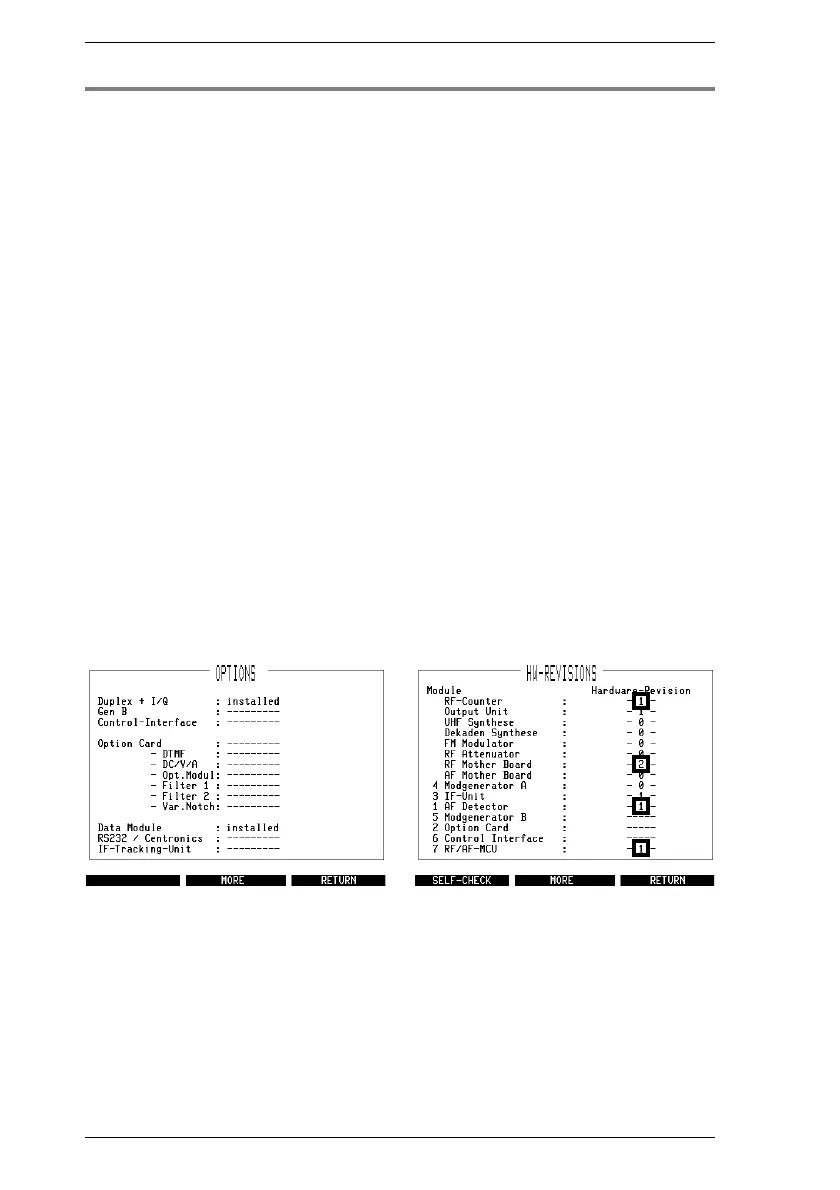
Call up the OPTIONS mask. This must show the entry
installed after the options Duplex + I/Q and
Data Module (Fig. 10.1).
Call up the HW-REVISIONS mask. This must show the
marked entries illustrated in Fig. 10.2.
Fig. 10.1: The OPTIONS mask gives you
the information whether the D-AMPS du-
plex unit and the DATA module are in-
Fig. 10.2: If the mask shows smaller en-
tries for the marked fields, you will have to
update the corresponding stage.
IS-136 MS Introduction
10-6



 To Next Page