Modulation Quality
WHY?
Test the modulation characteristics of the mobile. For
this the test set offers fast visual judgement of modula-
tion quality with the constellation display (graphic pres-
entation of modulation parameters) plus comprehensive
indication of the measured figures on the numeric dis-
play (with peak-hold function).
Requirement
Make the general test preparations. The channel type
must be To digital TC. Set time alignment to a value
smaller than 26 (in other case no measurement results).
Initiate a call with
{MOBILE}
or
{CELL.}
(the mobile must be
in a digital traffic channel).
This is also possible in test mode of the mobile.
Constellation display
HOW?
Press
{CONST}
in the basic test mask.
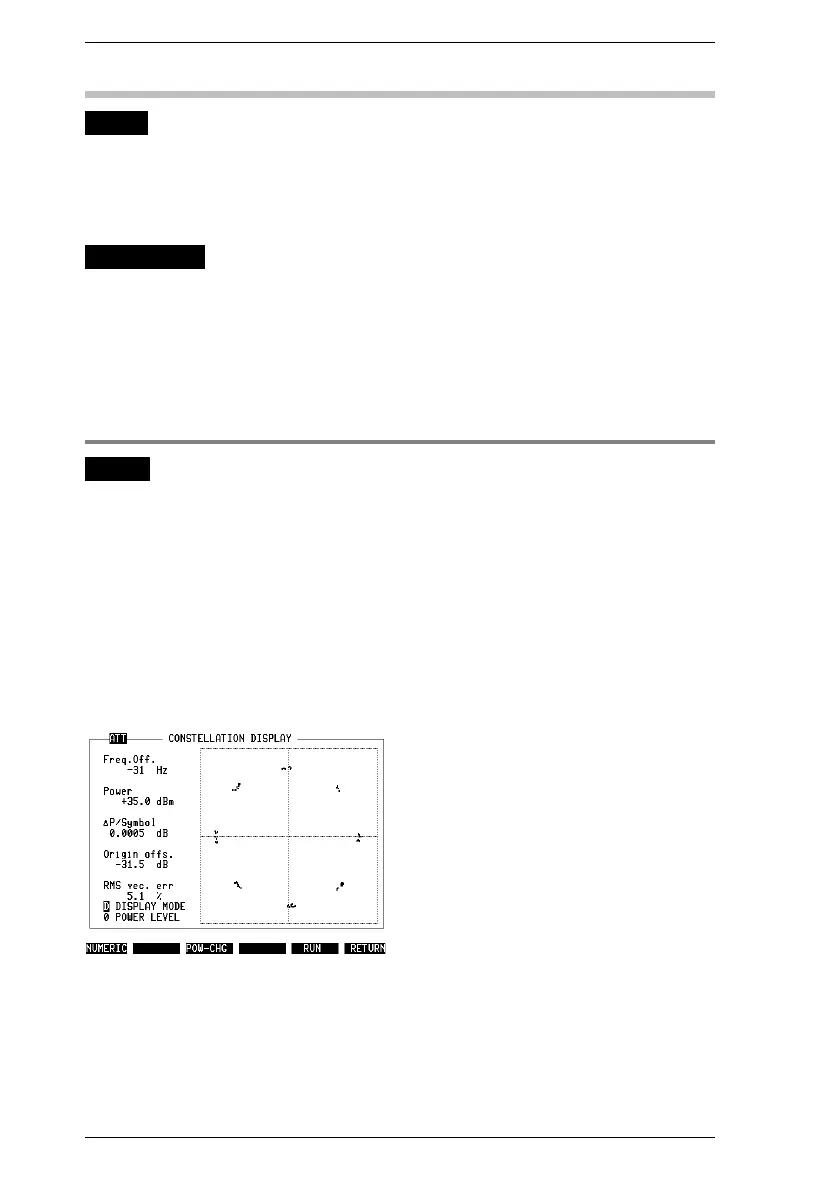
Select DISPLAY MODE in the scroll field (
Fig. 10.20
):
D = dots, L = lines, S = statistics (see box on page 10-37).
Press
{RUN}
. The display shows the test results.
Press
{STOP}
.
Change the output power of the mobile in the POWER
LEVEL scroll field. Confirm this by pressing
{POW_CHG}
.
Press
{RUN}
. The display shows the new test results.
End the test with
{STOP}
. After this
{NUMERIC}
takes you to
the numeric display or
{RETURN}
back to the basic test
mask.
Fig. 10.20: Constellation display after start-
ing test with
{RUN}
. ATT in mask header tells
you that cable attenuation of test setup is
compensated (see "General Preparations").
This only affects absolute Power figure, not
other (relative) power figures like ∆P/Sym-
bol.
IS-136 MS Modulation Quality
10-34



 To Next Page