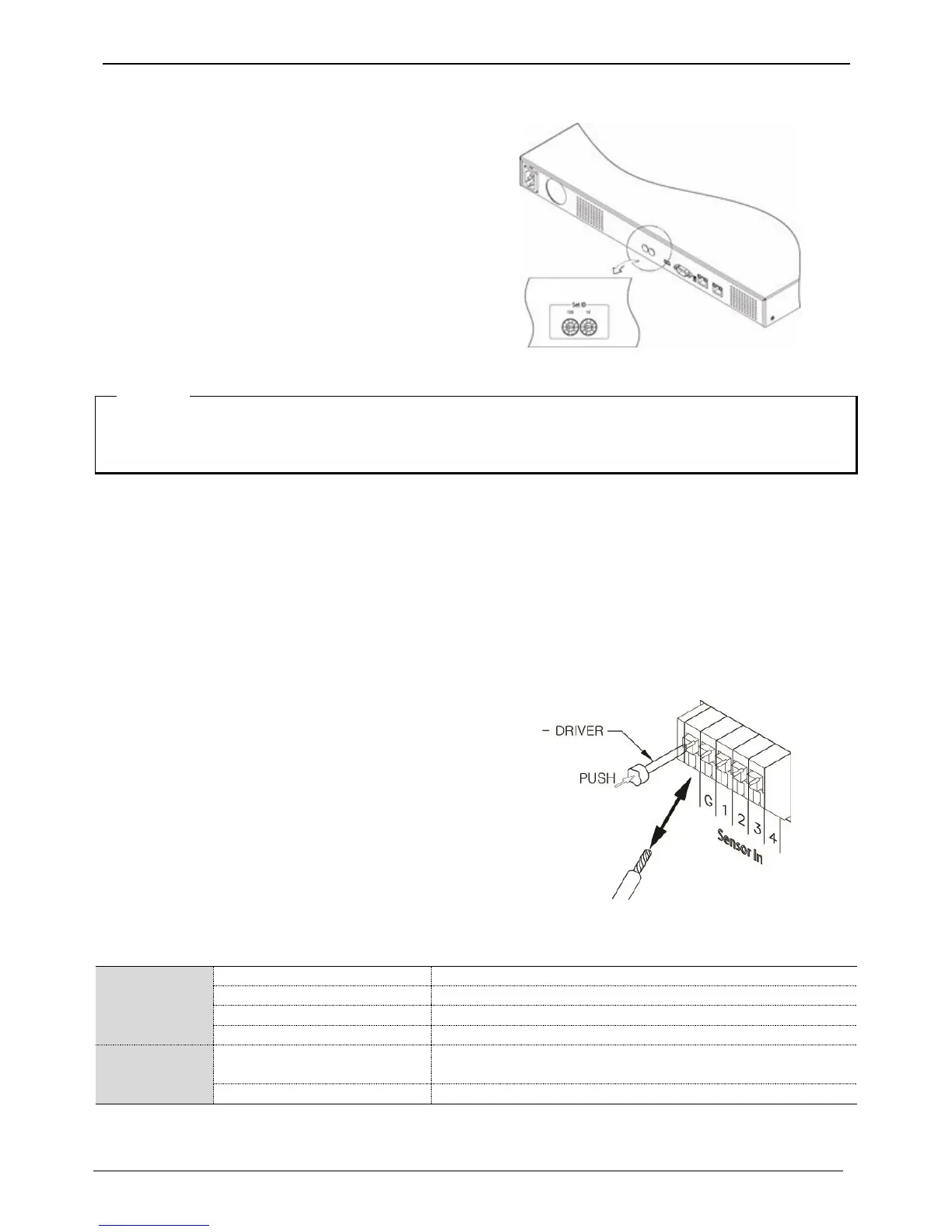
Set ID using Rotary switch located at rear panel.
Set each different ID in case of over 2 NS04Rs are
connected.
Using tool such as Driver to set ID. For Group ID swich, it is
set as ID in a unit of 10 when ID switch of NS04R is in a
unit of 1.
ID setup value must be within 0~99.
EX) ID will be 23 when switch is set as Group ID=2,
NS04R ID=3
1) It approximately takes a minute to turn on the power and to connect NS04R to DVR.
While it is connecting, 4 LEDs on the front will be turned on in order and all 4 LEDs may be turned on or
off when it is connected to DVR. HDD list can be checked on the disk manager.
Connecting input/out terminals
Wire end handling
See below for wire end handling used in terminal block. Please work on single line and multiple line as they
have different thicknesses.
Wire insertion/removal
As shown in the picture, push the lever to insert or remove a
wire.
Connecting the sensor
specification
below requirements need to be met in order to connect the sensor
Connect the trimmed wire to terminal block
Available input
pulse range
- Multiple lines : Peel off the recommended length(8~10mm) and lead-coat it. Use AWG 22 ~ 26.
- Single line : Peel off the recommended length(8~10mm) and use AWG 20 ~ 26.



 To Next Page