Functional Description .
ECW500 | 35
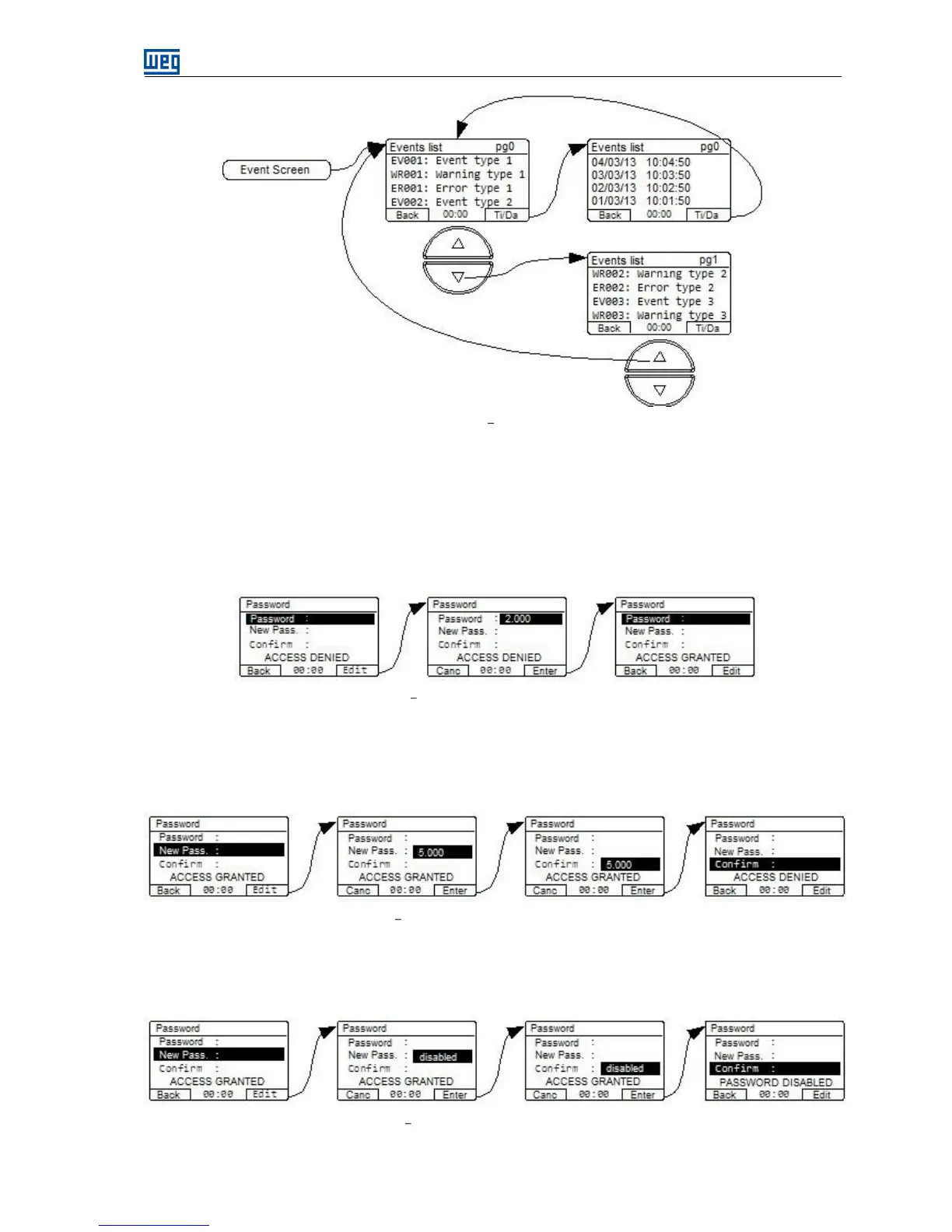
Figure 6.5 Event screen
6.1.4 Password Screen
The password screen allows the user to enable, disable or change the password on the equipment. With the
password enabled, it is not allowed editing any parameter. If there is an attempt to perform an edition, the HMI
will automatically display the password screen for punching in the correct password. The sequence of screens
for entering the password is shown in the following figure. After entering the correct password, the text of the
fourth line confirms with the message "access granted".
Figure 6.6 Sequence of screens to enter the password
In order to change the password, the user must edit the new password parameter in the second line with
access granted. The sequence of screens below shows the password changed to value 5. After punching in the
new password in line 2, the HMI automatically goes to line three prompting the confirmation of the entered
value. If confirmed, the new password is already effective and the access is blocked.
Figure 6.7 Sequence of the screens to change the password
If the password protection is not desired, the user can disable the function by entering a new password and
selecting the value "disabled" (equivalent to number zero). After confirming the new password, the message
"Password disabled" will show in the fourth line.
Figure 6.8 Sequence of screens to disable the password


 To Next Page