57 of 76
TECHNICIANS manual
ENGLISH
10.7.4 Dispensing group scheduled wash
If provided, the machine automatically requests that
the daily washing of the dispensing groups be carried
out.
To start the washing, proceed as shown on the display.
You can always cancel the washing request and resume
the normal work.
10.7.5 Dispensing group manual wash
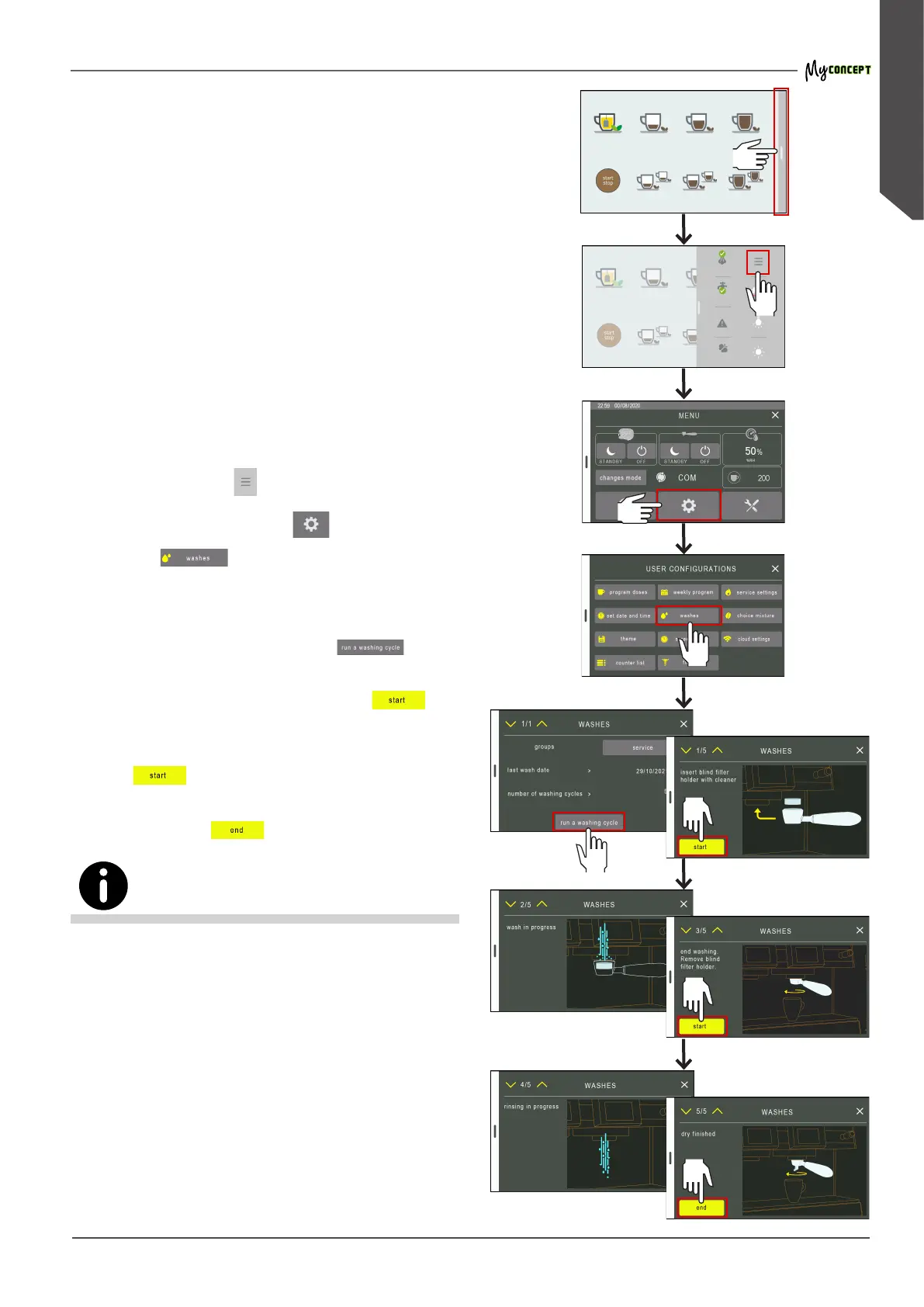
If desired, it is possible to perform the washing of the
groups at any time, proceeding in the following way:
• select the bar on the right side of the display;
• press the menu key
;
• select the conguration key
;
• press the
key;
• the display will indicate the date of the last washing
and the number of washing cycles;
• to start the washing, press the key
.
• insert the special detergent in the blind lter holder,
x it to the dispensing group and press
;
• wait for the washing to be performed and then re-
move the lter holder from the dispensing group and
press
;
• after the rinse, hook the lter holder of the dispensing
group and press
;
During the washing stage, all coee selections of that group are
disabled.
If washing is interrupted due to machine shutdown, the
washing will be reactivated automatically at restart.




 To Next Page