WF-255MST
© Weldclass 2019 | E.&O.E. | Edition 2.2 33
7.2 Stick (MMA) Welding Operation
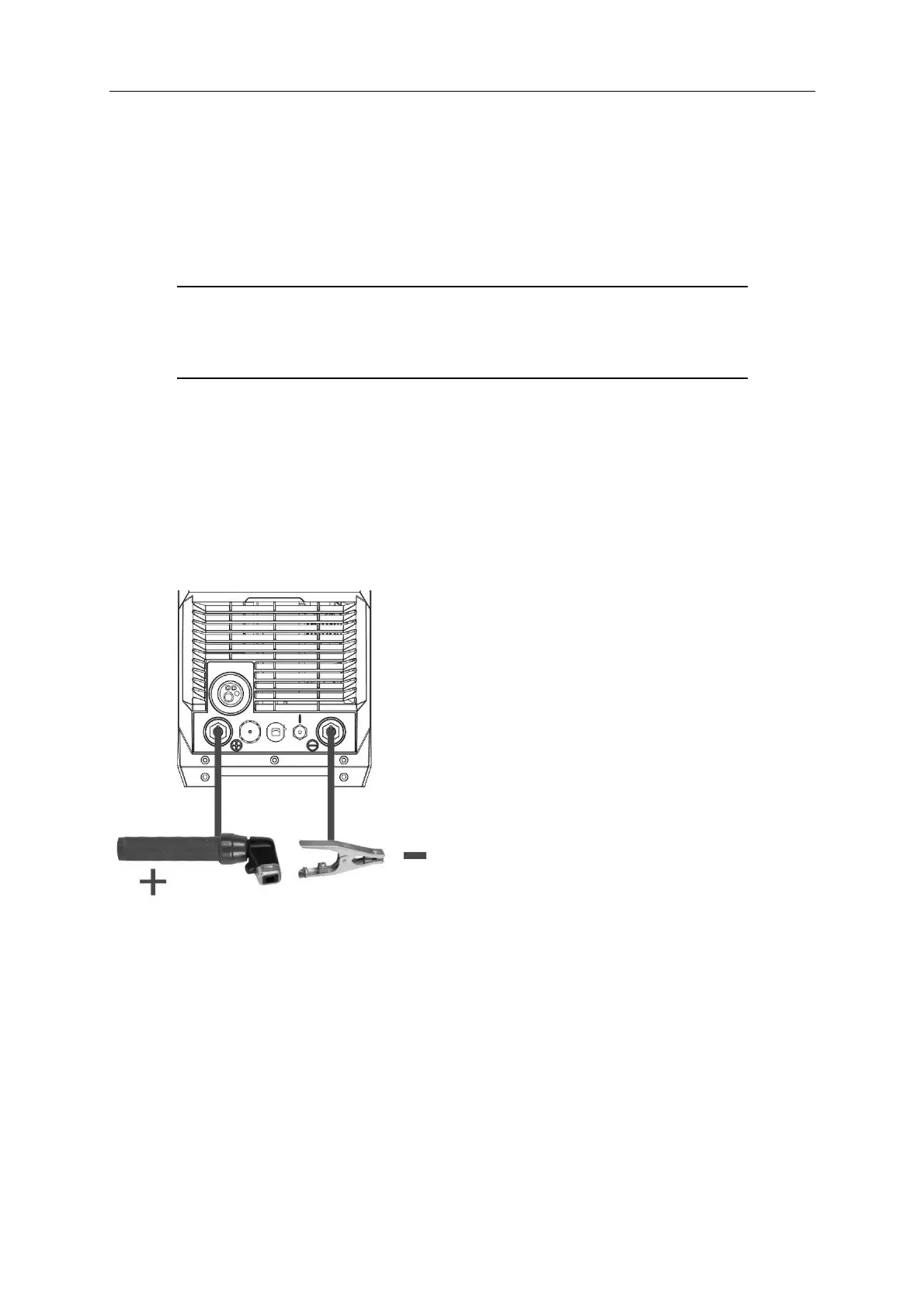
1. Connect the earth cable quick connector to the Negative (-) Welding Power Output Socket (7)
2. Connect the earth clamp to the work piece. Contact with the work piece must be firm contact
with clean, bare metal, with no corrosion, paint or scale at the contact point.
3. Insert an electrode into the electrode holder and connect the electrode holder and work lead to
the Positive (+) Welding Power Output Socket (3).
NOTE: This polarity connection configuration is valid for most GP (General Purpose)
MMA electrodes. There are variances to this. If in doubt, check the electrode
specifications or consult the electrode manufacturer.
4. Connect the machine to suitable power. Switch the mains power switch (23) to ‘on’ to power up
the machine.
5. Set welding process selector to ‘Stick’ (refer to 4.1)
6. Select the required output current using the Right Adjustment Knob (32). The Right LCD Readout
(38) will display the set amperage output.
7. Adjust special Function settings if required (refer to 4.3)
8. You are now ready to weld!
Figure 22


 To Next Page