SETTINGS
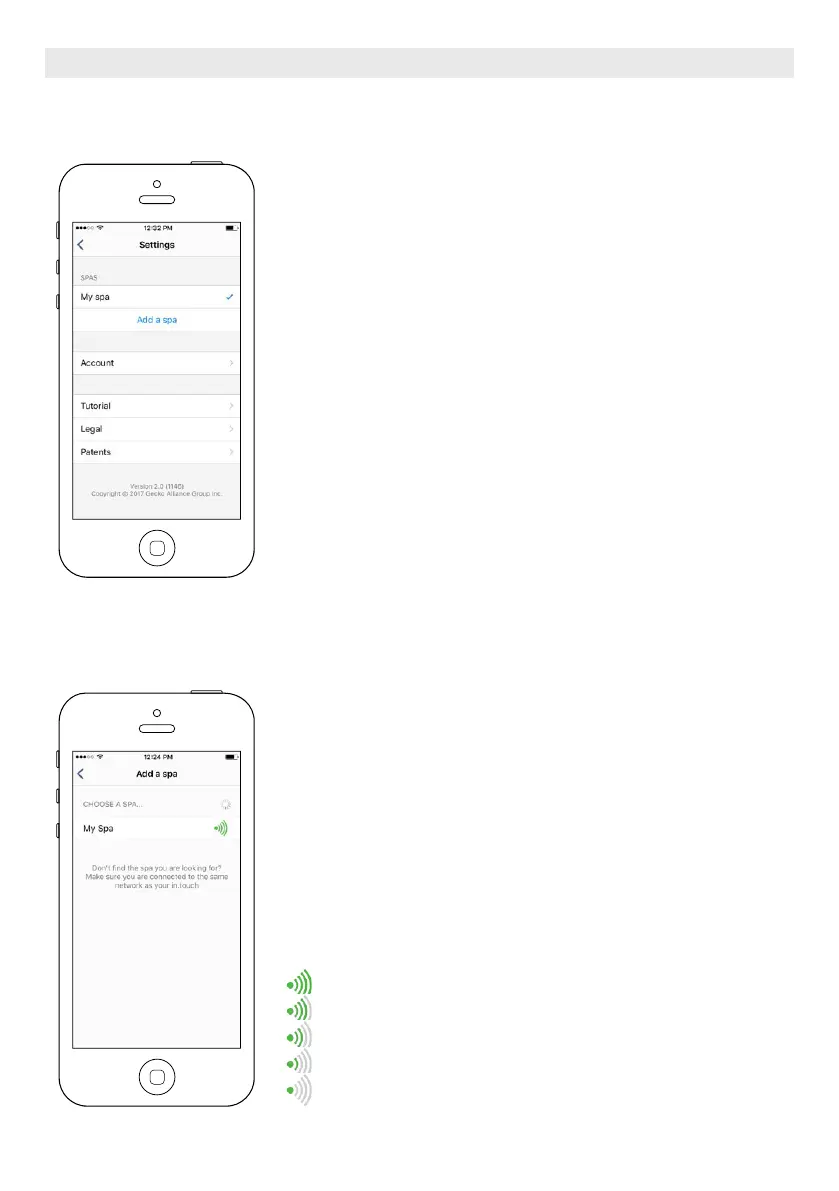
In the Settings page you can access the following:
Add a spa from local network
Account
Tutorial
*Legal
**Patents
To select an item, tap on the arrow next to it. It will open the selected menu.
*The button Legal will bring you to this web site :
https://geckointouch.com/legal
**The button Patents will bring you to this web site:
http://geckoportal.com/corpo/#patents
ADD A SPA
This page displays all the spas detected by your application.
To detect your spa, you need to connect your mobile device to the same
network to which you connected your Home Transmitter.
Once you have done a connection with the spa its name will be saved on this
page to allow you to connect to this spa from anywhere.
You can have access to this page by touching the following tabs: Settings (up
right corner) - Add a spa
The RF signal strength (communication between the two in.touch 2 transmit-
ters) is illustrated on the Select a spa page. There are 5 possibile states:
• Signal superior to 80%
• Signal between 80% and 51%
• Signal between 50% and 31%
• Signal below 30%
• The Spa Transmitter is not available
OPTIONAL ACCESSORIES IN.TOUCH 2
80





 To Next Page