3.13.6 3.12.6. Configuration Command
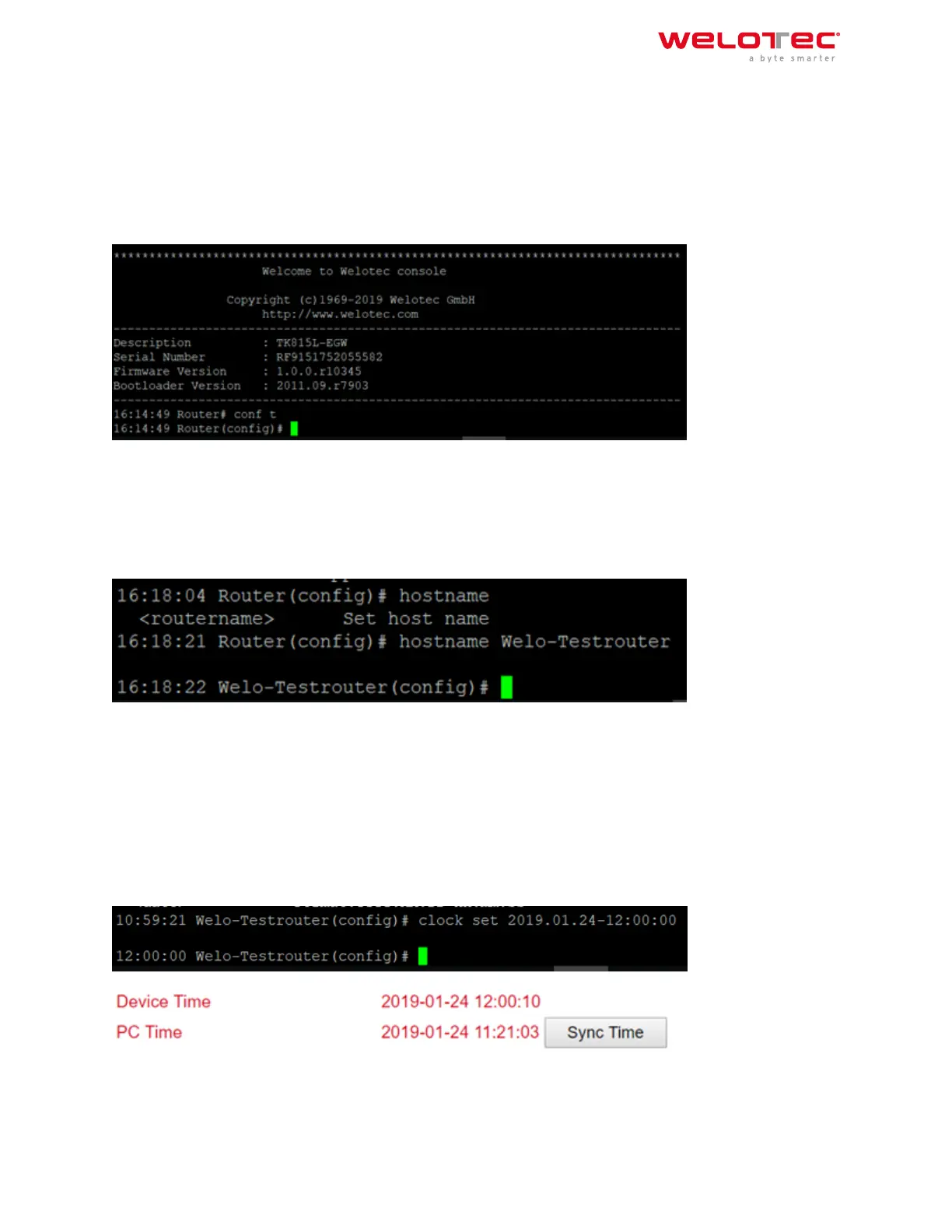
In the superuser view, the router can use the configurecommand to switch the configuration view for management.
A configure command can support no and default, where no indicates setting the abort of a parameter and default
indicatesrestoring the default setting of a parameter. The configure terminal (or conf t for short) command switches
the system to configuration mode. In this setting the router can be configured. To exit the configuration mode
use the exit command. All entered commands must be terminated with the wr command so that the changes are
applied to the router.
3.12.6.1 Hostname Command
In configuration mode, the router name can now be changed, for example. This is done with the command host‑
name name‑of‑router. This command changes the router name to the name you entered. If you want to reset the
default name of the router, use the default hostname command. This resets the router name to the default router
name.
3.12.6.2 Clock set Command
With the clock set command you can configure the system date and time of the router via the CLI. The date and
time format is as follows:
YYYY.MM.DD‑HH:MM:SS
The complete command would then look like this
clock set 2019.01.24‑12:00:00
Welotec GmbH
Zum Hagenbach 7
48366 Laer
www.welotec.com
info@welotec.com
+49 2554 9130 00
Page 144



 To Next Page