3.1.1 3.1.1. System
3.1.1.1. Status
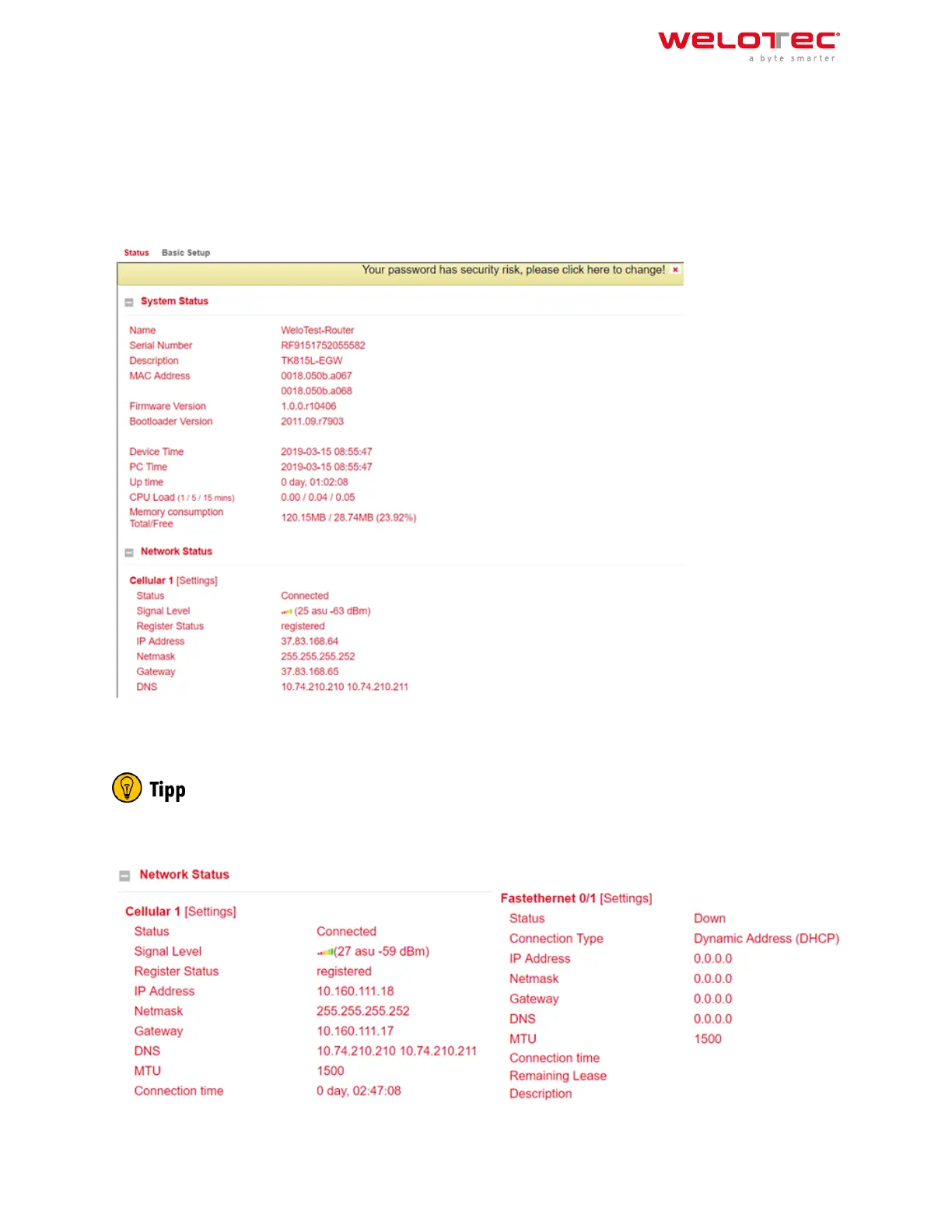
Under Administration > System > Status you will find the most important Status information of the router at a
glance. Via the button Sync Time the time of the router can be synchronized with the time of the connected PC. If
you use the default password for login (123456), a yellow bar will indicate that this is a security risk and should be
changed. You can do this by clicking on the hint. We strongly recommend that you do this for security reasons!
The Network Status is located under the System Status. By clicking on the gray [+] the information about the indi‑
vidual network interfaces appears. Here you will find all important information about the status of the individual
interfaces.
By clicking on [Settings] next to the individual interfaces (e.g. Cellular 1) you will be taken directly to the configu‑
ration of the interfaces.
Welotec GmbH
Zum Hagenbach 7
48366 Laer
www.welotec.com
info@welotec.com
+49 2554 9130 00
Page 25



 To Next Page