Parameter
Description
Enable Email Alarm Check the box for enabling/disabling the e‑mail server functionality
Mail Server IP/Name Host name (FQDN) or IP address of the e‑mail server
Mail Server Port Port of the mail server, default 25, but also 465 for SSL/TLS or 587 possible
Account Name User account on the e‑mail server through which the messages are to be sent
Account Passwort Password of the user account on the e‑mail server
Crypto Encryption TLS
Email Addresses E‑mail address to which the mails are to be sent
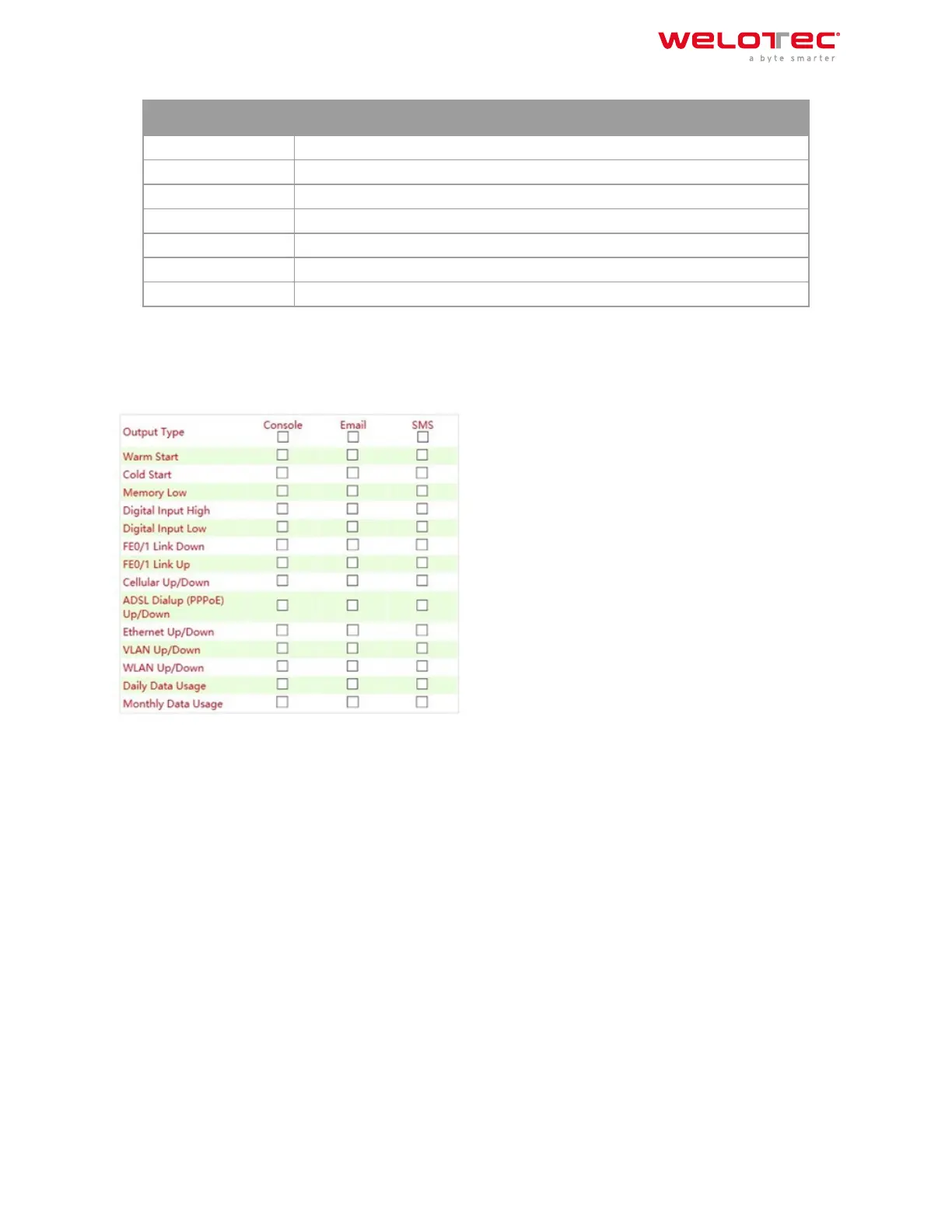
3.1.9.4. Alarm Map
On the Alarm Map you define whether the alerts should be displayed in the web browser or also sent by e‑mail or
SMS. Set the checkmark to Enable or Disable the feature.
3.1.11 3.1.10. Log
3.1.10.1. Log
The current messages of the router are displayed in the Log menu.
The log contains information about network, operational status, configuration changes, ISP connection informa‑
tion, IPSec, OpenVPN status and much more.
Welotec GmbH
Zum Hagenbach 7
48366 Laer
www.welotec.com
info@welotec.com
+49 2554 9130 00
Page 41



 To Next Page