The configuration as DHCP client is described under DHCP. The configuration of a WAN interface is described under
Wizard.
3.2.2.3. Bridge (TK8x5‑EXW)
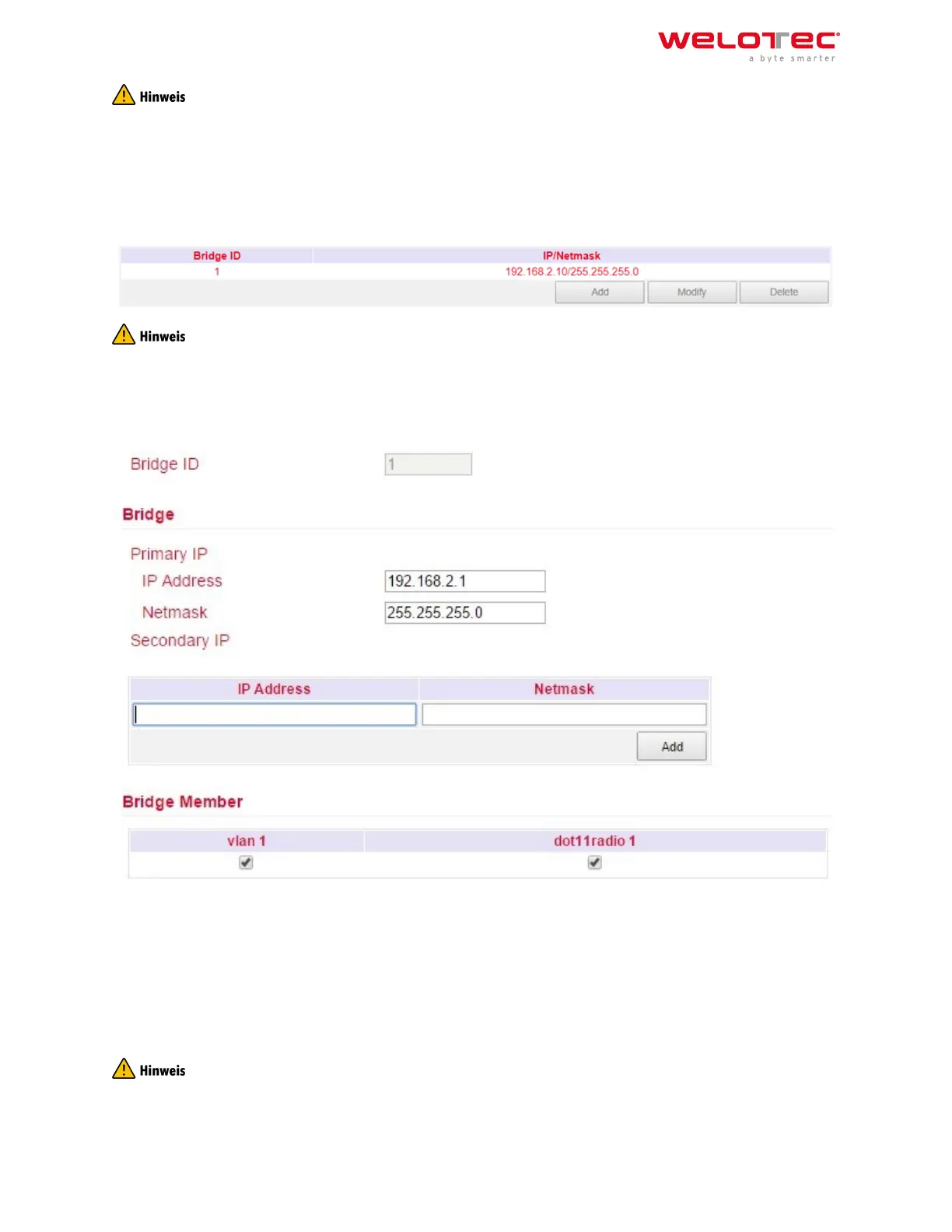
Overview of the existing bridge. Only one bridge is possible!
If you delete the bridge, no more IP address is set on the interfaces FE1/1 ‑ FE1/4. The router is then only accessible
via FE0/1 or console!!!
To edit the bridge, select the existing entry and then click Modify.
Bridge:
Here you can change the IP address of the bridge. Under Secondary IP you can assign additional IP addresses to
the bridge.
Bridge Member:
The interface dot11radio1 is the WLAN interface. Via the hooks a bridge member can be added or removed from
the bridge.
Removing a bridge member from the bridge results in the IP address of the interface being empty. It is therefore
recommended to only make changes via the interface FE0/1, as this is not a bridge member.
Welotec GmbH
Zum Hagenbach 7
48366 Laer
www.welotec.com
info@welotec.com
+49 2554 9130 00
Page 53



 To Next Page