3.2.3 3.2.3. VLAN (TK8x5‑x)
A Virtual Local Area Network (VLAN) is a logical subnet within a switch or an entire physical network. A VLAN sepa‑
rates physical networks into subnets by ensuring that VLAN‑capableswitchesdo not forward the frames (data pack‑
ets) of one VLAN to another VLAN. This happens even though the subnets may be connected to the same switches.
3.2.3.1. VLAN Trunk
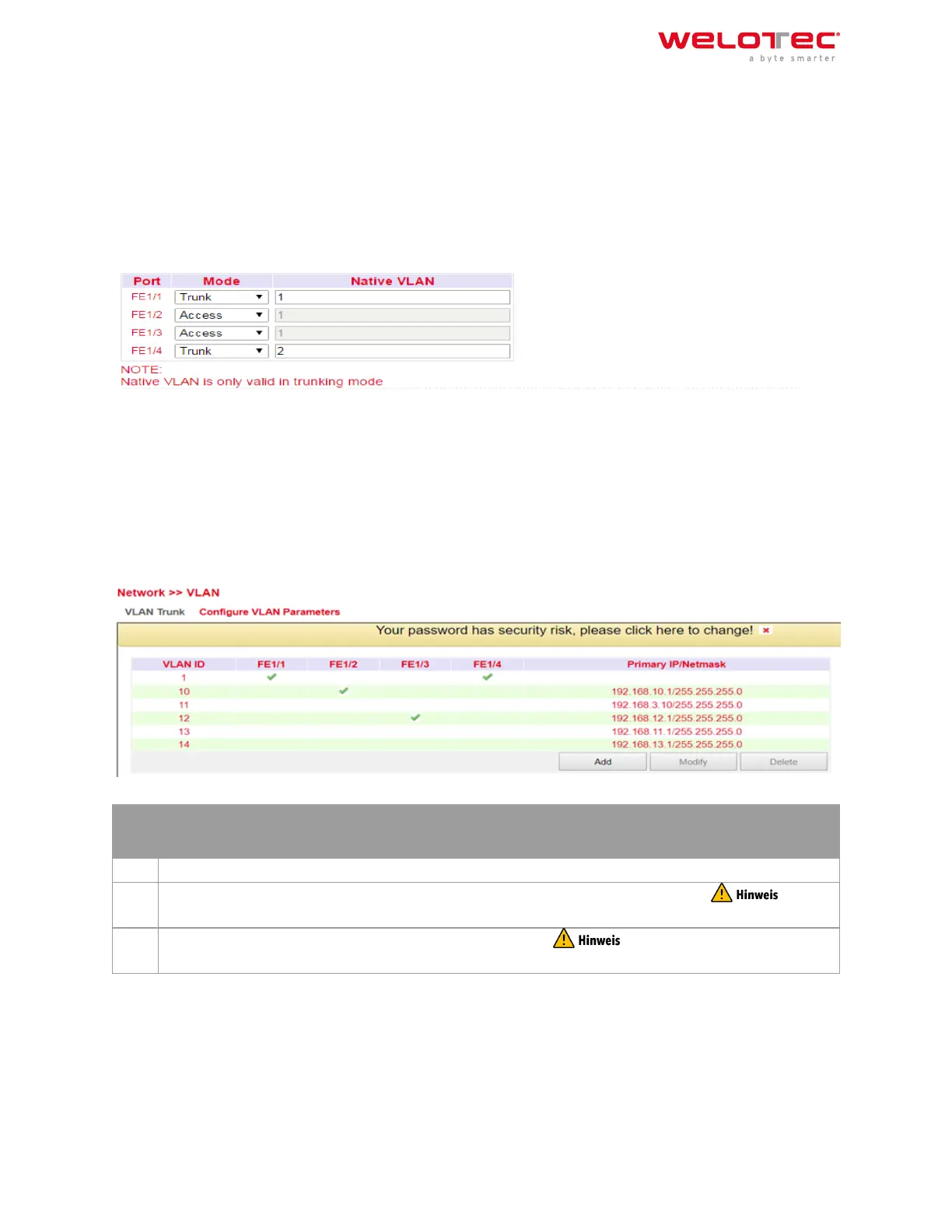
In the VLAN Trunk menu, dierent VLAN IDs can be assigned to the FastEthernet 1/1 to 1/4 network ports.
The options Access and Trunk are available for the FastEthernet ports.
In Access Mode, VLAN 1 is always selected.
In Trunk Mode, you can assign VLAN IDs between 1‑4000 to the FastEthernet ports.
3.2.3.2. Configure VLAN Parameters
In the Configure VLAN Parameters menu you can change the assignment of VLANs to FastEthernet ports and create
new VLANs.
But‑
ton
Description
Add A new VLAN can be added via the Add button.
Mod‑
ify
The existing VLANs can be edited by selecting them and then clicking on Modify. For the
TK8x5‑EXW model, the VLAN with ID1 cannot be edited as long as the bridge is active.
Delete With Delete a previously selected VLAN can be deleted. The VLAN with ID 1 cannot be
deleted!!!
Adding a new VLAN:
Welotec GmbH
Zum Hagenbach 7
48366 Laer
www.welotec.com
info@welotec.com
+49 2554 9130 00
Page 54



 To Next Page