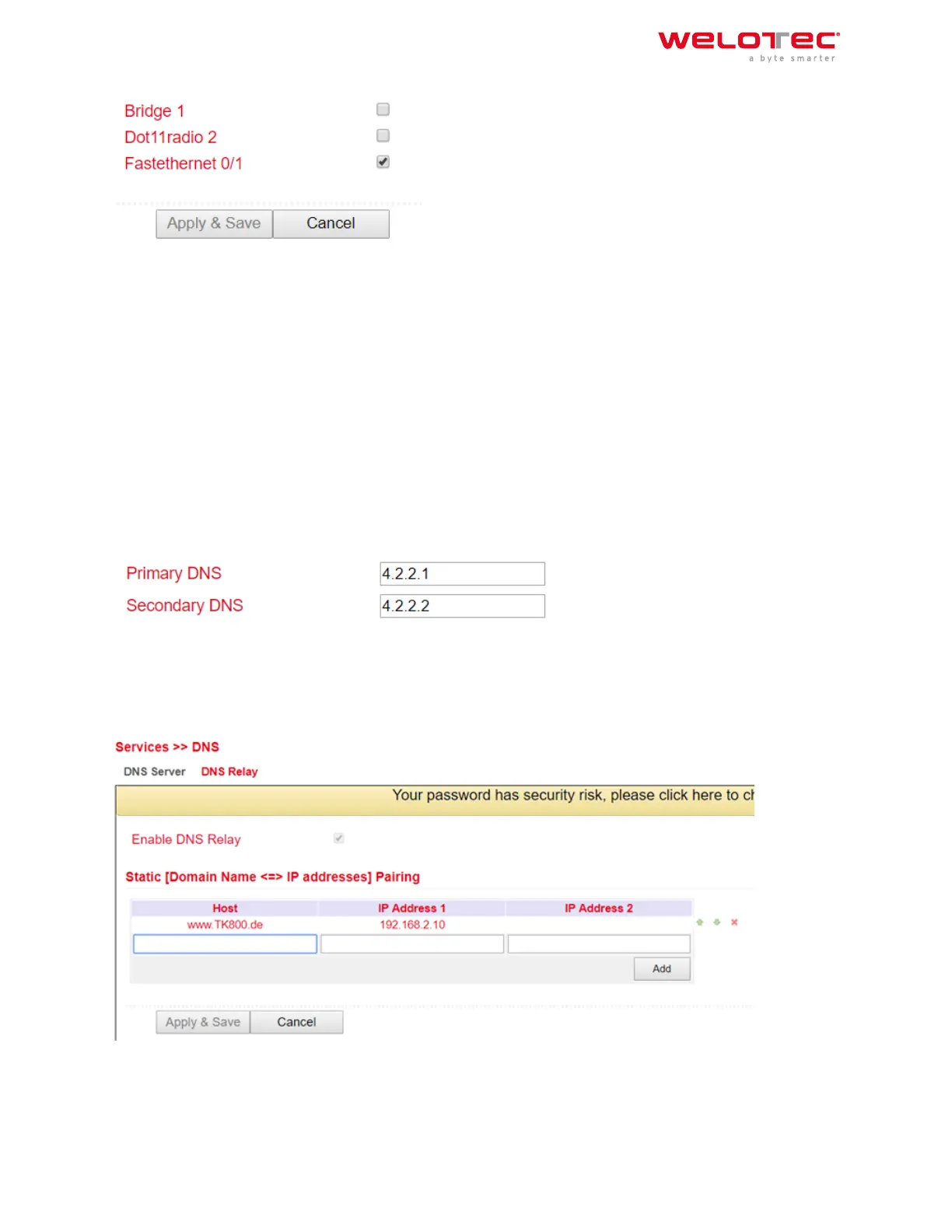
3.3.2 3.3.2. DNS
The Domain Name System (DNS) is one of the most important services in many IP‑based networks. Its main task
is to answer name resolution requests.
The DNS works similar to a telephone directory assistance. The user knows the domain (name of a server on the
Internet), e.g. welotec.com, and sends this as a request to the Internet. The domain is then converted by the DNS
into the corresponding IP address (if you like, the “connection number” on the Internet). E.g. an IPv4 address of
the form 192.168.2.1 and thus leads to the correct server.
3.3.2.1. DNS Server
Under Services > DNS > DNS Server you can enter two DNS servers. These are then valid for all interfaces, unless a
dierent DNS server was assigned via DHCP.
3.3.2.2. DNS Relay
Under Services > DNS > DNS Relay you can also enter DNS resolutions manually. Click Add to add the entry and
Apply & Save to apply it.
Welotec GmbH
Zum Hagenbach 7
48366 Laer
www.welotec.com
info@welotec.com
+49 2554 9130 00
Page 62



 To Next Page