■
Setting the Clock
■
Steam Mode
When the appliance is rst powered on, it will beep and returned to standby mode. The default clock display is 12:00. The
display panel lights up completely.
The combi steamer returned to energy saving mode if no button is pressed or door is opened for 5 minutes. Under energy
saving mode, display will be turned o, only the power button can be used. Press the power button to exit the energy saving
mode and back to the startup screen.
Example: Set the clock to the current time 13:20.
Steps:
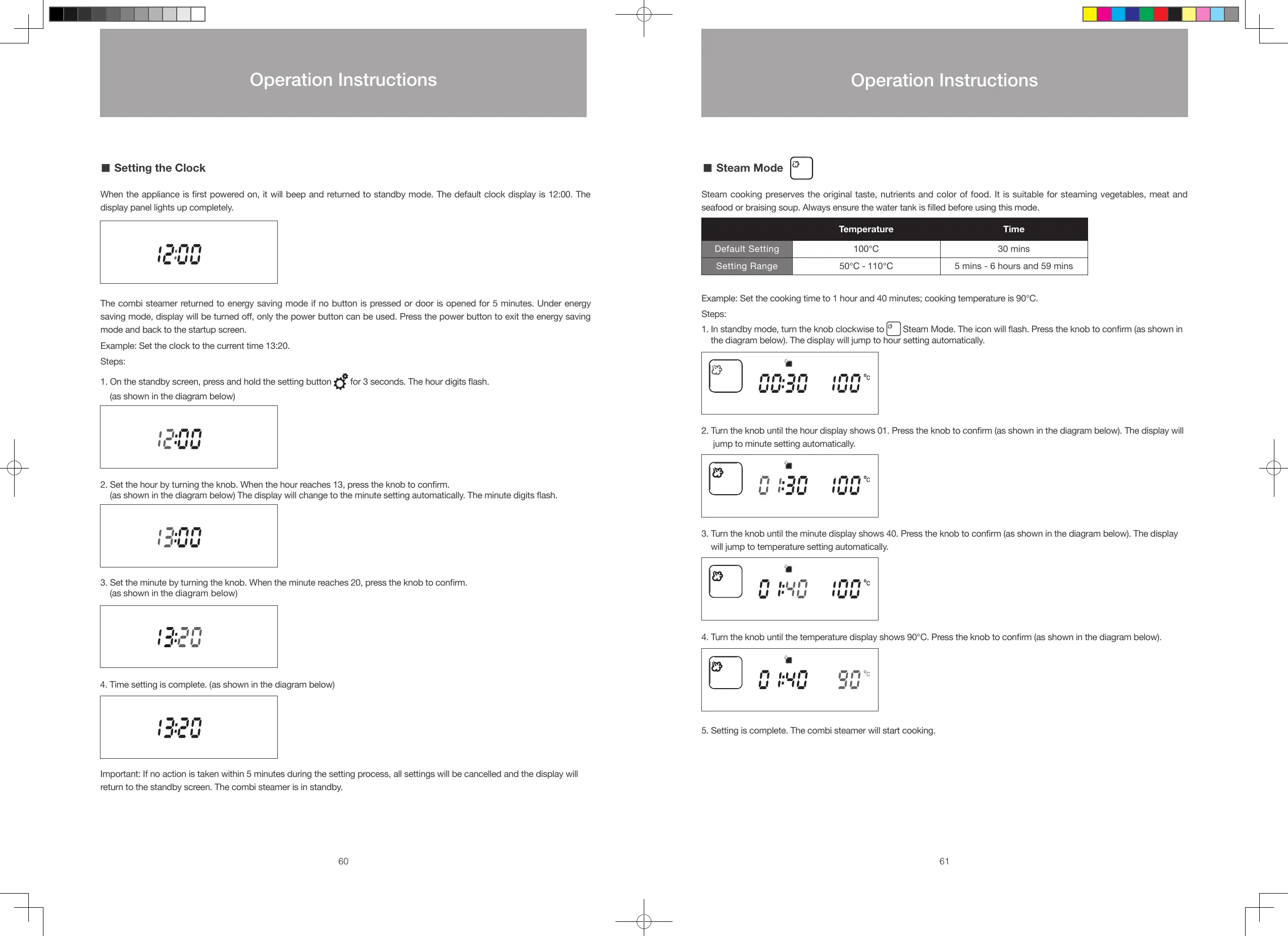
1. On the standby screen, press and hold the setting button
for 3 seconds. The hour digits ash.
(as shown in the diagram below)
2. Set the hour by turning the knob. When the hour reaches 13, press the knob to conrm.
(as shown in the diagram below) The display will change to the minute setting automatically. The minute digits ash.
3. Set the minute by turning the knob. When the minute reaches 20, press the knob to conrm.
(as shown in the diagram below)
4. Time setting is complete. (as shown in the diagram below)
Important: If no action is taken within 5 minutes during the setting process, all settings will be cancelled and the display will
return to the standby screen. The combi steamer is in standby.
Steam cooking preserves the original taste, nutrients and color of food. It is suitable for steaming vegetables, meat and
seafood or braising soup. Always ensure the water tank is lled before using this mode.
Temperature Time
Default Setting 100℃ 30 mins
Setting Range 50℃ - 110℃ 5 mins - 6 hours and 59 mins
Example: Set the cooking time to 1 hour and 40 minutes; cooking temperature is 90°C.
Steps:
1. In standby mode, turn the knob clockwise to
Steam Mode. The icon will ash. Press the knob to conrm (as shown in
the diagram below). The display will jump to hour setting automatically.
2. Turn the knob until the hour display shows 01. Press the knob to conrm (as shown in the diagram below). The display will
jump to minute setting automatically.
3. Turn the knob until the minute display shows 40. Press the knob to conrm (as shown in the diagram below). The display
will jump to temperature setting automatically.
4. Turn the knob until the temperature display shows 90°C. Press the knob to conrm (as shown in the diagram below).
5. Setting is complete. The combi steamer will start cooking.
60 61
Operation Instructions
Operation Instructions
S48893-Whirlpool Combi Steamer User Manual_EN_V12.indd 60-61 26/7/2016 下午12:55





 To Next Page