■
How to Remove the Back Panel
A. Dismantling the Back Panel
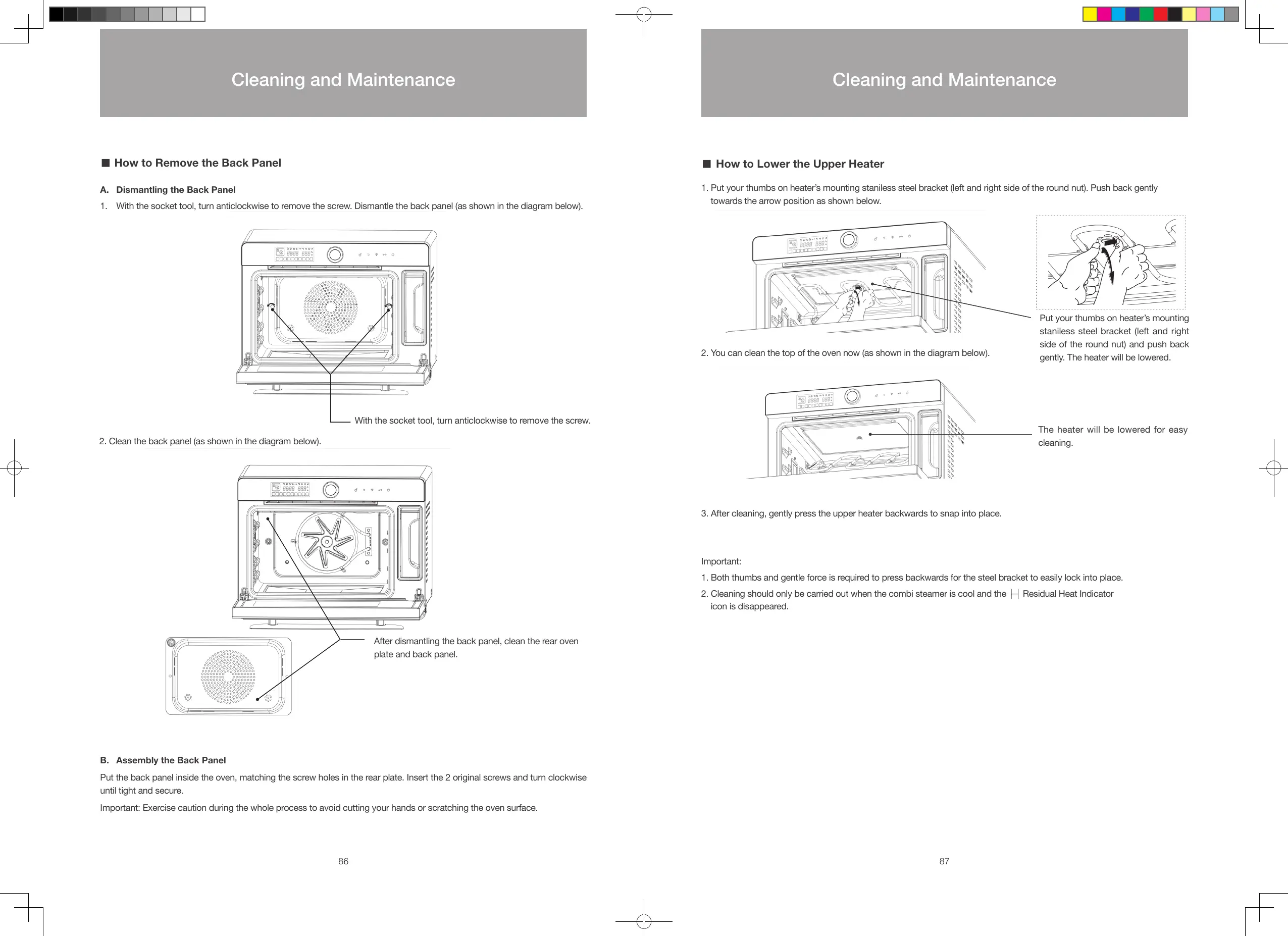
1. With the socket tool, turn anticlockwise to remove the screw. Dismantle the back panel (as shown in the diagram below).
With the socket tool, turn anticlockwise to remove the screw.
2. Clean the back panel (as shown in the diagram below).
After dismantling the back panel, clean the rear oven
plate and back panel.
B. Assembly the Back Panel
Put the back panel inside the oven, matching the screw holes in the rear plate. Insert the 2 original screws and turn clockwise
until tight and secure.
Important: Exercise caution during the whole process to avoid cutting your hands or scratching the oven surface.
■
How to Lower the Upper Heater
1. Put your thumbs on heater’s mounting staniless steel bracket (left and right side of the round nut). Push back gently
towards the arrow position as shown below.
2. You can clean the top of the oven now (as shown in the diagram below).
3. After cleaning, gently press the upper heater backwards to snap into place.
Important:
1. Both thumbs and gentle force is required to press backwards for the steel bracket to easily lock into place.
2. Cleaning should only be carried out when the combi steamer is cool and the
Residual Heat Indicator
icon is disappeared.
Put your thumbs on heater’s mounting
staniless steel bracket (left and right
side of the round nut) and push back
gently. The heater will be lowered.
The heater will be lowered for easy
cleaning.
86 87
Cleaning and Maintenance Cleaning and Maintenance
S48893-Whirlpool Combi Steamer User Manual_EN_V12.indd 86-87 26/7/2016 下午12:55





 To Next Page