■
Proving Mode
This mode works with steam to ensure stable high temperature and humidity inside the oven. It allows dough (for pizza or
bread) to rise quicker in a stable environment, and is used for fermenting dough for pizzas or bread. Always ensure that the
water tank is lled before using this mode.
Temperature Time
Default Setting 35℃ 30 mins
Setting Range 30℃ - 40℃ 5 mins - 6 hours and 59 mins
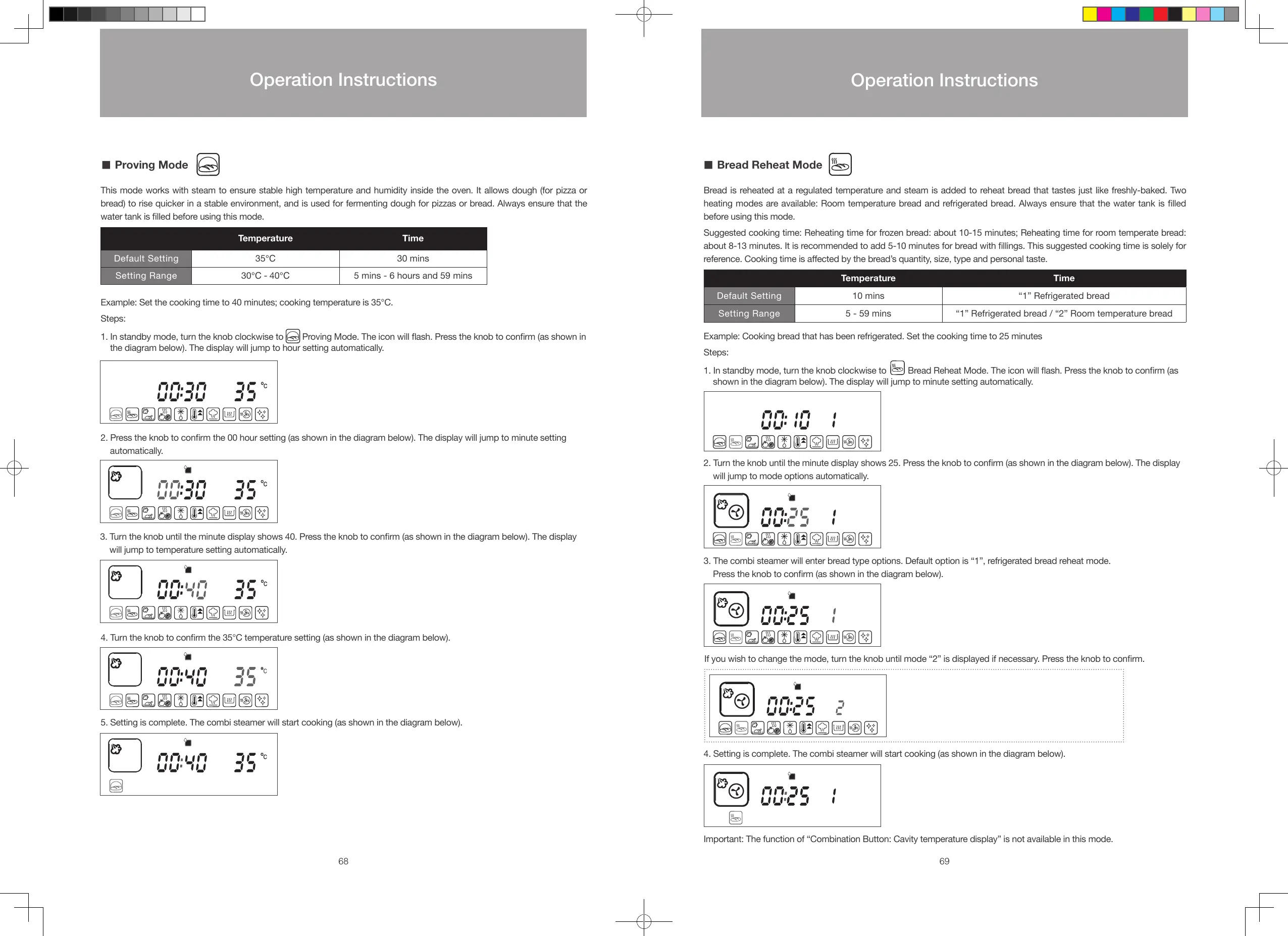
Example: Set the cooking time to 40 minutes; cooking temperature is 35°C.
Steps:
1. In standby mode, turn the knob clockwise to
Proving Mode. The icon will ash. Press the knob to conrm (as shown in
the diagram below). The display will jump to hour setting automatically.
2. Press the knob to conrm the 00 hour setting (as shown in the diagram below). The display will jump to minute setting
automatically.
3. Turn the knob until the minute display shows 40. Press the knob to conrm (as shown in the diagram below). The display
will jump to temperature setting automatically.
4. Turn the knob to conrm the 35°C temperature setting (as shown in the diagram below).
5. Setting is complete. The combi steamer will start cooking (as shown in the diagram below).
■
Bread Reheat Mode
Bread is reheated at a regulated temperature and steam is added to reheat bread that tastes just like freshly-baked. Two
heating modes are available: Room temperature bread and refrigerated bread. Always ensure that the water tank is lled
before using this mode.
Suggested cooking time: Reheating time for frozen bread: about 10-15 minutes; Reheating time for room temperate bread:
about 8-13 minutes. It is recommended to add 5-10 minutes for bread with llings. This suggested cooking time is solely for
reference. Cooking time is aected by the bread’s quantity, size, type and personal taste.
Temperature Time
Default Setting 10 mins “1” Refrigerated bread
Setting Range 5 - 59 mins “1” Refrigerated bread / “2” Room temperature bread
Example: Cooking bread that has been refrigerated. Set the cooking time to 25 minutes
Steps:
1. In standby mode, turn the knob clockwise to
Bread Reheat Mode. The icon will ash. Press the knob to conrm (as
shown in the diagram below). The display will jump to minute setting automatically.
2. Turn the knob until the minute display shows 25. Press the knob to conrm (as shown in the diagram below). The display
will jump to mode options automatically.
3. The combi steamer will enter bread type options. Default option is “1”, refrigerated bread reheat mode.
Press the knob to conrm (as shown in the diagram below).
4. Setting is complete. The combi steamer will start cooking (as shown in the diagram below).
Important: The function of “Combination Button: Cavity temperature display” is not available in this mode.
If you wish to change the mode, turn the knob until mode “2” is displayed if necessary. Press the knob to conrm.
68 69
Operation Instructions
Operation Instructions
S48893-Whirlpool Combi Steamer User Manual_EN_V12.indd 68-69 26/7/2016 下午12:55





 To Next Page