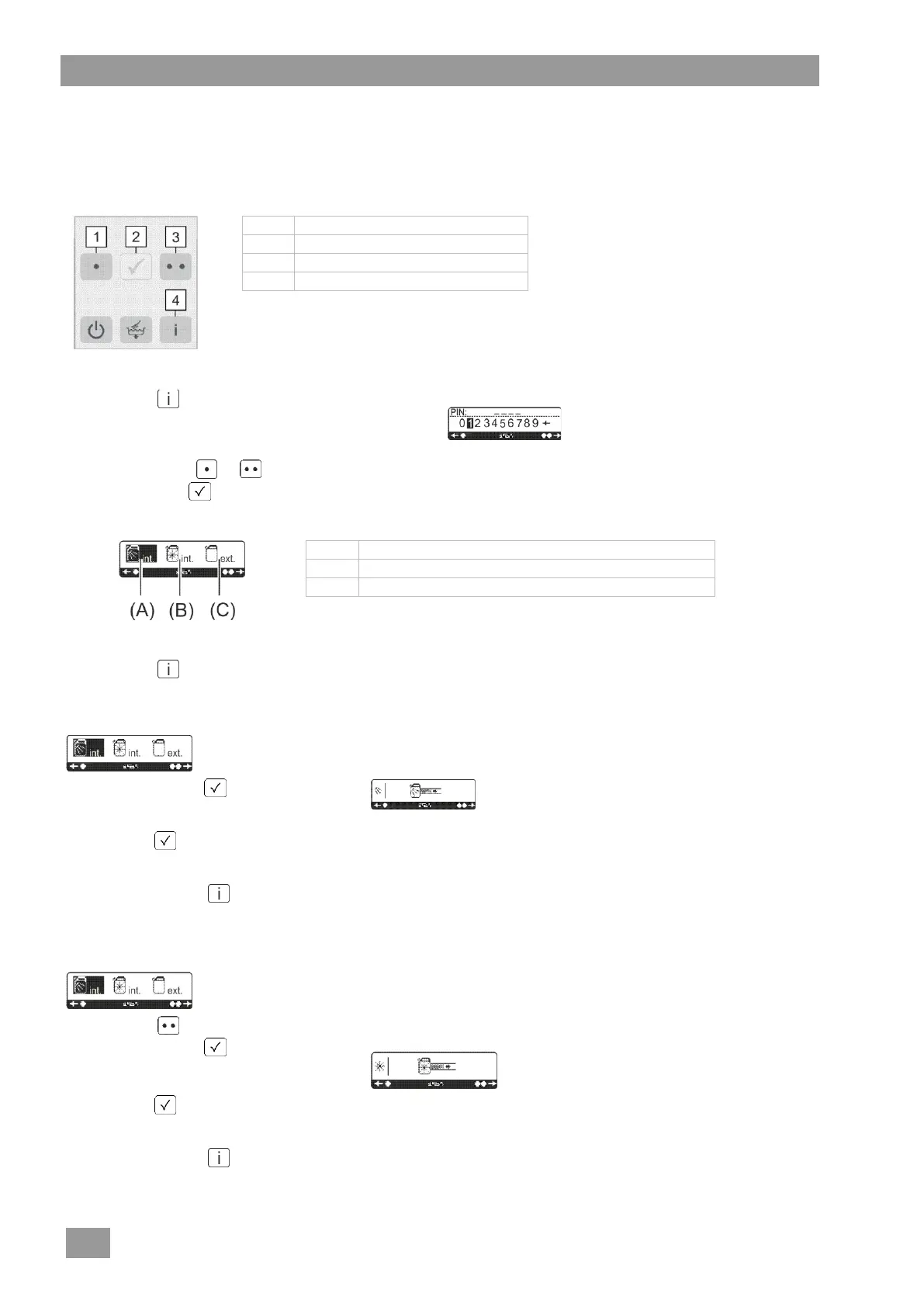
13 PIN Menu
In the PIN menu you can prime the dosing devices and programme the transfer strip for the connection of an
external dosing device ( 17.3).
Explanation of the buttons
Cursor left or reduce value
Cursor right or increase value
Accessing the PIN Menu
Press the button three times.
The PIN input mask is displayed.
Enter PIN 1575. To do this, select the individual
figures with the or button and confirm each
figure with the button.
The following selection is shown in the display:
Priming the integral detergent dosing device
Priming the integral rinse aid dosing device
Setting for external dosing devices ( 17.3)
Leaving the PIN Menu
Press the button.
(A) Priming the integral detergent dosing device
Confirm with the button.
The next screen is displayed.
Keep the button pressed.
The dosing device is primed.
Go back with the button.
The output screen is displayed.
(B) Priming the integral rinse aid dosing device
Press the button.
Confirm with the button.
The next screen is displayed.
Keep the button pressed.
The dosing device is primed.
Go back with the button.
The output screen is displayed.




 To Next Page