17.2 Electrical connection
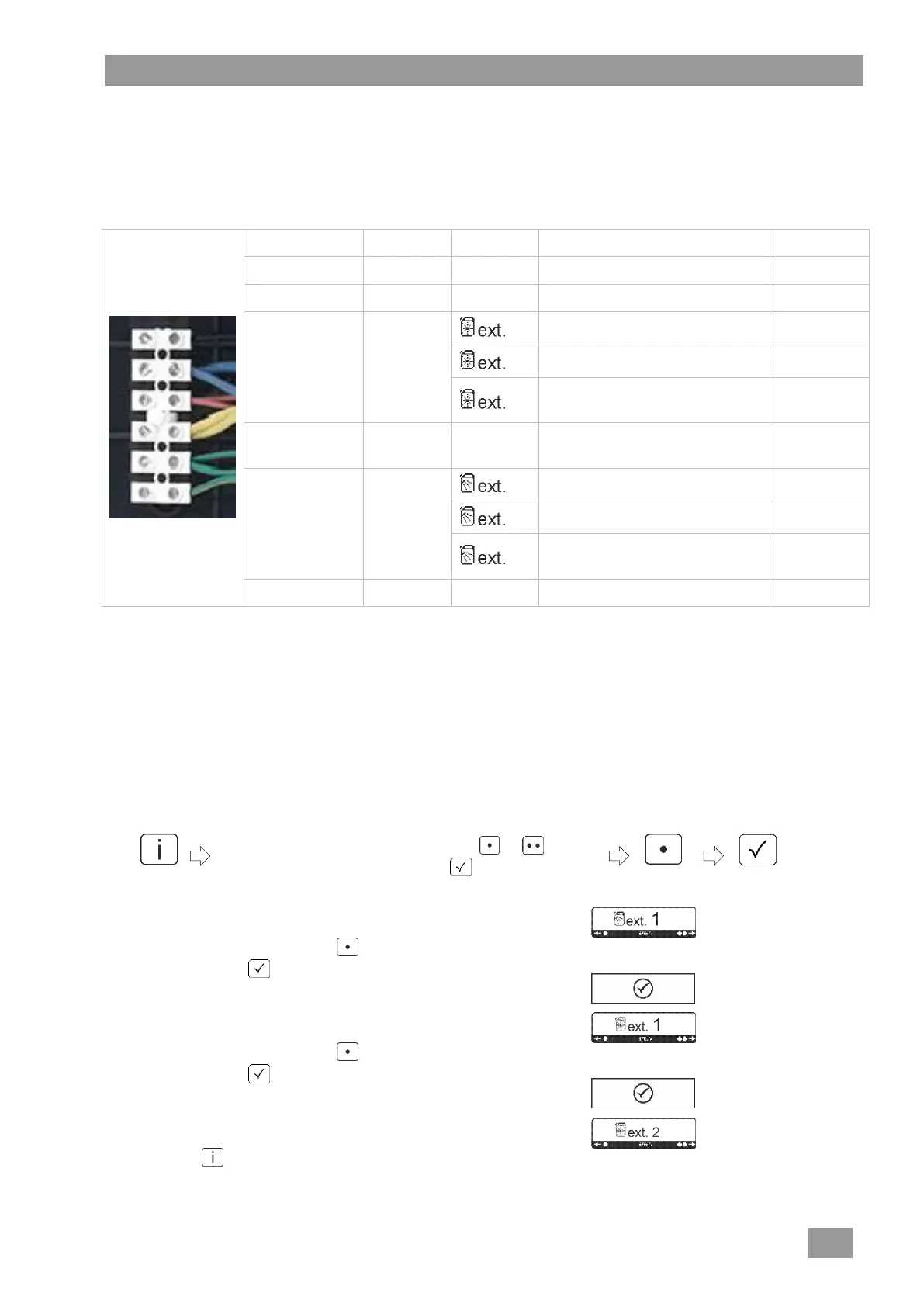
IMPORTANT maximum current drain at the transfer strip: 0.5 A.
Connect the external dosing device to the 6-pin terminal.
Terminals
while the rinse pump is running
parallel to solenoid valve
only for integral Winterhalter
dosing devices
while the circulating pump is
running
while the machine is filling
parallel to solenoid valve
only for integral Winterhalter
dosing devices
a) only with the hood closed
b) minimum water level in the tank
c) not in the self-cleaning programme
d) not while the machine is filling
Set the dosing amount at the dosing device.
17.3 Settings
Checking and changing the settings
Chose the required settings for detergent and rinse aid in the table above.
Check the settings and change if necessary by pressing the following buttons in turn:
Enter "1575".
(select the individual figures with the or button
and confirm each figure with the button)
The setting (detergent) is displayed (number flashes).
If necessary, change with the button.
Confirm with the button.
The input is confirmed.
The setting (rinse aid) is displayed (number flashes).
If necessary, change with the button.
Confirm with the button.
The input is confirmed.
The new setting (rinse aid) is displayed (number flashes).
Press the button three times to leave the PIN Menu.




 To Next Page