1139300 Shadow 8 User Manual
2-46 Installation and Checkout
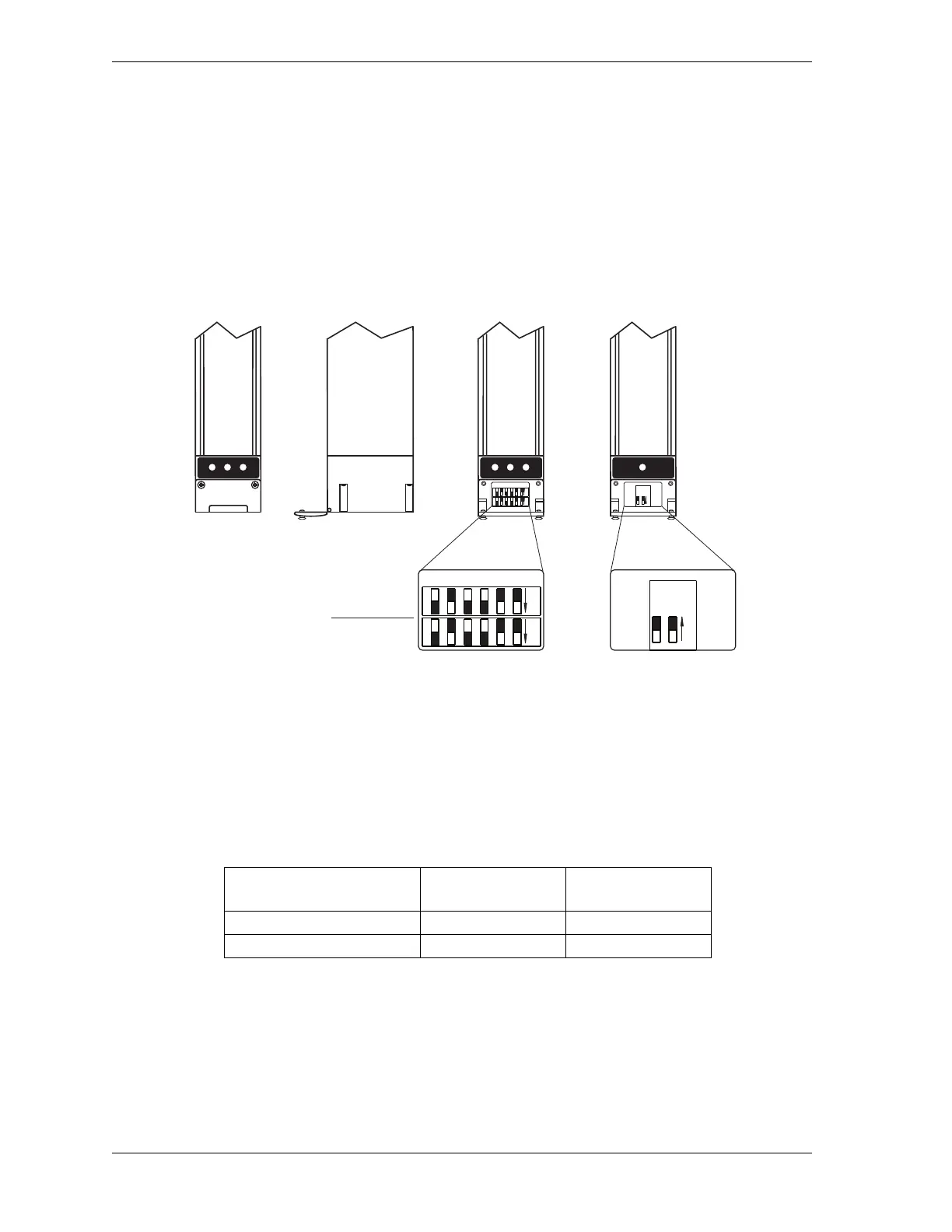
To set the option switches, loosen the retainer screws on the access doors just beneath the
LEDs on Main Receiver and Transmitter, and swing the doors down on their hinges. (Access
doors are located above LEDs and swing up if mounting orientation of the heads is reversed.)
Move switches to the desired positions, using a slender tool with a blunt tip. When you are
finished making settings, swing the doors back to their original positions and screw them
down.
Setting Operating Mode (Receiver Switch 1)
Shadow 8 can be set to operate in either Automatic Start (Default) or Start/Restart Interlock
operating mode (see Setting Operating Mode, page 3-3). Table 2-7 shows operating mode
option switch settings.
Figure 2-24. Shadow 8 Option Switches (Located in Main Receiver and Transmitter)
Table 2-7. Operating Mode Settings: Receiver Switch 1
Option
Receiver
SWA Switch 1
Receiver
SWB Switch 1
Automatic Start (Default) OFF OFF
Start/Restart Interlock ON ON
Receiver Transmitter
Option switches
(Shown in factory
default positions)
Block SWA
Block SWB
Receiver
(Front
View)
Receiver
(Side
View)
Access door
screwed
shut
Access
door
open
ON
165432
ON
165432
ON
12
ON
165432
165432
ON
12



 To Next Page