Chapter 2: Getting Started
EN-27
2.4.12 Relay Switch(LA5577)
a. Power on the adapter with a proper location.
b. Connect the wiring pin of 3rd party device by DI/DO (dry contact).
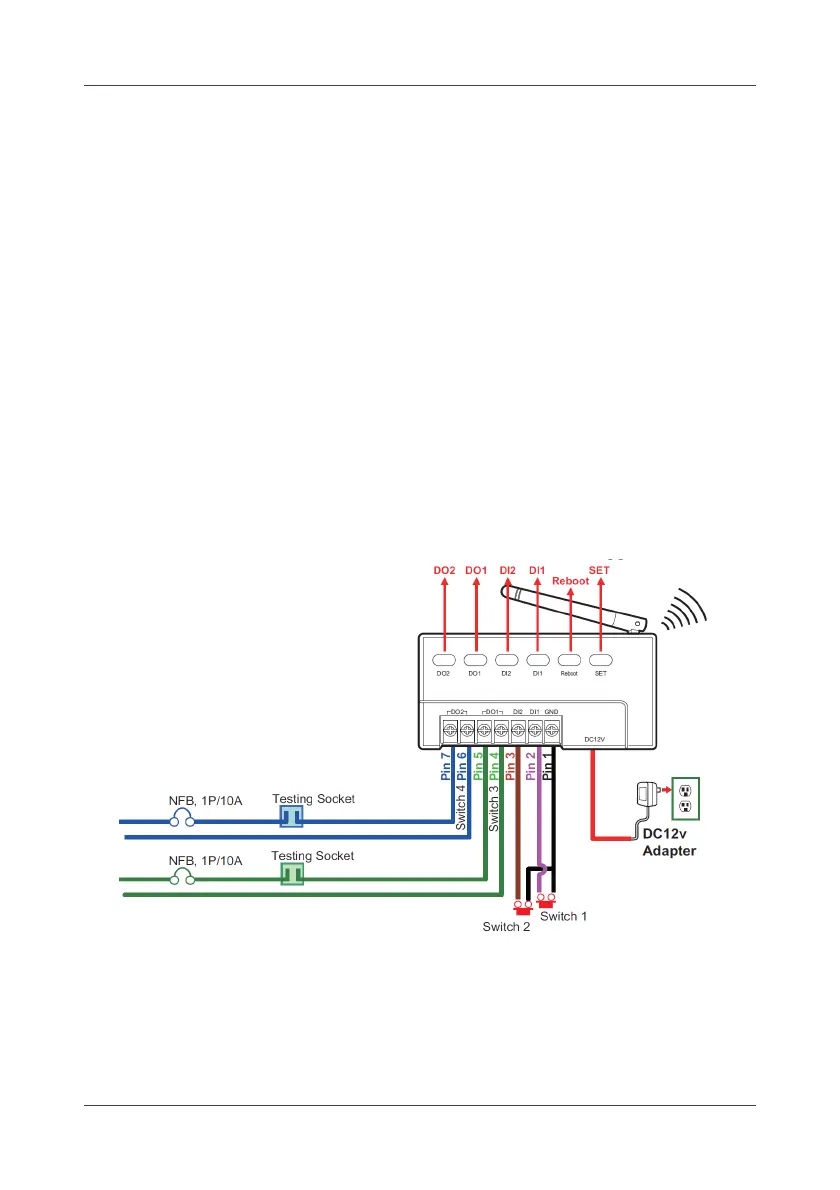
c. The description of integration and wiring as example:
SET: blinking when joining
Reboot: blinking when reboot
Wire 1- DC +12V: Power Input
Wire 2- GND: Common
Wire 3- DI1: Dry contact Input 1 (Positive)
Wire 4- DI2: Dry contact Input 2 (Positive)
Wire 5- DO1: Dry contact Output
Wire 6- DO1: Dry contact Output
Wire 7- DO2: Dry contact Output
Wire 8- DO2: Dry contact Output
*hard buttons: DI/DO for trigger simulation
*NFB: No-Fuse Breaker



 To Next Page