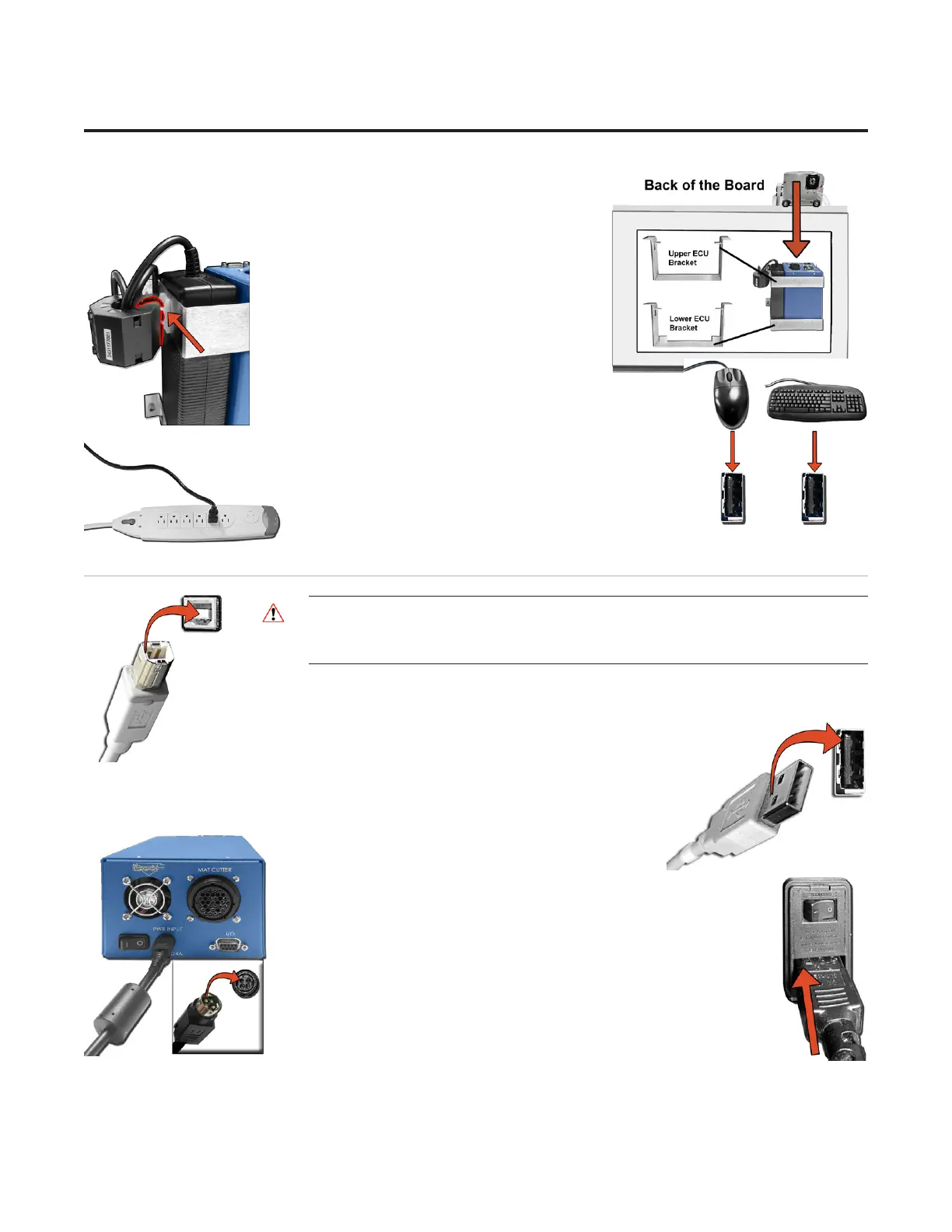
3. Place the ECU and its power supply into the ECU bracket on the
back of the board.
4. Locate one of the zip ties. Slip it through the
plastic mount on the side of the ECU bracket
and attach it to the Ferrite on the output cable
of the power supply then secure it in place.
5. Hook up the keyboard and mouse by
plugging their USB cables into the computer.
Some of the USB connections are in the back, and some
are available along the side.
6. Plug in the computer power cord into the matching
port on the computer, then plug the power cord from
the computer into a surge protector.
Connect the ECU
* WARNING: High voltage. No user serviceable parts
inside the ECU.*
1. Connect ECU USB cable to the matching port on the back of the ECU.
2. Plug the other end of the USB cable into the USB port on the computer.
3a. If using an ECU with an external power supply (blue unit), connect
the power supply output cable to the back of the ECU.
3b. If using an ECU with an internal power supply (black unit), connect
the ECU power supply cord to the back of the ECU.
12
Wizard™ International, Inc., 4600 116th St. SW, Mukilteo, WA 98275 888/855-3335 wizardcutters.com
20-34300-1A GettingStartedManual9K-70FrameShop
02/23/24
Wizard™ CMC Model 9000 Hardware and Software Getting Started Guide


 To Next Page