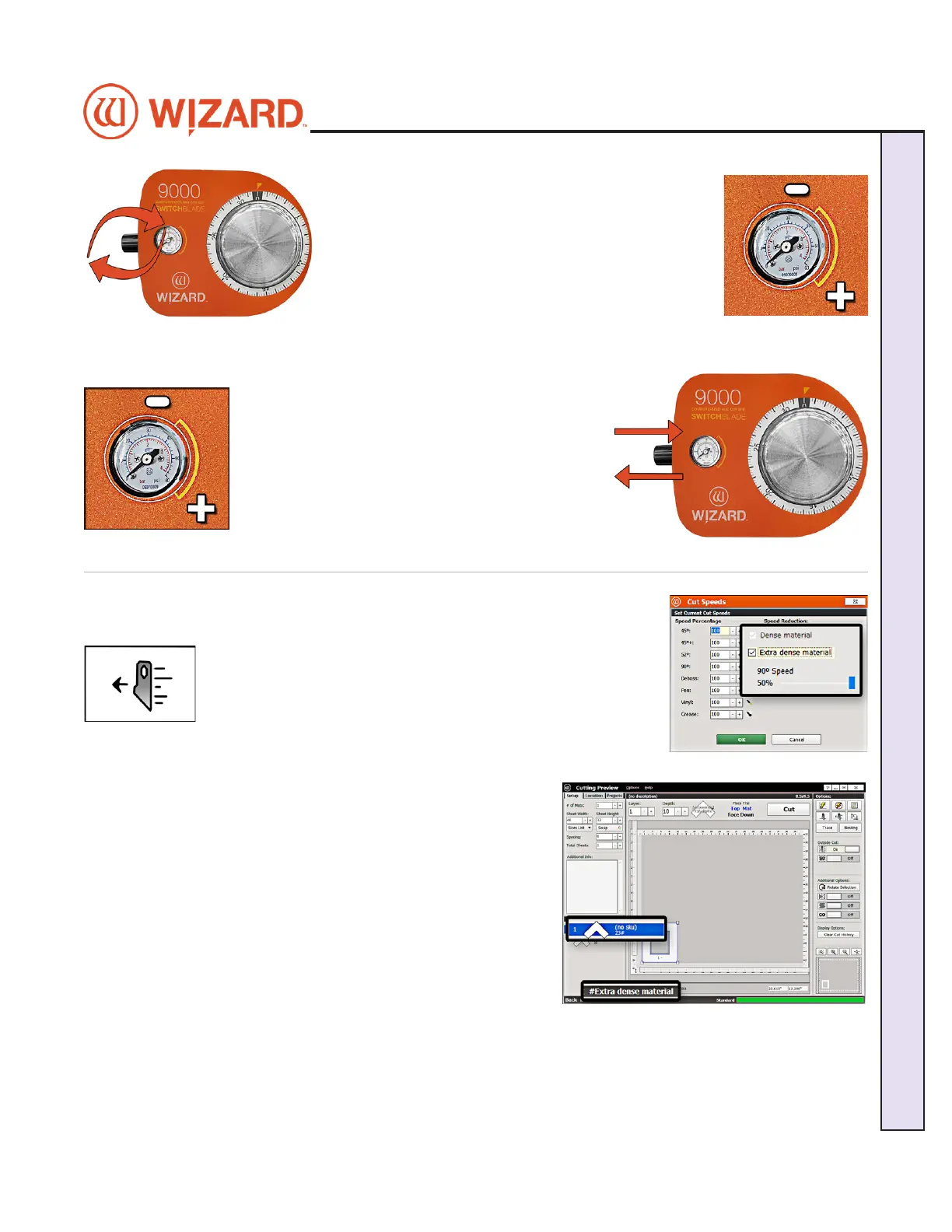
9. Adjust air regulator.
• For High Setting: Turn the air regulator pressure
knob clockwise until the marker on the gauge is at the
high setting. The maximum air pressure should be less The maximum air pressure should be less
than or equal to 60 psi to avoid crushing the matboardthan or equal to 60 psi to avoid crushing the matboard.
• For Low Setting: Turn the air regulator pressure
knob counter-clockwise until the marker on the gauge is
at the low setting. The minimum air pressure should be 35 The minimum air pressure should be 35
psi, otherwise the blade may not cut through the matboardpsi, otherwise the blade may not cut through the matboard.10. Set it by pushing the air regulator pressure
knob back in.
10. The software will prompt for a head pressure
change only if the current mat is a dierent setting
than the previously cut mat. If the settings are the
same as the previously cut mat, the CMC will skip
this step and proceed to the Cartridge Change and
Depth Setting screen.
11. Click OK to cut the mat with this setting.
Cutting an Extra Dense Layer with the 90° Cartridge
This setting is only for the 90° Cartridge and will not take aect if another cartridge is selected. This setting will
allow the 90° Cartridge to cut at a slower pace.
1. Select the desired layer on the Cut Preview.
2. Click the Cut Speeds button to open the Cut Speeds Screen.
3. Click the checkbox for Dense and change the Blade Depth to
the appropriate setting for this matboard.
4. Click the checkbox for Extra Dense Material.
5. Adjust the slidebar to the percentage of cutting speed. For instance, 50% is 50% of the standard cutting speed.
6. Click OK. The Cut Preview displays the dense layer with a
pound sign and indicates that this layer is extra dense.
7. Click Cut the cut the mat and Align the Head if requested.
20-34300-1A GettingStartedManual9K-70FrameShop
02/23/24
23
Wizard CMC Model 9000 Hardware and Software Getting Started Manual
Wizard™ CMC Model 9000 Hardware and Software Getting Started Guide


 To Next Page