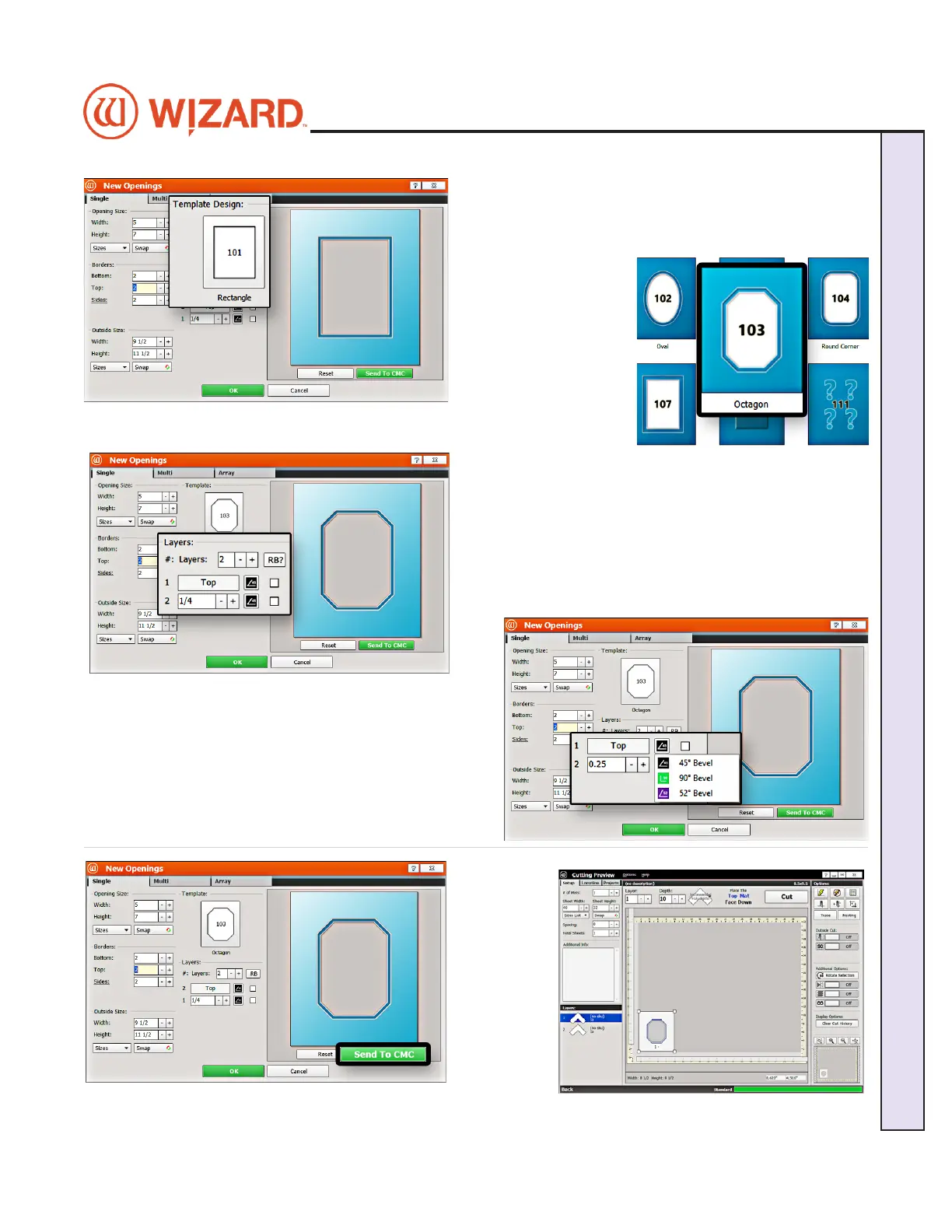
Select Template
1. Click on the template thumbnail under template design.
2. The Template Library opens.
Note: There are
several pages of
templates you can
scroll through.
3. Click on any
template thumbnail to
select it.
4. The new template is
displayed.
Layers
1. Select the number of matboard layers desired. For this
project, leave it at the default of 2 layers.
Cartridge Selection
1. Click on the cartridge icon and select the desired
cartridge for this layer. For this project, leave it at the
default cartridge, which is the 45° bevel cartridge.
Cut Your First Mat
1. Click
Send to
CMC to take
the design
to the Cut
Preview.
20-34300-1A GettingStartedManual9K-70FrameShop
02/23/24
15
Wizard CMC Model 9000 Hardware and Software Getting Started Manual
Wizard™ CMC Model 9000 Hardware and Software Getting Started Guide


 To Next Page