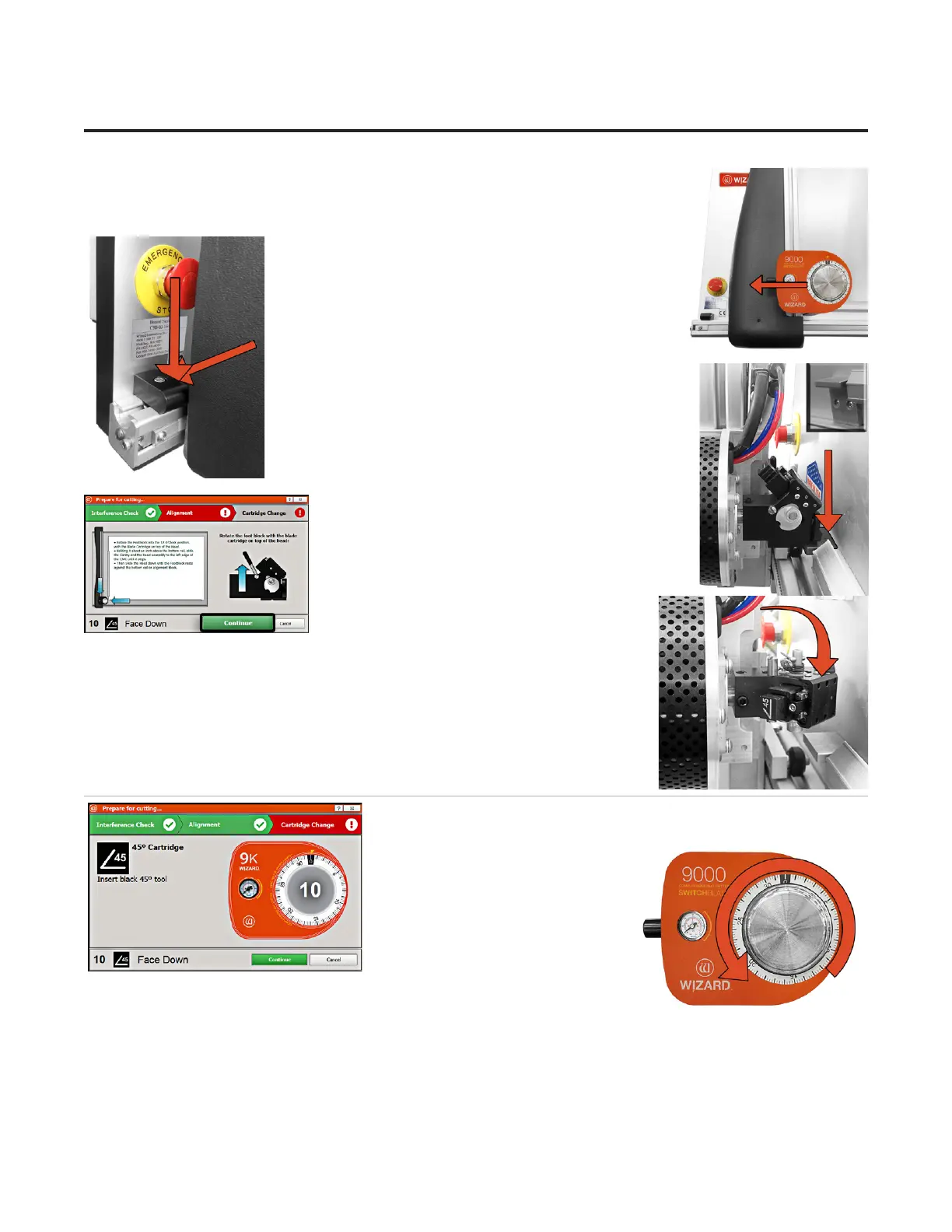
2. Holding it about an inch above the bottom rail, slide the gantry and the head
assembly to the left edge of the CMC until it stops.
3. It will stop against the Magnetic Stop.
4. Then slide the head down until the footblock rests
against the head alignment stop.
5. Click on the Align the Head screen.
6. Head will align to the home position.
Cartridge Change and Depth Setting
1. Once the cutting head has homed and aligned itself, you will be
prompted to insert the correct
Cartridge for the next operation.
Note: If the same cartridge is
needed as the previous operation,
you will not need to change the
cartridge.
2. The 45° blade cartridge
and blade have already been
inserted, so change the blade depth by turning the blade depth dial to the
requested depth.
3. Once you click Continue, the machine will automatically adjust to the
new depth setting and begin the cutting operation.
18
Wizard™ International, Inc., 4600 116th St. SW, Mukilteo, WA 98275 888/855-3335 wizardcutters.com
20-34300-1A GettingStartedManual9K-70FrameShop
02/23/24
Wizard™ CMC Model 9000 Hardware and Software Getting Started Guide


 To Next Page