Removing the Shipping Blocks
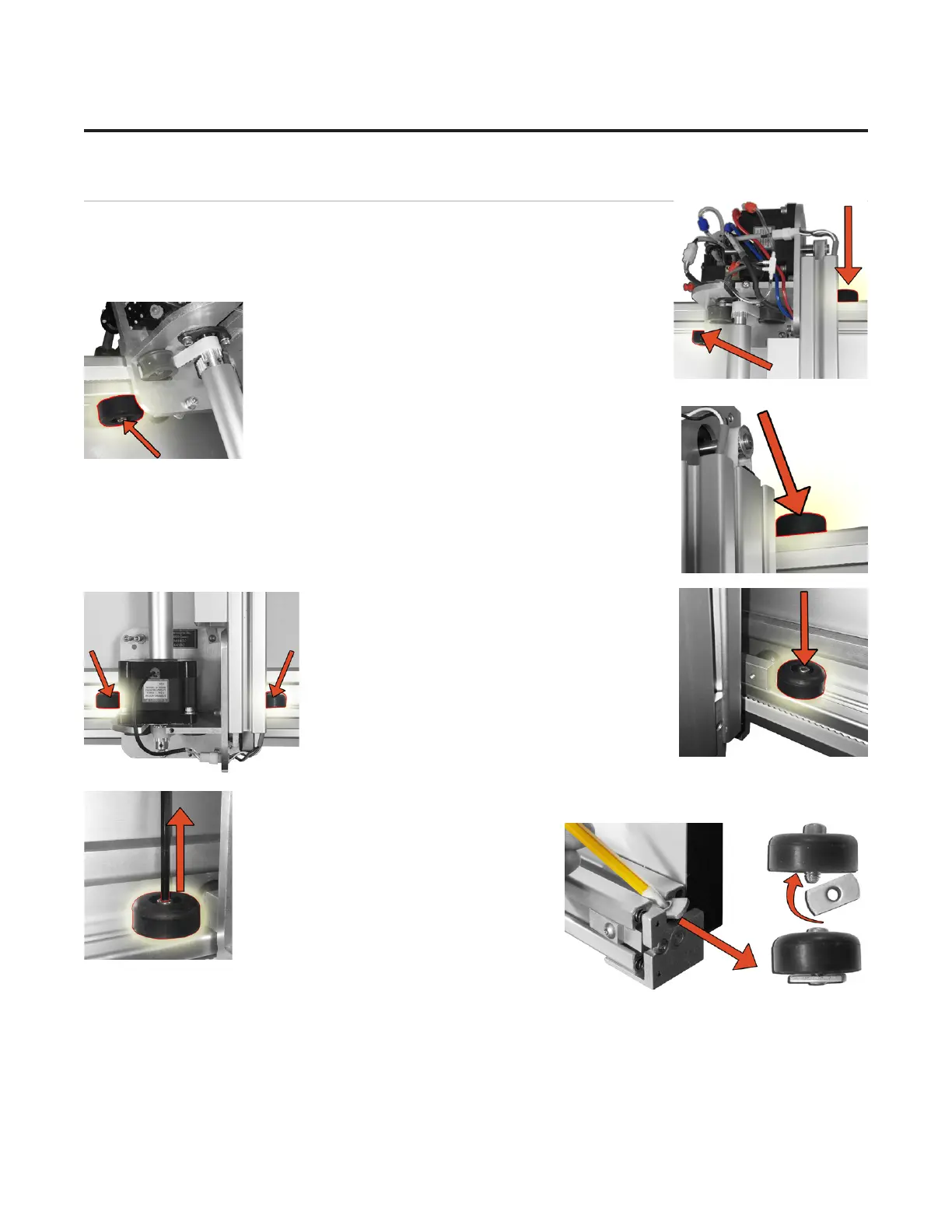
1. Locate the four shipping blocks holding the gantry in place. There are two on
top of the upper gantry;
one to the left of the gantry on the underside of the top
rail,
and one to the right of the gantry on the top of the rail.
There are two shipping blocks on each side of the
lower gantry on the bottom rail.
2. Remove the shipping blocks by
loosening the 3/16” Allen screw from the
T-Nut. Slide the T-Nuts to the right end of
the rail; a pencil tip helps. Reattach the
T-Nuts to the shipping blocks and place
them in the shipping box for storage.
8
Wizard™ International, Inc., 4600 116th St. SW, Mukilteo, WA 98275 888/855-3335 wizardcutters.com
20-34300-1A GettingStartedManual9K-70FrameShop
02/23/24
Wizard™ CMC Model 9000 Hardware and Software Getting Started Guide


 To Next Page