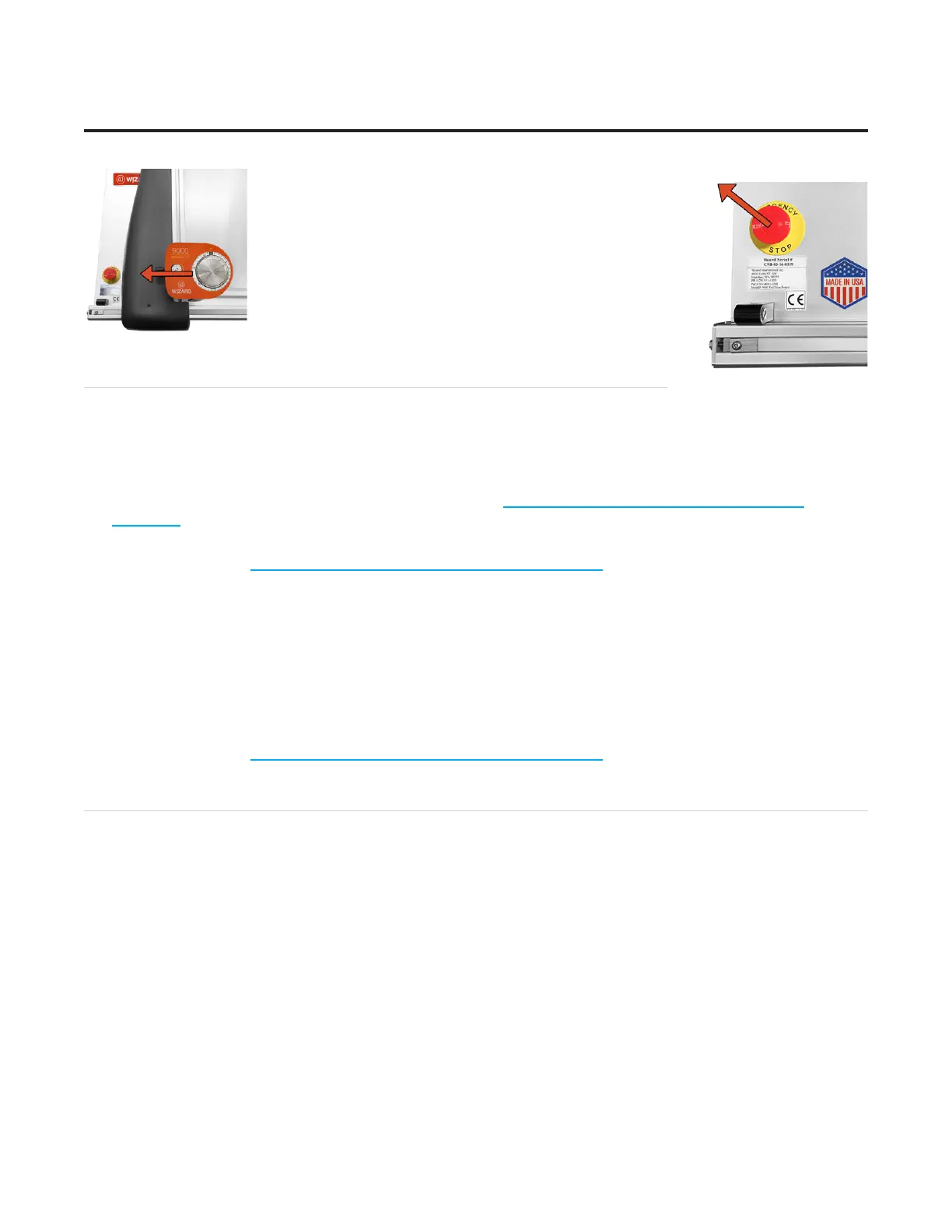
3. Grasp the head and manually lower the head back to
the home position.
4. Pull out the Emergency Stop button and realign the
head. See “Homing and Alignment” page 17” for
instructions on how to Align the Head.
Troubleshooting
Cuts Look Wavy
Check for squareness. See “Check Squareness” page 9.
Make sure the board cable is unobstructed. See “Connecting the Board Cable” page 10.
Check the head wheels. See Head Wheel Adjustment at https://wizardcutters.atlassian.net/wiki/x/
YYDHFw.
Check the blade depth - See “Blade Depth Settings” page 21 and Blade Depth Adjustment on the
Knowledge Base at https://wizardcutters.atlassian.net/wiki/x/9I2rBQ.
Blade Keeps Breaking
Check how the blade is installed. See “Install a Blade” page 16 and “Adjusting for Regular or Dense
Matboard” page 22.
Check to make sure the head is properly aligned. See “Homing and Alignment” page 17.
Check the Blade Depth. See “Blade Depth Settings” page 21 and Measuring Blade Depth on the
Knowledge Base at https://wizardcutters.atlassian.net/wiki/x/9I2rBQ.
Frequently Asked Questions
Q: When I click cut, it makes a lot of noise and breaks the blade even though I’ve followed the troubleshooting
suggestions. What do I do?
If the motors have been idle (i.e., you can move the head because there is no power to the motors), or
if a cut has been aborted, the head will have to be aligned before cutting. Otherwise, the head is rotated
into the incorrect position and will break the blade. See “Homing and Alignment” page 17 in this
document for more information.
Q: I click cut and the matboard moves around and does not cut correctly. How do I x this?
Make sure that the air compressor is turned on, and that the air lines are not pinched. The CMC requires
air pressure to engage the clamps and cutting head.
26
Wizard™ International, Inc., 4600 116th St. SW, Mukilteo, WA 98275 888/855-3335 wizardcutters.com
20-34300-1A GettingStartedManual9K-70FrameShop
02/23/24
Wizard™ CMC Model 9000 Hardware and Software Getting Started Guide


 To Next Page