11
3062878_201707
6. Installation / Electrical connection,
programming module
6.1 Wall mounted
installation
(A)
(B)
(C)
(D)
(E)
(F)
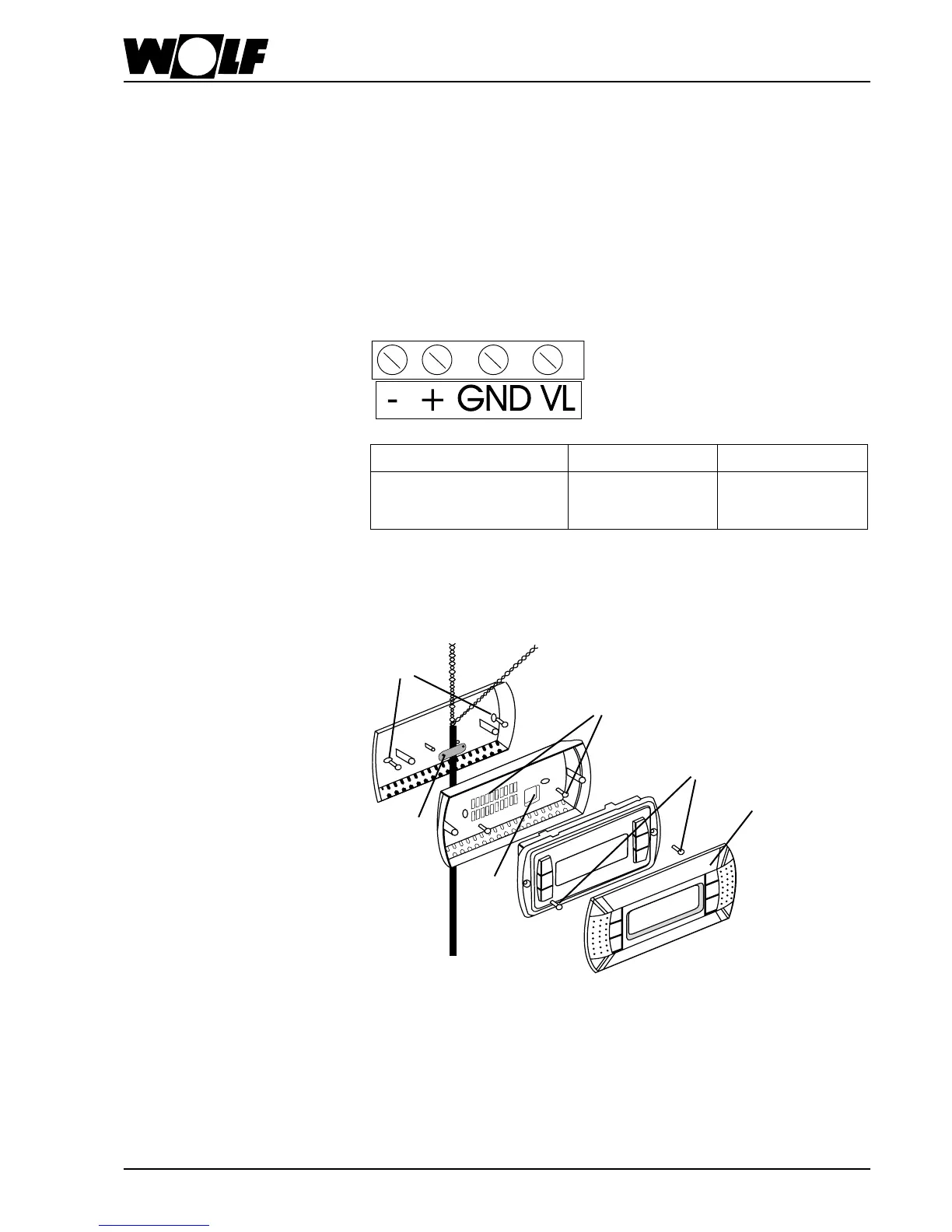
To mount the programming module on the wall, proceed as follows:
1. Mount the wall mounting base on the wall using screws (A).
2. Install the cable and secure using the strain relief (B) supplied.
3. Guide the ends of the cable through aperture (C) in the back panel of the
programming module.
4. Secure the back panel to the wall mounting base using screws (D).
5. Connect the cable as follows:
VL / GND
+ -
Supply voltage
via KLM control unit
(see wiring diagram)
Databus (pLAN)
Tx+/Rx+
Databus (pLAN)
Tx-/Rx-
6. Secure the programming module to the back panel using screws (E).
7. Fit the cover (F; clicks into place).



 To Next Page