23
3062878_201707
9. Operating level 1
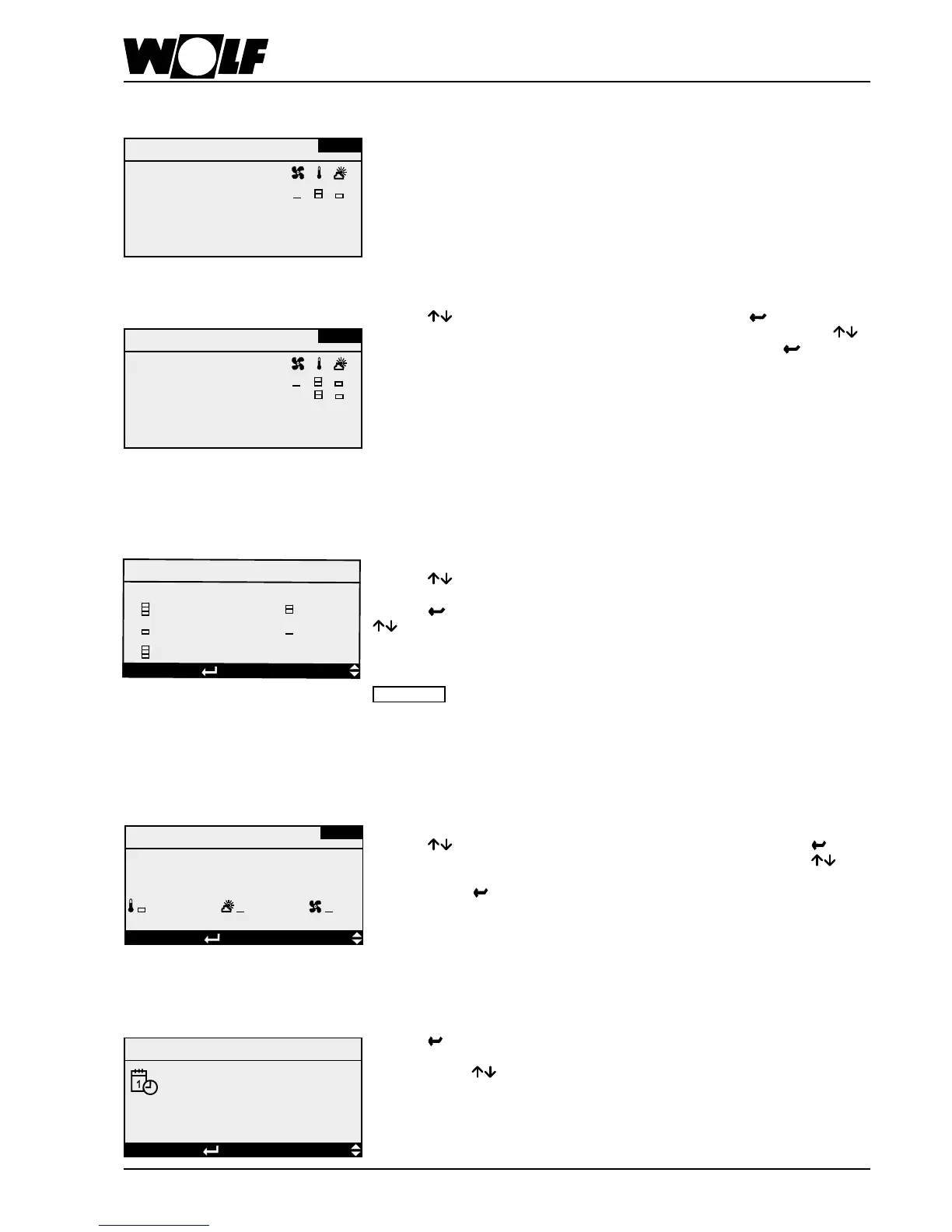
In all, there are 4 adjustable day programs available (factory setting: T1 = 6 - 18 h /
T2 = 6 - 14 h / T3 = 11 - 14 h and 17 - 22 h / T4 = 0 - 23:59 h). A day program can be
split into a max. of 5 day sections, to each of which a start and end time (resolution
1 min) can be assigned. The 5 day sections can also overlap (see example), i.e. if
one time lies in two or more sections, the set values of the lower section take priority.
4adjustablevalues(bars)caneachbedenedindividuallyassetvalues,fanstage
or speed, temperature and fresh air rate.
Example:
With this setting, the system will run from 06:00 h until 12:00 h with the settings of
day section 1. From 12:00 h to 12:30 h with the settings of day section 2 and from
12:30 h until 18:00 h with the settings of section 1 again.
Pressing
shows in sequence the 4 day programs. Pressing highlights the
starttime(hours)oftherstdaysectionoftheselecteddayprogram.Pressing
enablesyoutosettherequiredvalue.Conrmtheselectedvaluewith . At that
time, the cursor jumps to the start time (min), to which you assign the required value
as described above. As a next step, set the end time in the same manner. Once both
timeshavebeendened,thesetfanspeed,thesettemperatureandthesetfresh
air proportion (if mixer air dampers are installed) should be set using the bars. You
can cancel any time by pressing
. In that case, the cursor returns to the home
position where you can either change the day program or exit the day program by
pressing
.
Day programs
Day program 1
06:00 18:00
00:00 00:00
00:00 00:00
00:00 00:00
00:00 00:00
Example
Day program 1
06:00 18:00
12:00 12:30
00:00 00:00
00:00 00:00
00:00 00:00
TP-01
TP-01
Thisiswherethesetvaluesfortemperature,fanspeed,pressure,owrateandfresh
air proportion are assigned to the bars used in the day programs.
Pressing enables the selection of which control variable should be assigned to
the set value.
Pressing again shows in sequence the four stages of the control variable. With
,aspecicsetvaluecanbeassignedtothehighlightedstages.Youcancancel
by pressing
. In that case, the cursor returns to the home position (l.h. top corner)
where you can exit the menu by pressing
again.
Please note
Ifasetvaluetransduceristted,itwillonlybeactiveifbarsareactivatedinday
program 4.
Set values
Set values, time program
Temperatures
DISPLAYSELECTIONEsc BACK
20.0 °C
16.0 °C
21.7 °C
18.5 °C
= Set room transducer
Intheholidayprogram,5xedperiods(comprisingadateandtime)canbedened.
Corresponding set values can be assigned to these periods.
Pressing enables the selection from the 5 holiday programs. Pressing
highlights the start time for the selected holiday program. First, by pressing the
dateandthenthetimeareset.Conrmtheselectedday,month,hourandminute
respectively with .Denetheendtimeinthesameway.
Finally, the fan speed, temperature and fresh air proportion are assigned to the
selectedperiod,usingthesetvaluesdenedtothebars.
Holiday program
DISPLAYSELECTIONEsc BACK
Holiday program
UR-01
Holiday time 1
Start:
End:
00:00
00:00
00:00
00:00
Setting the date and time
Pressing several times highlights in sequence the day of the week, the date, the
month, the year, the hour and minutes of the current time. The highlighted value can
be adjusted with .
Changes from winter to summer time and vice-versa are made automatically.
Date/time
Date/time
dd.mm.yy hh:mm
18 02 09 11 48
Time function
DISPLAYSELECTIONEsc BACK



 To Next Page