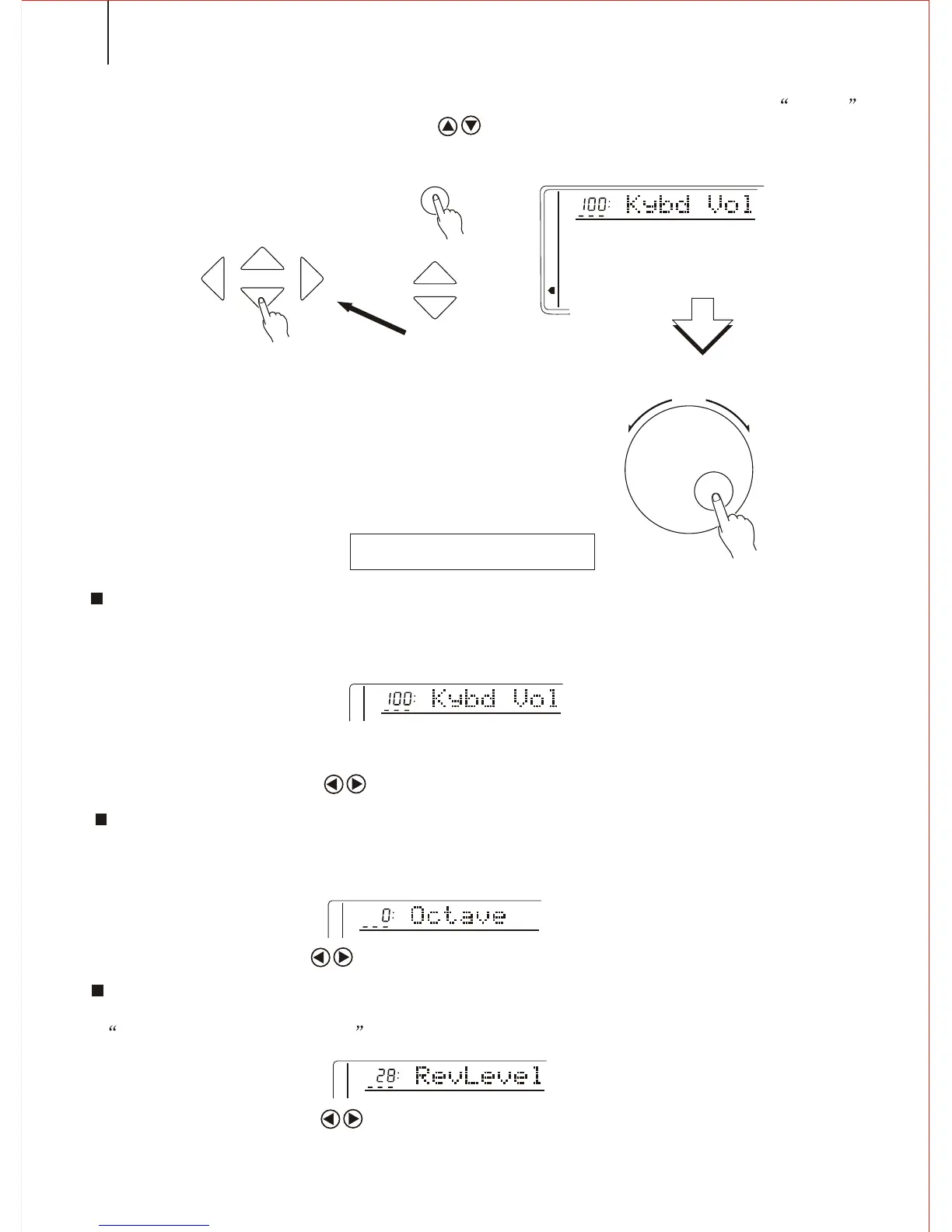
KEYBOARD VOLUME
To set the volume suitable to the accompaniment and playback.( including DUAL
& SPLIT VOICE). Extension:00 to127. 00 stands for no sound, and 127the highest Vol.
Notice:
Holding the [VOICE ]button can quickly select this function.
Press both CURSOR buttons to return to the original volume setting(100).
Press the FUNCTION buttons to select the WHOLE FUNCTION (The arrow
marks the position). Use the CURSOR buttons to select the parameter you need
and
then use [SEARCH] dial to set the parameter.
COMMON FUNCTIONS
46
8 OCTAVE
To change the Octave pitch of the voice in the right part of the keyboard. -1 is to fall
by an Octave, and -2 by Octaves, and +1,+2 to rise by one or two Octaves.
REV LEVEL
To set the voice output to the REV LEVEL. Extension: 00-127. Return LEVEL is set by
SET RETURN REV LEVEL above.
Notice:
Press both CURSOR buttons to return to the original volume setting (28).
SEARCH
FUNCTION
TEMPO
CURSOR
MEMORY
MULTIFUNCTION
DUAL VOICE
SPLIT MODE
HARMONY/ECHO
WHOLE FUNCTION
NUMBER EFFECT
S. NUMBER
VOICE
STYLE
Notice:
Press both CURSOR buttons to return to the original volume setting(0).



 To Next Page