16 •Getting to know the WIDE FORMAT COPY SYSTEM XEROX WIDE FORMAT COPY SYSTEM
NOTE: The Background Suppression option cannot be used with the
Photo setting. If Photo is selected, Background Suppression is
automatically set to Off.
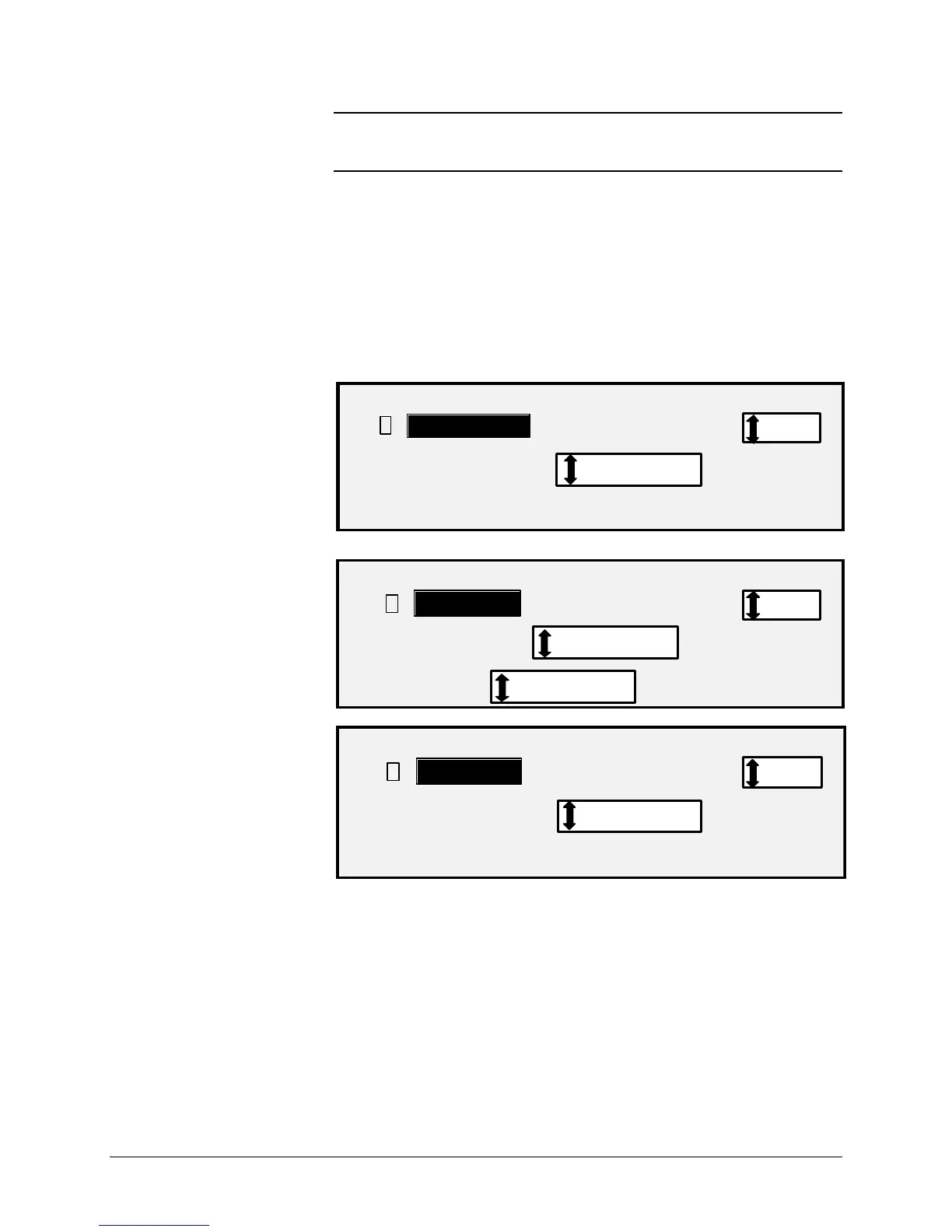
Color — Select Color when scanning full color documents. When Color
Type is selected a version of the following screens will be displayed. The
content of the screen will depend on the selected FORMAT and
COMPRESSION.
The following screens will only be displayed in SCAN mode when the
Scan to Net and Color Scanner feature keys are installed. The Normal
and Photo LED's will be lit when Color is selected.
The selections that appear on the screen depend on the FORMAT and
COMPRESSION selections.
SCAN OPTIONS (COLOR)
COMPRESSION:
FORMAT:
: PACKBITS
: TIFF
PREVIEW
SCAN OPTIONS (COLOR)
COMPRESSION:
FORMAT:
INDEX
: TIFF
PALETTE:
DEFAULT
PREVIEW
SCAN OPTIONS (COLOR)
COMPRESSION:
FORMAT:
NORMAL
JPEGPREVIEW
Color


 To Next Page
 Loading...