RECOMMENDED: To ensure reliable operaon, Xilinx recommends running the
report_power
command in
the Vivado tools for designs targeng this board. The reported rail current requirements must not exceed the
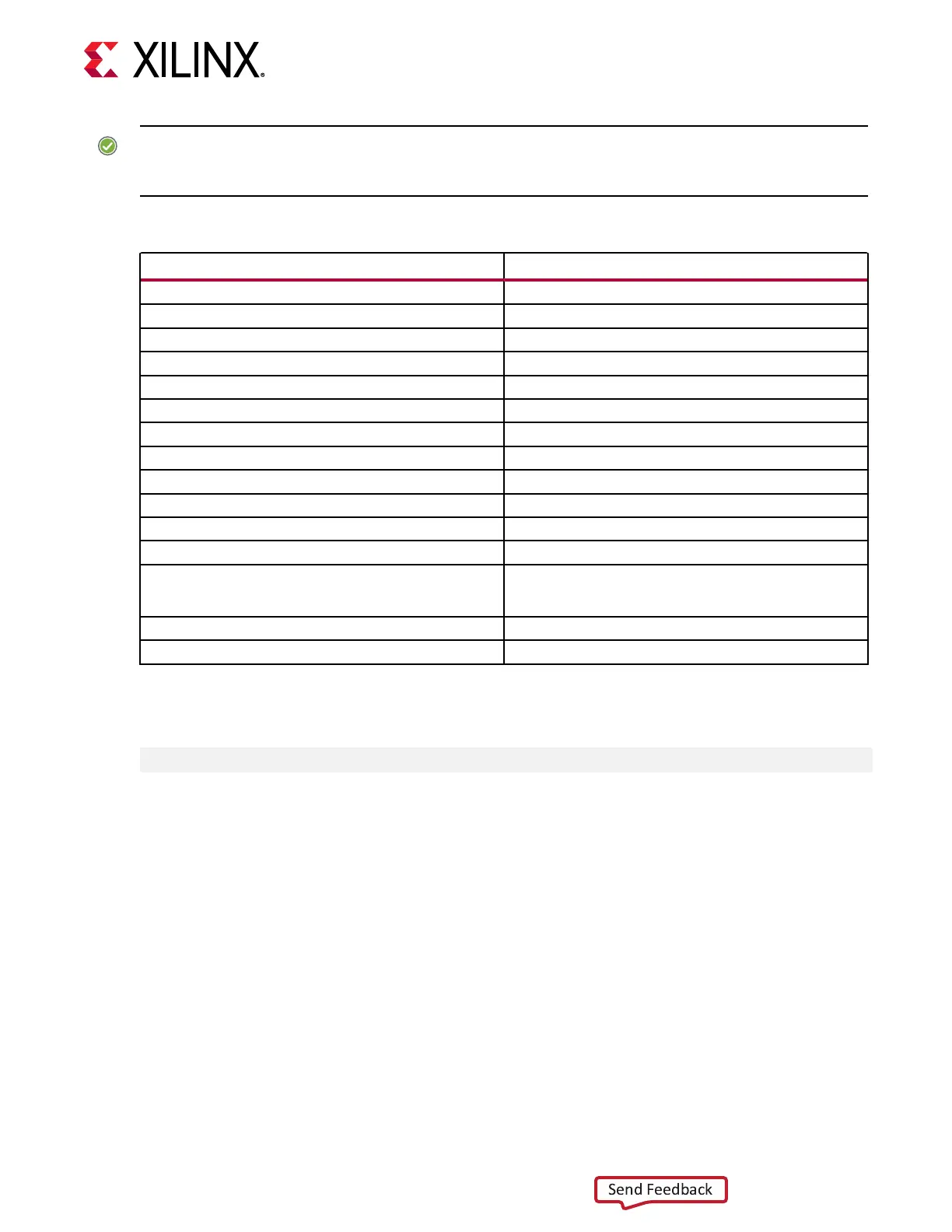
values listed in the following table.
Table 26: Device Rail Maximum Current
Device Rail Maximum Current (Amps)
V
CCINT
60
V
CCINT_IO
+ V
CCBRAM
+ V
CC_PSINTLP
+ V
CC_PSINTFP
+ V
CC_PSINTFP_DDR
18
MGTYV
CCAUX
+ V
PS_MGTRAVTT
0.5
MGTYA
VCC
4
V
PS_MGTRAVCC
0.5
MGTYA
VTT
+ V
CC_PSPLL
7
V
CCINT_AMS
28
V
ADC_AVCC
4
V
ADC_AVCCAUX
2
V
DAC_AVCC
6
V
DAC_AVCCAUX
1.5
V
DAC_AVTT
1.5
V
CCAUX
+ V
CCAUX_IO
+ V
CCO
1.8V + V
CCAUX_IO
+ V
CC_PSAUX
+
V
CC_PSDDR_PLL
+ V
CCO_PSIO0_500
+ V
CCO_PSIO1_501
+ V
CCO_PSIO2_502
+
V
CCO_PSIO3_503
+ V
CCADC
+ V
CC_PSADC
8
V
CCO
1.2V + V
CCO_PSDDR_504
6
V
CCO
#V (# corresponds to VADJ programmed voltage) 6
The total device power must remain under 50W. To assist the Vivado tools in reporng when
power exceeds this amount, add this XDC constraint:
set_operating_conditions -design_power_budget 50 ;# (50W max power)
Monitoring Voltage and Current
Voltage and current monitoring and control are available for the Inneon power system
controllers through the Inneon PowIRCenter graphical user interface. The PMBus interface
controllers and regulators are accessed through 1x3 PMBus connector J21, that is provided for
use with the Inneon PowIRCenter USB cable (Inneon part number USB005) and can be
ordered from the Inneon Integrated Circuits website. The associated Inneon PowerTool GUI
can be downloaded from the Inneon website. This is the simplest and most convenient way to
monitor the voltage and current values for the Inneon PMBus programmed power rails listed in
Table 25.
Chapter 3: Board Component Descriptions
UG1410 (v1.0) July 8, 2020 www.xilinx.com
ZCU208 Board User Guide 63


 To Next Page
 Loading...