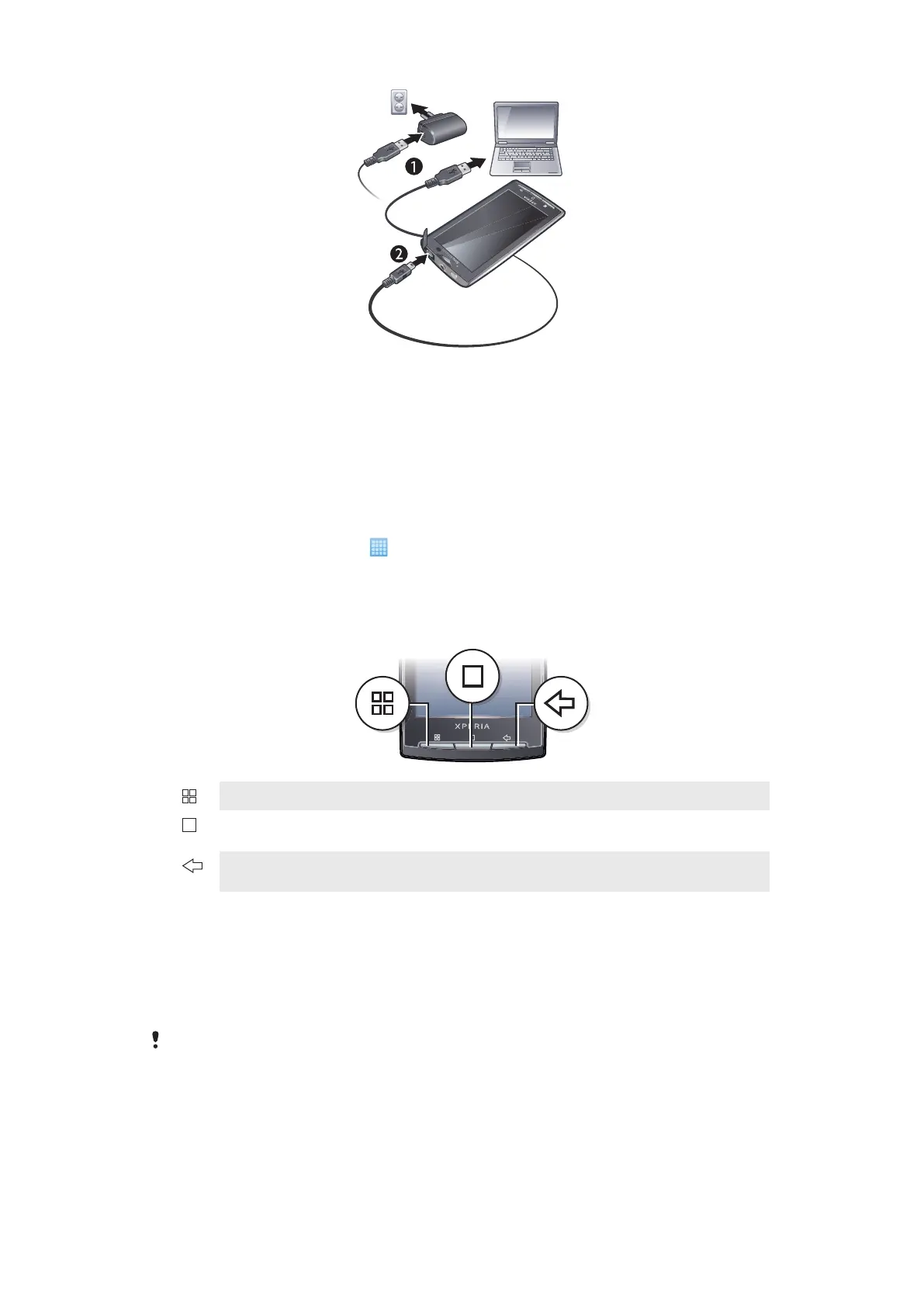
To charge the phone using the power adapter
•
Connect the phone to a power outlet using the USB cable and the power adapter.
To charge the phone using a computer
1
Connect the phone to a USB port on a computer using the USB cable included in
the phone kit.
2
Tap Charge phone.
To check the battery level
1
From the Home screen, tap
.
2
Find and tap Settings > About phone > Status.
Using the hardware keys
Menu
•
Open a list of options available in the current screen or application
Home
•
Go to the Home screen or to the applications screen from any application or screen
•
Open the recently used applications window
Back
•
Go back to the previous screen
•
Close the onscreen keypad, a dialog box, an options menu, or the Notification panel
Home screen
The Home screen is the starting point of your phone. You can personalise the Home
screen by adding, for example, applications, shortcuts and widgets, or by changing the
wallpaper. The Home screen extends beyond the screen width, giving you more space to
personalise.
When you go to the
Home screen, some applications may continue to run in the background. If
you do not want applications to run in the background, you should exit each application you have
opened before going to the Home screen.
10
This is an Internet version of this publication. © Print only for private use.


 To Next Page