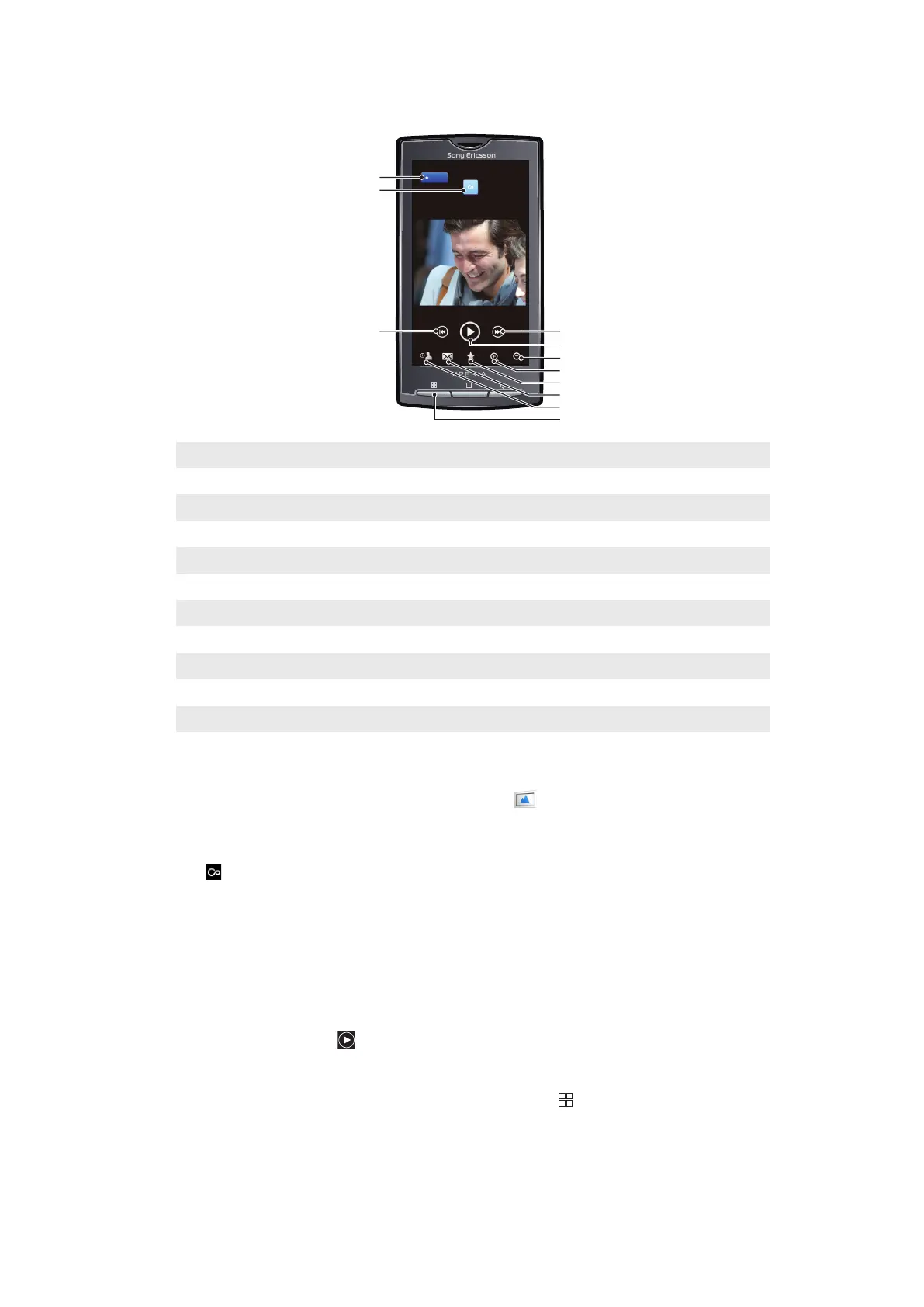
Photo viewer overview
1 Home key. Go to the photo home screen
2 Infinite button. Find related photos on the memory card
3 Previous key. Go to the previous photo
4 Next key. Go to the next photo
5 Play key. Start a slideshow
6 Zoom out
7 Zoom in
8 Favourite. Mark the photo as a favourite
9 Share. Send the photo using one of the available transfer methods
10 Use as. Use photo as wallpaper or as a contact photo
11 Menu key. Select additional photo features
To view related photos
1
From the Home screen, tap Mediascape.
2
If the photo home screen is not shown, tap Photo
.
3
In the upper part of the screen, tap More.
4
Flick left or right to view photos by category.
5
View a photo in the photo viewer.
6
Tap
.
7
Flick to Same date to view photos that were taken on the same date, to Same
location to view photos that were taken at the same location, or to a name tag to
list the photos of a specific person on the memory card.
To view the photo viewer controls
•
In the photo viewer, tap the screen.
To start a slideshow
•
In the photo viewer, tap
.
To adjust slideshow settings
1
When you are viewing a photo in the photo viewer, press .
2
Tap Slideshow settings.
80
This is an Internet version of this publication. © Print only for private use.



 To Next Page