Page 18 FT-2000D OPERATING MANUAL
FRONT PANEL CONTROLS & SWITCHES
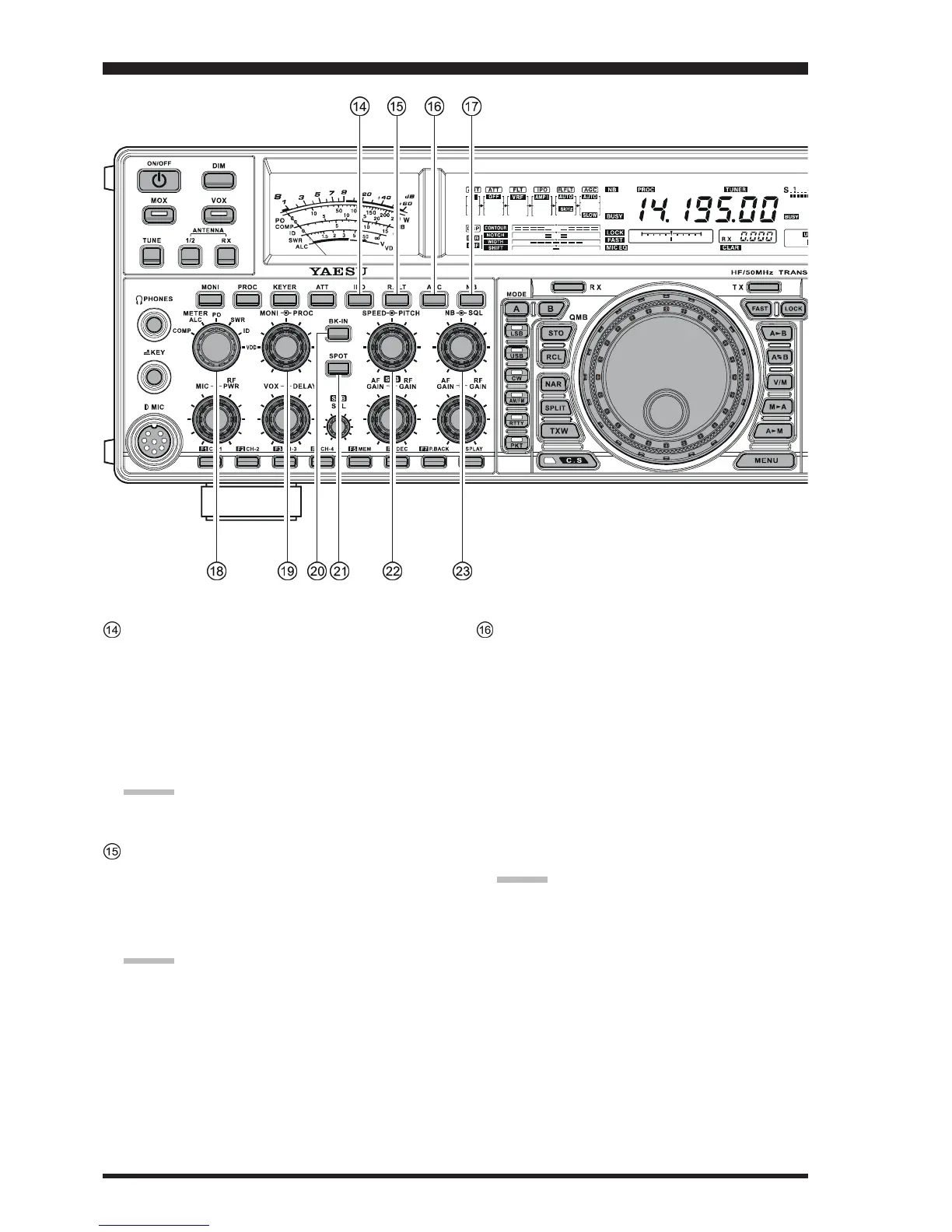
IPO
(
INTERCEPT POINT OPTIMIZATION
)
Switch
This button may be used to set the optimum front end
characteristics of the receiver circuit for a very strong-
signal environment. Available selections are AMP 1
(low distortion amplifier), AMP 2 (2-stage low-distor-
tion RF amplifier), or ON (bypasses the front end RF
amplifier), and the selected receiver RF amplifier ap-
pears at the IPO column of the Receiver Configuration
Indicator in the display.
ADVICE:
The IPO switch affects both the Main (VFO-A) and
Sub (VFO-B) receivers.
R.FLT Switch
This button selects the bandwidth for the Main Band
(VFO-A) receiver’s first IF Roofing Filter. Available
selections are 3 kHz, 6 kHz, 15 kHz, or Auto, and the
selected bandwidth appears in the FLT column of the
Receiver Configuration Indicator on the display.
ADVICE:
The Roofing Filter selection applies to the Main
band (VFO-A) only.
Because the roofing filter is in the first IF, the pro-
tection it provides against interference is quite sig-
nificant. When set to AUTO, the SSB bandwidth is
6 kHz, while CW is 3 kHz and FM/RTTY are 15
kHz. On a crowded SSB band, however, you may
wish to select the 3 kHz filter, for the maximum
possible interference rejection.
AGC Switch
This button selects the AGC characteristics for the re-
ceiver. Available selections are FAST, MID, SLOW,
or AUTO, and the “AGC” icon will change according
to the AGC characteristics selected.
Press the
[
AGC
]
button repeatedly to select the de-
sired receiver-recovery time constant. Press and hold
in the
[
AGC
]
button for two seconds to disable the
AGC (for testing or weak-signal reception).
When the
[
AGC
]
button is pressed independently, it
applies to the Main band (VFO-A) receiver.
When you press the
[
B
]
button, followed by the
[
AGC
]
button (within five seconds of pressing the
[
B
]
switch),
it affects the Sub band (VFO-B) receiver.
ADVICE:
If the AGC receiver-recovery time is set to “
OffOff
OffOff
Off” by
pressing and holding in the
[
AGC
]
button, the S-meter
will no longer deflect. Additionally, you will likely en-
counter distortion on stronger signals, as the IF ampli-
fiers and the following stages are probably being over-
loaded.










 To Next Page