Page 94 FT-2000D OPERATING MANUAL
TEXT Memory
The five channels of CW message memory (up to 50 characters total) may also be programmed using a text-entry tech-
nique. This technique is somewhat slower than when you send the message directly from your keyer paddle, but accuracy
of character spacing is ensured.
Example 1: CQ CQ CQ DE W6DXC K} (20 characters)
And we will utilize another powerful feature of the CW Memory Keyer, the sequential Contest Number (“Countup”)
feature.
Example 2: 599 10 200 # K} (15 characters)
CONTEST MEMORY KEYER
(
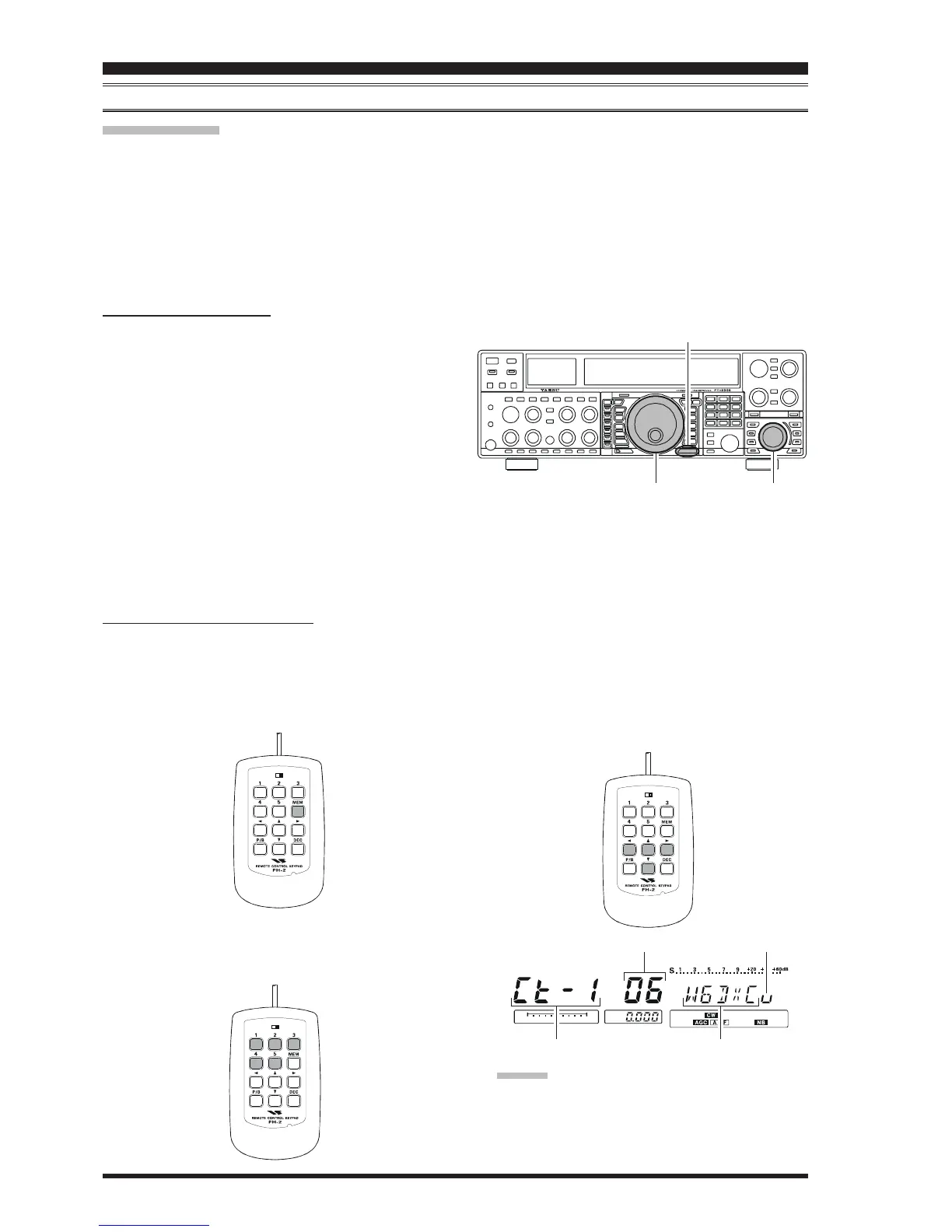
USING THE OPTIONAL FH-2 REMOTE CONTROL KEYPAD
)
TEXT MEMORY STORAGE
1. Press the
[
MENU
]
button to enter the Menu mode.
2. Rotate the Main Tuning Dial knob to select the CW
Memory Register into which you wish to store the
message; we are now selecting the message entry tech-
nique (Text entry).
021 tEy CW MEM1
022 tEy CW MEM2
023 tEy CW MEM3
024 tEy CW MEM4
025 tEy CW MEM5
3. Rotate the
[
SUB VFO-B
]
knob to set the selected
Memory Register to “
tyP1tyP1
tyP1tyP1
tyP1.”
4. Press and hold in the
[
MENU
]
button for two seconds
to save the new settings and exit.
TEXT MESSAGE PROGRAMMING
1. Press the
[
CW
]
mode button to set the operating mode
to CW.
2. Be sure that Break-in is Off by pressing the
[
BK-IN
]
button, if necessary.
3. Press the FH-2’s
[
MEM
]
key.
4. Press the FH-2’s
[
1
]
~
[
5
]
key to select the desired
Message Memory Register into which you wish to pro-
gram the text.
[
SUB VFO-B
]
Knob
[
MENU
]
Button
LOCK
OFFON
LOCK
OFFON
LOCK
OFFON
5. Use the FH-2’s
[
W
]
and
[
X
]
keys to set the cursor
position and use the
[
S
]
and
[
T
]
keys to choose the
letter/number to be programmed in each slot of the
memory. In the case of the second example above, the
“#” character designates the slot where the Contest
Number will appear.
ADVICE:
You may also use the Main Tuning Dial knob and the
[
SUB VFO-B
]
knobs to program the message charac-
ters.
CW CONVENIENCE FEATURES
Main Tuning Dial Knob
CW Memory Register Number
Current Cursor Position
Message
Cursor










 To Next Page