Page 22 FT-2000D OPERATING MANUAL
+
CLAR
FRONT PANEL CONTROLS & SWITCHES
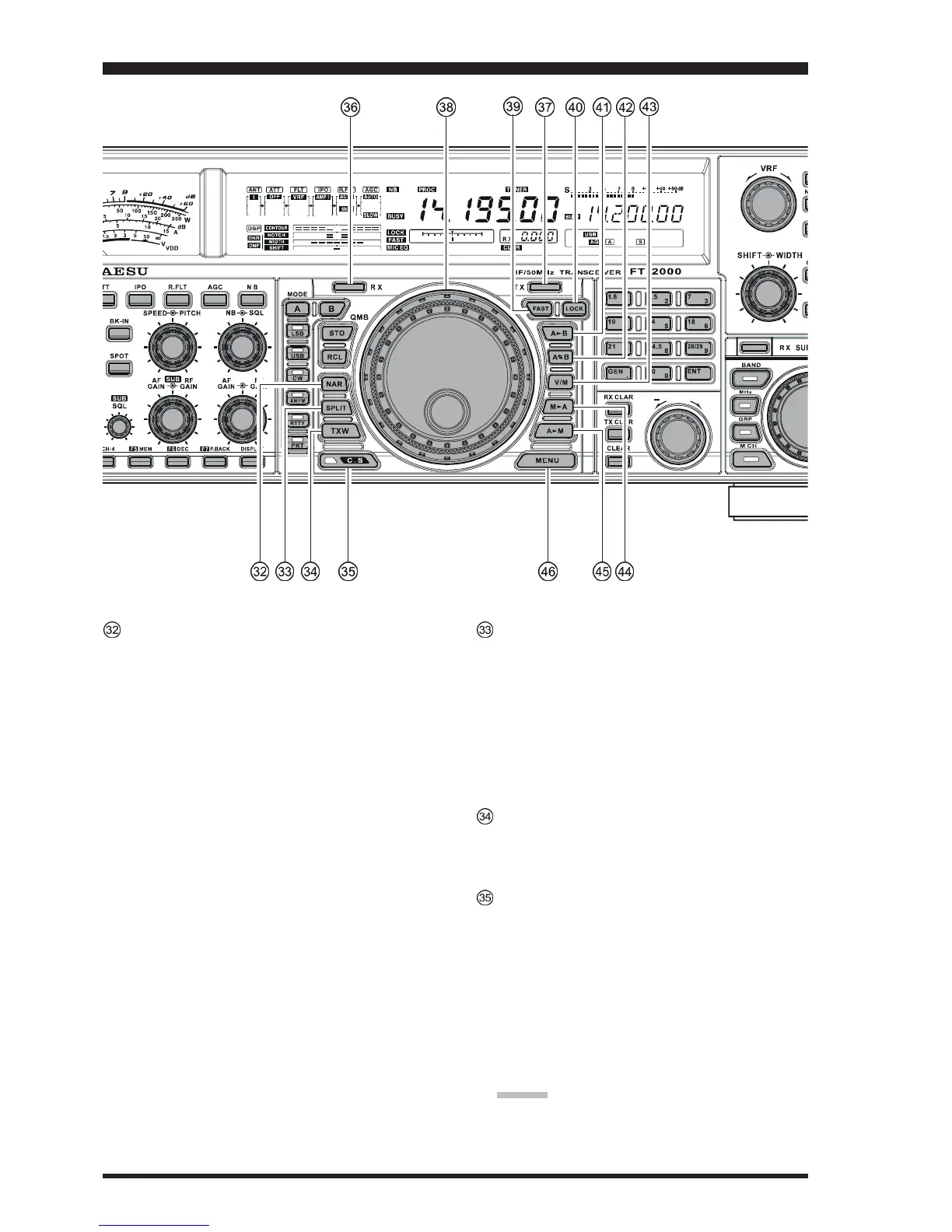
NAR
(
Narrow
)
Switch
In the SSB/CW modes on the Main band (VFO-A),
this button is used to set the bandwidth of the DSP
(digital) IF filters to a user-programmed bandwidth (de-
fault values are SSB: 1.8 kHz, CW: 500 Hz, and RTTY/
PKT(SSB): 300 Hz).
ADVICE: In the SSB mode, when
[
NAR
]
has been en-
gaged, the
[
WIDTH
]
knob will be disabled, although
the
[
SHIFT
]
knob still works normally.
In the SSB mode on the Sub Band (VFO-B), this but-
ton is used to toggle the receiver’s bandwidth between
wide (2.25 kHz) and narrow (1.10 kHz).
In the CW mode on the Sub Band (VFO-B), this but-
ton is used to toggle the receiver’s bandwidth between
wide (2.0 kHz) and narrow (1.2 kHz).
ADVICE: When the Sub Band’s (VFO-B) optional YF-
122C (500 Hz) or YF-122CN (300 Hz) CW narrow
filter is installed, the optional narrow filter will be ac-
tivated when the
[
NAR
]
switch has been engaged on
the CW/RTTY/PKT(SSB) modes.
In the AM mode, this button is used to toggle the
receiver’s bandwidth between wide (9 kHz) and nar-
row (6 kHz).
In the FM mode on the 28 MHz and 50 MHz bands,
this button is used to toggle the FM deviation/band-
width between wide (±5.0 kHz Dev./25.0 kHz BW)
and narrow (±2.5 kHz Dev./12.5 kHz BW).
Pressing the
[
A
]
or
[
B
]
button (located above the
[
MODE
]
selection buttons) will select either the Main
band (VFO-A) or Sub band (VFO-B) for individual
bandwidth setting.
SPLIT Switch
Pressing this button to activate split frequency opera-
tion between the Main band (VFO-A), used for recep-
tion, and the Sub band (VFO-B), used for transmis-
sion. If you press and hold in the
[
SPLIT
]
button for
two seconds, the “Quick Split” feature will be engaged,
whereby the Sub band VFO (VFO-B) will automati-
cally be set to a frequency 5 kHz higher than the Main
band (VFO-A) frequency with same operating mode,
and the transceiver will be placed in the Split mode.
TXW “TX Watch” Switch
Pressing this button lets you monitor the transmit fre-
quency when split frequency operation is engaged.
Release the button to return to normal operation.
C.S Switch
Press this button momentarily to recall a favorite Menu
Selection directly.
To program a Menu selection as the short-cut, press
the
[
MENU
]
button to enter the Menu, then select the
Menu item you want to set as the short-cut. Now press
and hold in the
[
C.S
]
button for two seconds; this will
lock in the selected Menu item as the short-cut.
Furthermore, the LED inside this switch will flash red
when the transmit and receive serial CAT command
signals are being exchanged.
ADVICE:
You may disable the LED function (flashes in conjunc-
tion with CAT command) via Menu item “031 GEnE
CAT IND.” See page 118 for details.










 To Next Page