22
Operation
Turning the Transceiver ON
1. Press and hold the Power (Lock) switch to turn the
transceiver ON.
z
Turning the transceiver OFF
Press and hold the Power (Lock) switch again to turn
the transceiver OFF.
If the battery pack is removed or the external power
supply is turned OFF, without turning the FT3DR/DE
OFF, the display may remain on the screen for a while,
this is not a malfunction.
z
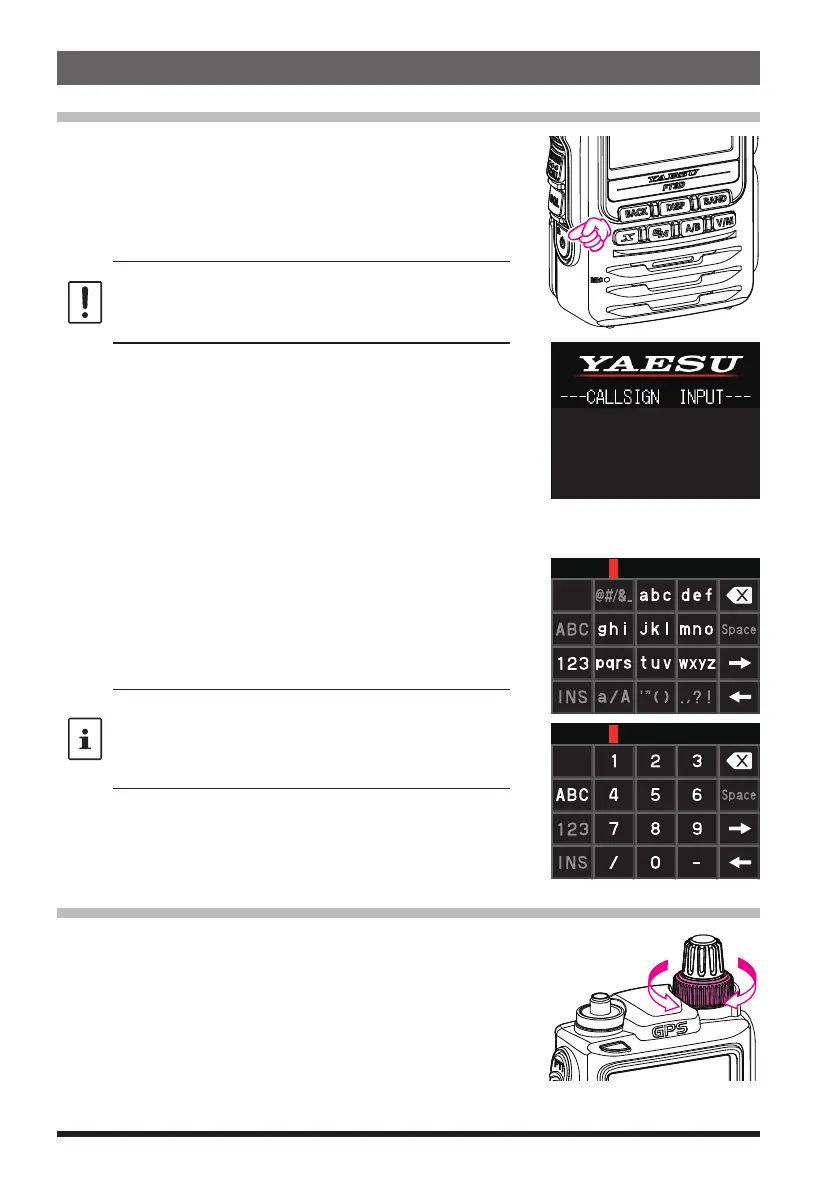
Inputting the call sign
The first time the transceiver is turned ON after it is
purchased; input your own call sign.
1. Press the [DISP] key to proceed to the call sign input
screen.
• When the transceiver is subsequently turned ON,
the opening screen appears followed by the fre-
quency screen.
Please enter your
Callsign.
(Max 10 letters)
2. Input the call sign (toggle the alphabet input screen,
and the number input screen when necessary).
3. Saving the entered call sign:
4. Press the [PTT] switch or press and hold the [DISP]
key.
• Up to 10 characters (letters, numbers, and symbols)
can be entered.
• Characters that may be entered for the call sign are
the numbers 0-9, letters “A – Z” in upper case, the
hyphen and the slash.
Adjusting the Volume Level
1. Rotate the DIAL knob to adjust the volume to a com-
fortable level.
• The transceiver volume levels for the A-band and
B-band are adjusted separately.
• The transceiver volume levels for the AM broad-
cast band and the FM broadcast band are adjusted
separately.



 To Next Page