48
Set the VOX (Voice Operated Transmit) delay time
During transmissions using the VOX (Voice Operated Transmit) function, set the time to
return to receive when speaking is paused:
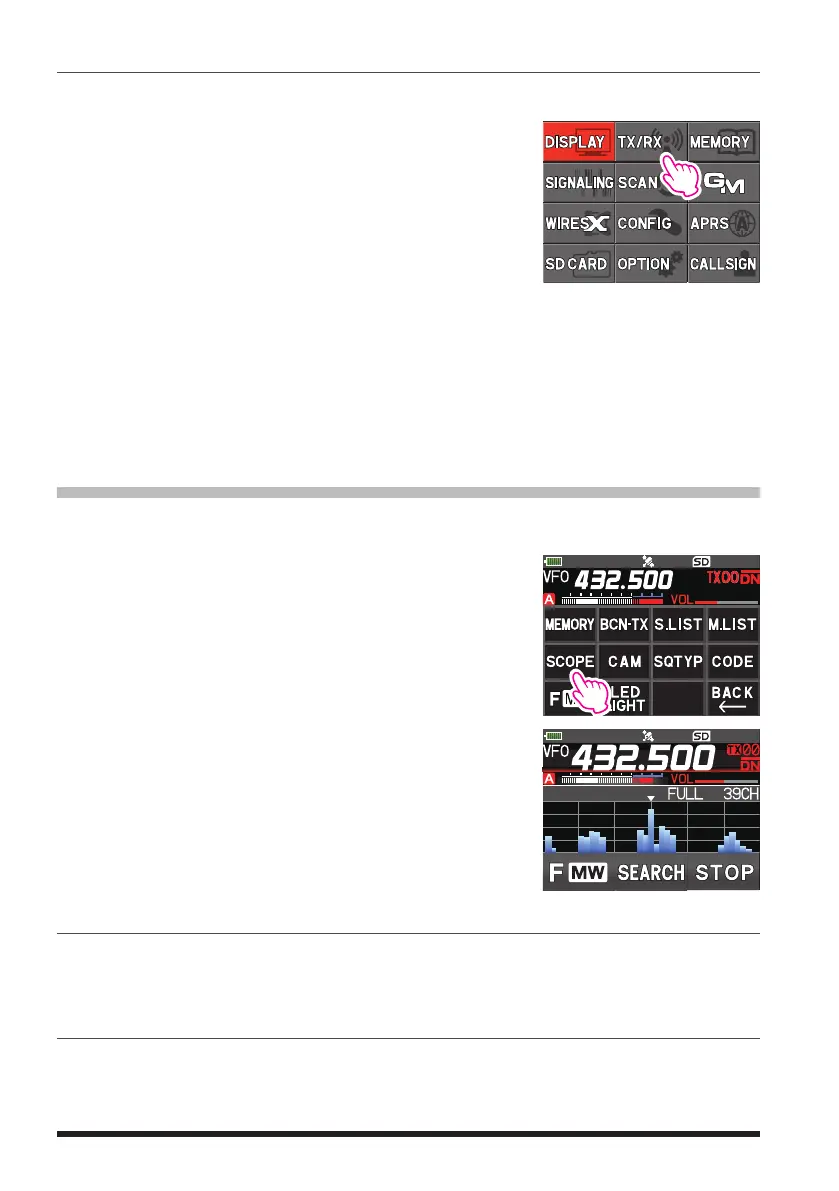
1. Press and hold the [DISP] key, and then touch [TX/
RX].
2. Touch [AUDIO], and then touch [4 VOX].
3. Rotate the DIAL knob to select [DELAY].
4. Press the [DISP] key, and then rotate the DIAL knob to select the delay time (the
transmit-receive delay after the cessation of speech).
0.5sec / 1.0sec / 1.5sec / 2.0sec / 2.5sec / 3.0sec
5. Press the PTT switch to return to normal operation.
Band Scope
The Spectrum Analyzer presents a view of operating activity on channels above and be-
low the centered main band operating frequency.
1. Touch [F MW], and then touch [SCOPE].
If [SCOPE] is not displayed, touch [FWD →] to display
[SCOPE] and then touch it.
2. With the current operating frequency in the center, the
signal strengths of 39 channels within the bandwidth
are shown on a graph.
3. Touch [STOP].
The band scope scanning stops.
• To resume band scope scanning, touch [SEARCH].
4. To turn the Band Scope OFF, press the [BACK] key.
Change frequency
• When a signal on the scope screen is touched, the frequency in the vicinity becomes
the receive frequency, and is set to the center frequency of the scope.
• The receive frequency may also be changed by turning the DIAL knob.
Change the number of channels displayed
• The number of channels to be displayed may be set to 19CH, 39CH or 79CH, by
touching the channel display area at the top right of the scope screen.



 To Next Page