47
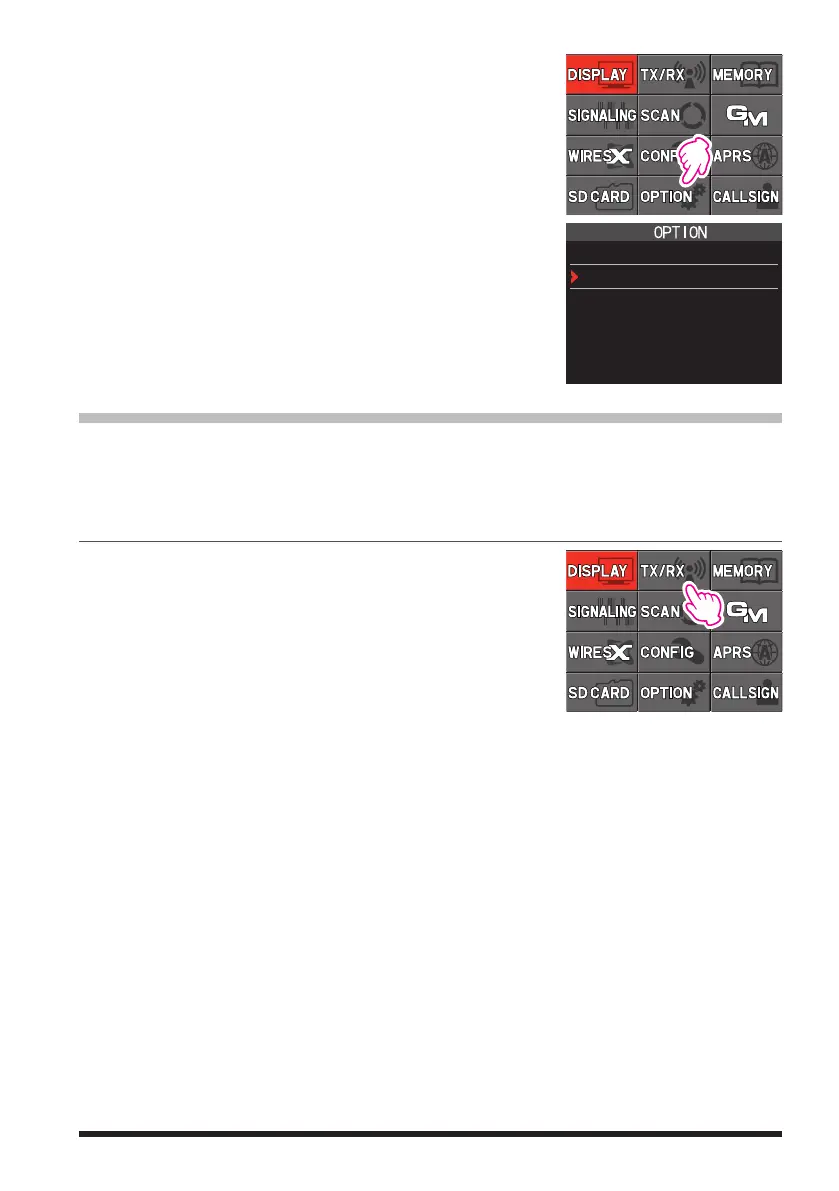
1. Press and hold the [DISP] key, and then touch [OP-
TION].
2. Touch [4 Bluetooth Save], and then rotate the DIAL
knob to select [ON].
3. Press the PTT switch to return to normal operation.
4 Bluetooth Save
ON
VOX Operation
The VOX system provides automatic transmit/receive switching activated by voice input
to the microphone or Bluetooth Headset. With the VOX system enabled, it is not neces-
sary to press the PTT switch in order to transmit, and it is not necessary to use an ac-
cessory VOX headset in order to utilize VOX operation.
Setting VOX function
1. Press and hold the [DISP] key, and then touch [TX/
RX].
2. Touch [AUDIO], and then touch [4 VOX].
3. Press the [DISP] key, and then rotate the DIAL knob to select “LOW” or “HIGH”.
OFF: VOX function OFF
LOW: VOX function ON (VOX Gain Level “LOW”)
HIGH: VOX function ON (VOX Gain Level “HIGH”)
4. Press the PTT switch to return to the normal operation.
z
Disable the VOX function
To cancel VOX and return to PTT operation, just repeat the above procedures, se-
lecting “OFF” in step 3 above.



 To Next Page