89
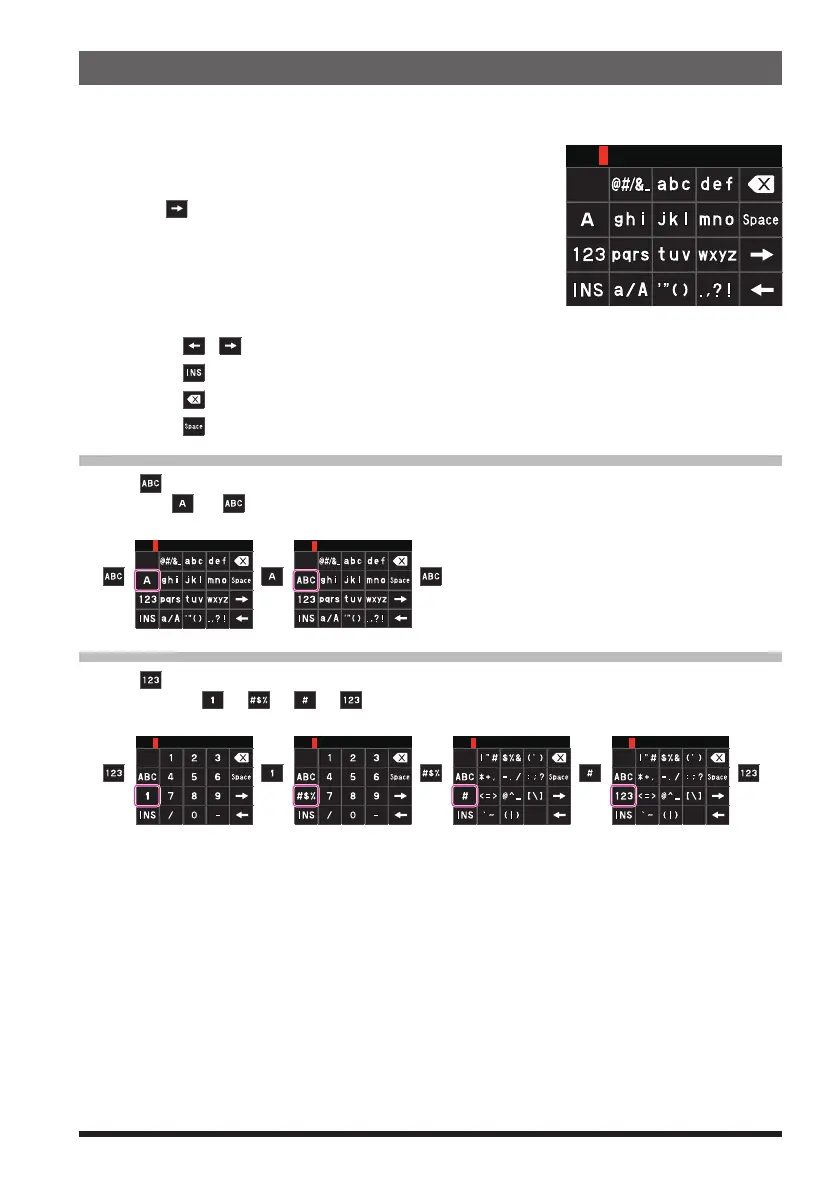
Text input screen
When the radio is first turned on after restoring defaults, the keyboard screen is dis-
played to enter your own station call sign.
z
Character input method
1. Touch a character on the screen to enter it.
2. Touch [
] to move the cursor to right in the text input
area.
3. Repeat steps 1 and 2 to enter additional characters.
4. When input is complete, press the PTT switch to
save the characters and return to normal operation.
• Touch [ ]/[ ] to move the cursor to left/right in the text input area.
• Touch [
] to insert a space at the cursor position.
• Touch [
] to erase the character at the cursor position.
• Touch [
] to enter a space at the cursor position.
Alphabet Input
Touch
[
]
to display the alphabet input screen.
Each time
[
]
/
[ ]
is touched, the screen changes as follows:
1 byte letters 2 byte letters
Number Input
Touch
[
]
key to display the numeric keypad input screen.
Each time the
[
]
,
[ ]
,
[ ]
,
[ ]
, key is touched, the screen changes as follows:
1 byte numbers 2 byte numbers 1 byte numbers 2 byte numbers



 To Next Page