Pairing Bus Outs 111
01V—Owner’s Manual
Pairing Bus Outs
Bus outs 1 and 2 and bus outs 3 and 4 can be paired together for stereo signal process-
ing. When paired, the master faders and ON buttons are linked for simultaneous con-
trol.
Making Bus Out Pairs
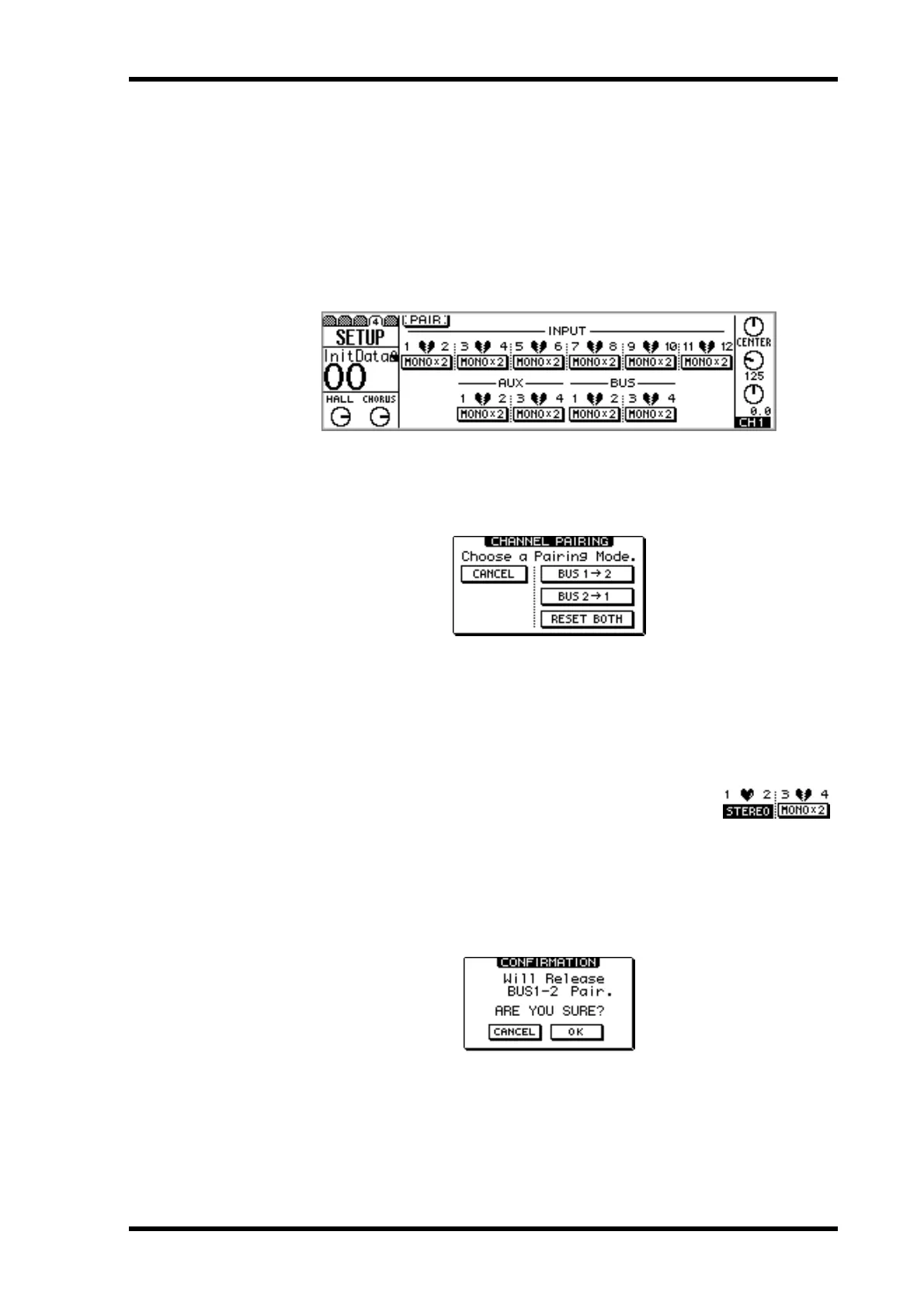
1. Use the [SETUP] button to locate SETUP page 4, as shown below.
2. Use the cursor buttons to select bus pair 1/2 or 3/4, and then press the
[ENTER] button.
The following dialog box appears.
BUS 1 –> 2—Copy the settings of bus out 1 to bus out 2.
BUS 2 –> 1—Copy the settings of bus out 2 to bus out 1.
RESET BOTH—Reset both bus outs to their initial settings.
3. Use the cursor buttons to select a pairing mode, and then press the
[ENTER] button.
The highlighted switch and STEREO label show that the bus outs
are now configured as a stereo pair.
Releasing Bus Out Pairs
1. On SETUP page 4, use the cursor buttons to select the paired bus switch,
and then press the [ENTER] button.
The following dialog box appears.
2. Select OK, and then press the [ENTER] button.
The stereo pair is broken, and both bus outs operate independently.


 To Next Page