Recalling Dynamics Programs 175
01V—Owner’s Manual
Recalling Dynamics Programs
Dynamics programs 1 through 80 can be recalled.
1. Select the channel to which you want to recall the dynamics program.
Use [SEL] buttons 1 through 16 to select the input channels 1 through 16. To select an
aux send, use the [AUX] buttons to select an aux send, and then press the MASTER
[SEL] button. To select the stereo output, press the [HOME] button, and then the
MASTER [SEL] button.
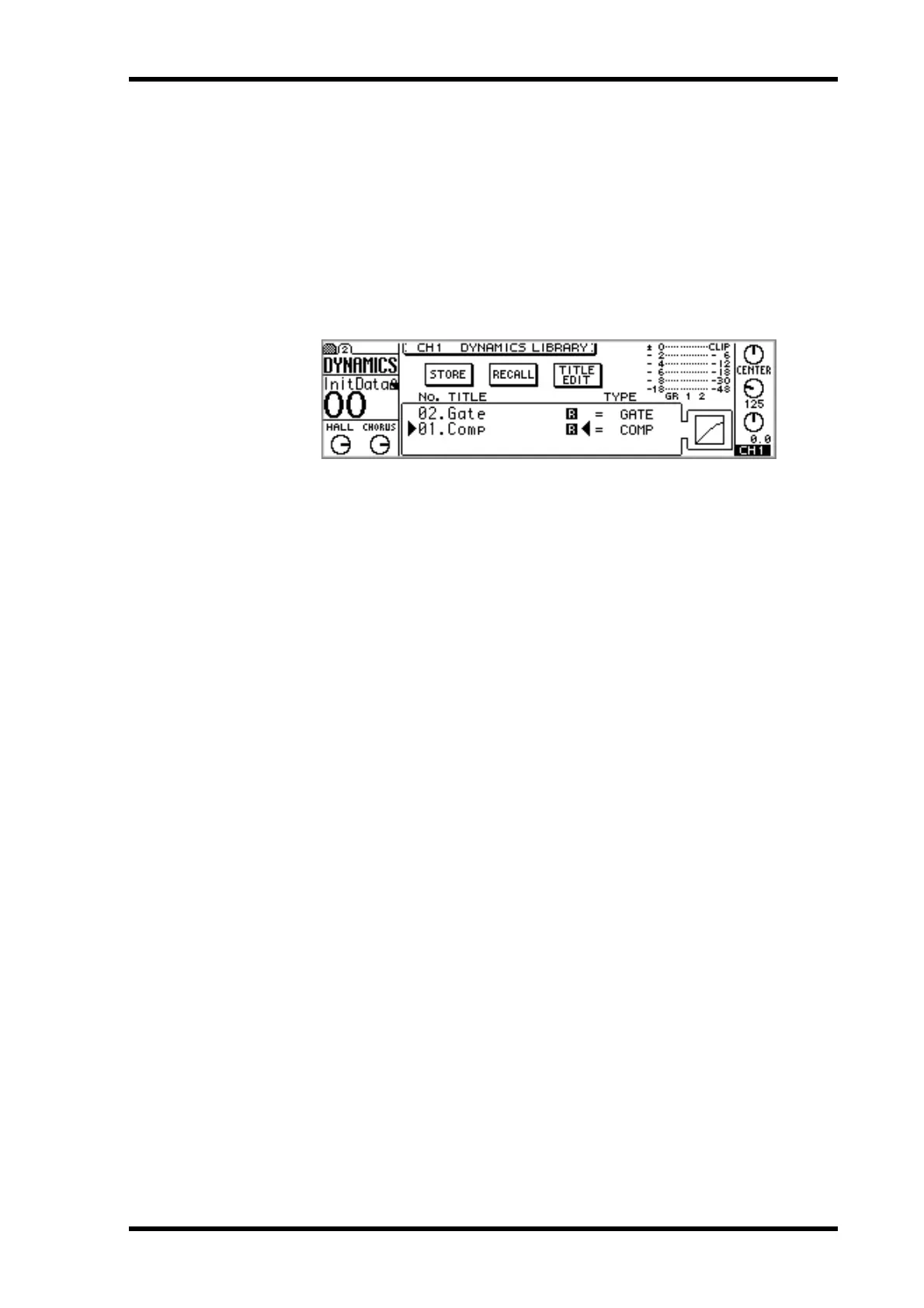
2. Use the [DYNAMICS] button to locate the Library page, as shown below.
3. Use the PARAMETER wheel or [–1/DEC] and [+1/INC] buttons to select
programs.
As each program is selected its dynamics curve is displayed.
The program list order can be set using the LIBRARY LIST ORDER option in prefer-
ences (“Setting 01V Preferences” on page 203).
4. Use the cursor buttons to select the RECALL switch, and then press the
[ENTER] button.
The Dynamics program is recalled. If the RECALL CONFIRMATION option is turned
on in the preferences (“Setting 01V Preferences” on page 203), a confirmation dialog
box appears. In this case, select OK, and then press the [ENTER] button to confirm the
recall.


 To Next Page