Utility Mode [UTILITY]
Reference
126
DTX900 Owner’s Manual
Pad Settings [F2] PAD
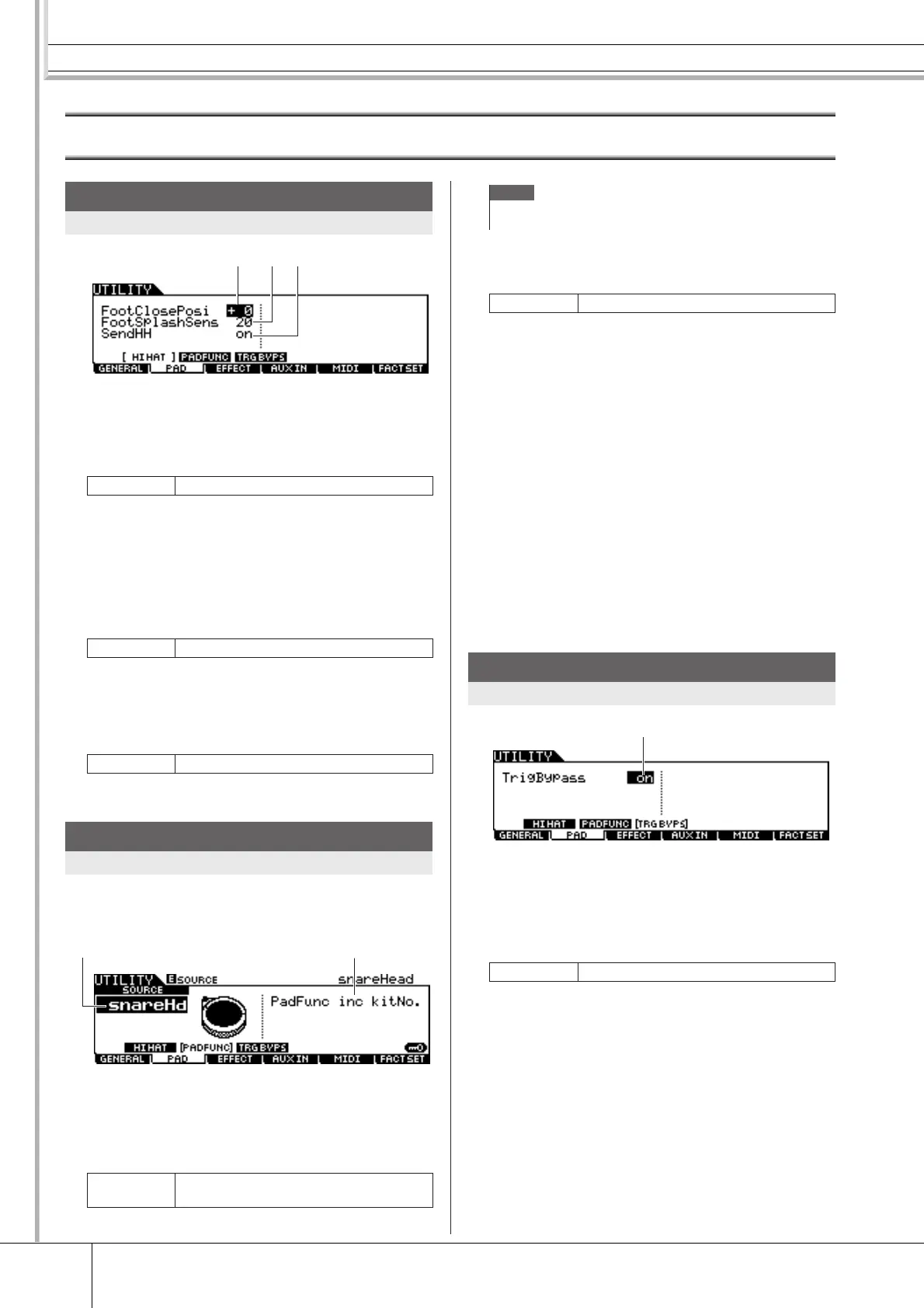
1 FootClosePosi (Foot Close Position)
Determines the amount of time it takes to detect a foot splash
(from the start of a downward press to the opening of the hi-
hat controller). The smaller the value, the more narrow the
“virtual” open position is.
B FootSplashSens (Foot Splash Sensitivity)
Determines the length of time from the moment you apply a
foot-splash performance to the Hi-Hat Controller to the
moment the foot-splashed hi-hat sound is actually triggered.
For larger values, you can play the foot-splashed sound more
easily; however, slight movements of the pedal may trigger
the sound inadvertently. It is a good idea to set this parameter
to “off” if you do not play foot-splashes.
C SendHH
Determines whether or not the continuous change of the
sound generated by opening/closing the Hi-Hit cymbal (by
pressing/releasing the Hi-Hat Controller) is transmitted as
MIDI messages via MIDI OUT.
From this display, you can assign functions other than trig-
gering the drum sound to the pad (Trigger Input Source).
1 SOURCE (Trigger Input source)
Determines the Trigger Input Source to which the specified
function is assigned. When Input Lock (page 79) is turned off,
you can select the Trigger Input Source also by hitting the
corresponding section of the pad.
B PadFunc
Determines the function assigned to the Trigger Input Source
specified above.
Off No function is assigned. Normal operation.
inc kitNo. Hitting the pad increases the Drum Kit num-
ber by 1.
dec kitNo. Hitting the pad decreases the Drum Kit num-
ber by 1.
inc chain Hitting the pad increases the Chain Step
number by 1.
dec chain Hitting the pad decreases the Chain Step
number by 1.
inc tempo Hitting the pad increases the value of the
tempo by 1.
dec tempo Hitting the pad decreases the value of the
tempo by 1.
tap tempo Hitting the pad three times sets the tempo
value even when the Tap display is not called
up.
clk on/off Hitting the pad starts/stops Click playback.
1 TrigBypass
When this parameter is set to on, the DTX900 will not accept
any Trigger Signals coming from all Trigger Input Sources.
This parameter is useful when you want to cancel all Trigger
Signals temporarily in order to change the pad connection
setup. This parameter should be set to off normally.
Hi-Hat Settings
[SF1] HI HAT
Range -32 – +32
Range off, 1 – 127
Settings off, on
Pad Function Settings
[SF2] PADFUNC
Settings
Refer to the Trigger Input Source List on
page 61.
1
2 3
2
1
NOTE
• The Pad Function setting overcomes the Pad Song setting (page 93)
if both of them are assigned to the same Trigger Input Source.
Settings See below.
Trigger Bypass Settings
[SF3] TRGBYPS
Settings off, on
1



 To Next Page