Recording Your Drum Performance to a Song
Quick Guide
Quick Guide
DTX900 Owner’s Manual
49
Assigning a Name to a User Song
You can assign an original name to a User Song.
1
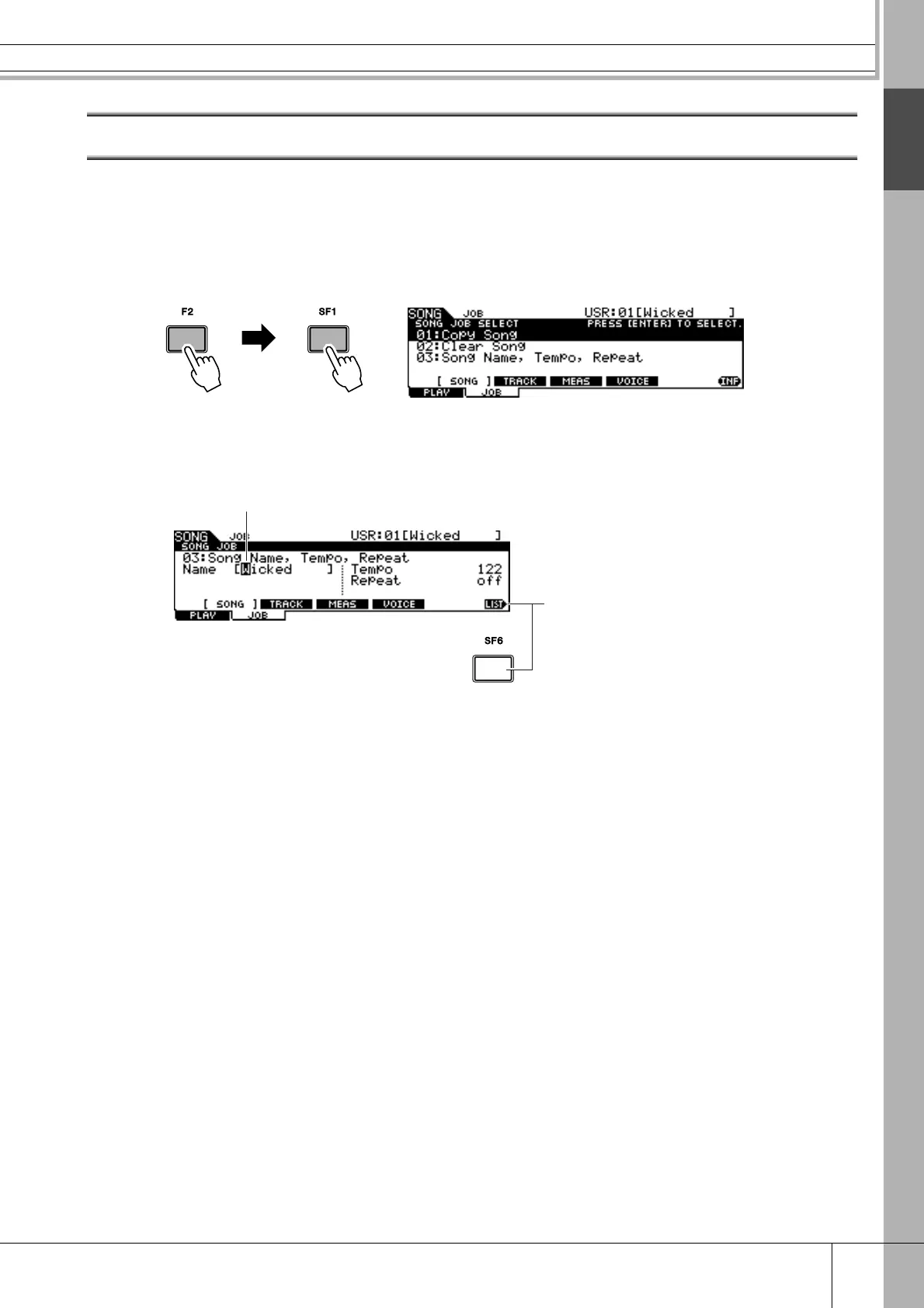
With the desired User Song selected, press the [F2] JOB button
followed by the [SF1] SONG button in the Song mode to call up
the SONG JOB SELECT display.
2
Move the cursor to “03: Song Name, Tempo, Repeat” then press
the [ENTER/STORE] button to call up the Job display.
1 Name
Determines the Song name, which can contain up to 10 characters. For detailed
instructions on naming, refer to “Basic Operation” on page 15.
B [SF6] LIST
When the cursor is located at Name, this [LIST] icon appears at the right bottom of
the display indicating that you can call up the Character List display by holding the
[SF6] button. For details, see page 15.
3
Enter the Song name by following the instructions on page 15.
You can call up the character list by pressing the [SF6] LIST button, then select the
desired one from the list.
2
1



 To Next Page