Utility Mode [UTILITY]
Reference
DTX900 Owner’s Manual
131
Drum Kit mode
Reference
Song modeClick modeTr igger modeFile modeUtility modeChain modeSampling mode
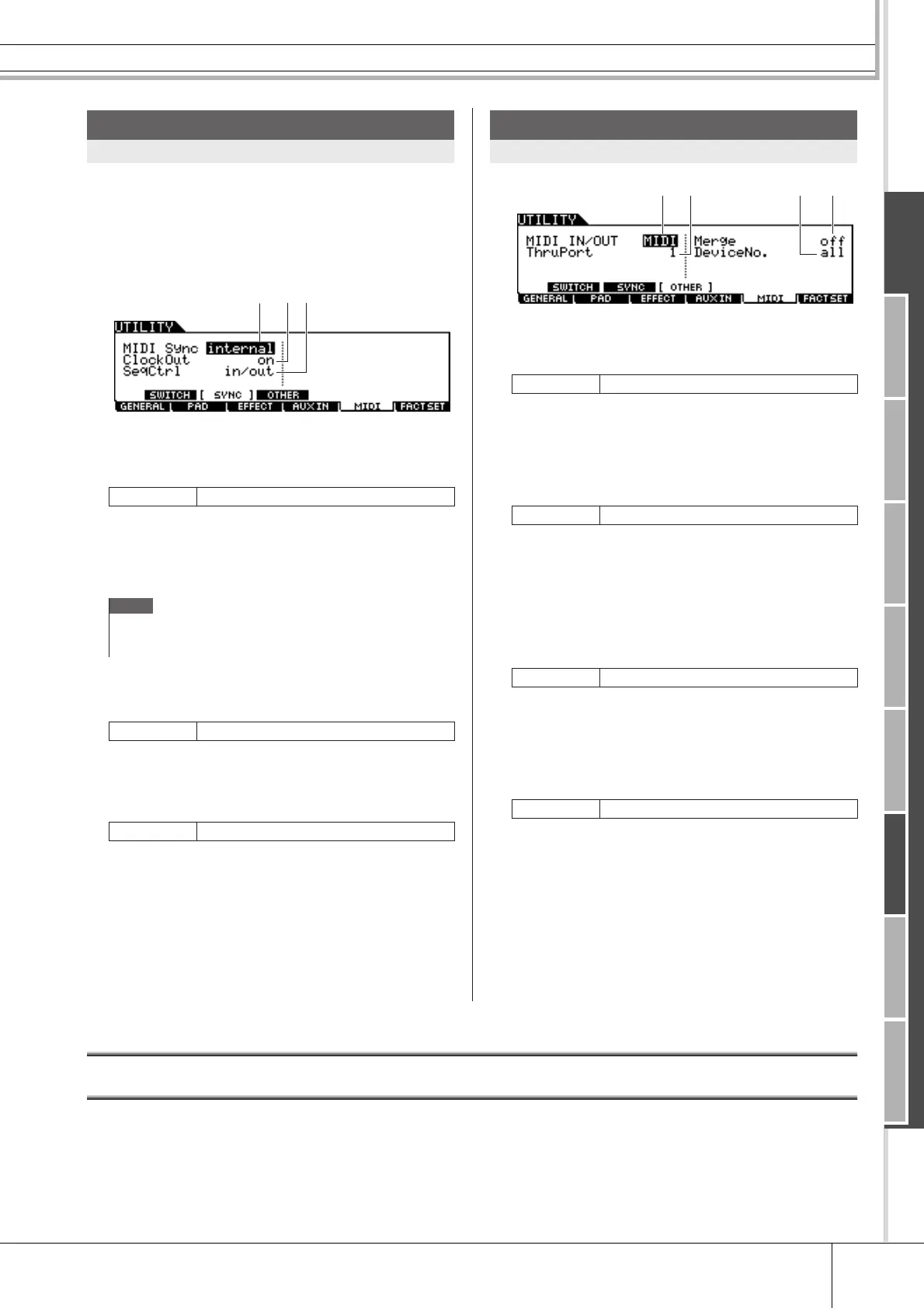
Song or Click playback of the DTX900 can be synchro-
nized with the external MIDI clock coming from the MIDI
device connected to the DTX900. (Song or Click conven-
tionally plays according to the internal clock.) From this
display, the related parameters can be set.
1 MIDI Sync
Determines whether Song playback will be synchronized to
the instrument’s internal clock or an external MIDI clock.
Internal Synchronization to internal clock. Use this set-
ting when this instrument is to be used alone or
as the master clock source for other equipment.
MIDI MIDI Synchronization to a MIDI clock received
from an external MIDI instrument via MIDI.
B ClockOut
Determines whether MIDI clock (F8H) messages will be
transmitted from the DTX900 via MIDI.
C SeqCtrl
Determines whether Sequencer Control signals – start (FAH),
continue (FBH), and stop (FCH) – will be received and/or
transmitted via the MIDI OUT/USB terminal.
off Not transmitted/recognized.
In Recognized but not transmitted.
out Transmitted but not recognized.
in/out Transmitted/recognized.
1 MIDI IN/OUT
Determines which physical output/input terminal(s) will be
used for transmitting/receiving MIDI data.
B ThruPort
When using the USB terminal for MIDI transmission/recep-
tion, you can have the DTX900 respond to MIDI data over
one port, while relaying the data for another port number
(which can be set here) to a separate tone generator (con-
nected to the MIDI OUT terminal).
C Merge
This parameter allows you to mix incoming MIDI data
(received via MIDI IN) with MIDI data generated on the
DTX900, and output them together from MIDI OUT. Merge
is enabled when this is set to on. This parameter is useful
when you want to control a MIDI tone generator connected to
the DTX900 by playing a different MIDI keyboard connected
to the DTX900 and playing the drum pads at the same time.
D DeviceNo.
Determines the device number used by the DTX900 in receiv-
ing or transmitting data. This number must match the device
number of the external MIDI device when transmitting/
receiving bulk data, parameter changes or other system exclu-
sive messages.
all When this is selected, system exclusive mes-
sages for all MIDI device numbers are received.
The DTX900 is recognized as Device Number
1.
off When this is selected, system exclusive mes-
sages such as bulk dump and parameter
change cannot be transmitted or received.
When you try to execute transmission or recep-
tion of system exclusive messages, an error
message appears.
Resetting the User Memory to the Initial Factory Settings [F6] FACTSET
The original factory settings of the DTX900’s User Memory (page 76) can be restored. For details and instructions, see page
23.
MIDI Sync Settings
[SF2] SYNC
Settings internal, MIDI
NOTE
• When the MIDI Sync parameter is set to MIDI, make sure that the
external MIDI equipment or computer connected to the DTX900 can
transmit MIDI clock data.
Settings off, on
Settings off, in, out, in/out
1
2 3
MIDI Other Settings
[SF3] OTHER
Settings MIDI, USB
Settings 1, 2
Settings off, on
Settings 1 – 16, all, off



 To Next Page